Do You Need an Appointment to Update Your License? A Practical Guide
Wondering if you must book an appointment to update your driver's license? Learn when appointments are required, how to update online or in person, and how to save time with smart planning.


Do you need an appointment to update your license? Generally no—most DMVs offer walk-in service for license renewals or address changes, and many states support online updates. However, availability varies by state and location, and some services (like real ID updates) may require an appointment or specific documents. Always verify hours, online options, and required IDs on your state DMV site before you go.
Why the Appointment Question Matters
Do you need an appointment to update your license? The short answer is: it depends, but in many places you can complete updates without a prior booking. According to Update Bay, most DMV offices offer walk-in service for standard license renewals or address changes, and many states support quick online updates. However, the availability of walk-in slots varies by location, staffing levels, and the specific update you seek. Real ID upgrades, name changes, or extensive documentation checks often prompt more formal scheduling. In practice, starting with an online check two days before you go can save you time and reduce frustration. This article breaks down what to expect, how to plan, and where to confirm rules in your state.
How DMV Policies Vary by State
DMV appointment policies differ widely. Some states encourage online renewals and in-person visits without an appointment for standard updates, while others steer users toward scheduling, especially for Real ID changes or complex identity verifications. The critical takeaway is to verify your local rules before you visit. Update Bay’s analysis shows that a quick online check typically reveals whether you can walk in or must book, saving you a trip if the system is backlog-heavy or the office is tight on staff. Always use your state’s official DMV portal for the latest details and any temporary exceptions related to holidays or special events.
When You Might Need an Appointment
Appointments tend to be necessary in specific scenarios. If you are updating to a Real ID, changing your name, or transferring from another state, you may face stricter document checks and scheduling requirements. Some offices reserve walk-in slots for routine renewals, but high-demand periods (like the start of summer or just before holidays) can push you toward an appointment. If you’re unsure, a quick call or online check can confirm whether an appointment is recommended or mandatory. Update Bay recommends confirming your status ahead of time to minimize on-site delays.
How to Check Your Local DMV Options
Start with your state DMV website and search for license updates or renewals. Look for “hours and services” or a specific page about walk-ins vs. appointments. If the site isn’t clear, call the local office or use chat support if available. In many cases you’ll find a simple yes/no answer about appointments, plus a link to the online portal if you want to renew or update without visiting in person. Based on Update Bay research, planning a quick online check before you go can cut total time by half in some locations.
Steps for Updating Your License in Person or Online
First, decide whether to update online or visit in person. Online updates are often fastest and require less travel time, while in-person visits may be necessary for Real ID or address proofs. If online is available, log in, verify your information, upload documents if required, and complete payment. If you need to go in person, schedule an appointment if required, pack your documents, and arrive early. The on-site process generally involves identity verification, a photo, a signature, and fee payment. Update Bay’s guidance emphasizes starting online when possible and using a checklist to avoid missing documents.
Documents You'll Need For a License Update
Document requirements vary by state and update type. Common essentials include proof of identity (like a passport or birth certificate), proof of residency (utility bill or lease), your current license, and your Social Security number. If your address has changed, bring a recent utility bill or bank statement with the new address. Always check the exact list for your state, since missing items can force a second trip. Having copies of each document can also speed up the process.
Common Pitfalls and How to Avoid Them
Pitfalls include assuming you can renew online when your state requires an in-person visit, bringing expired or unreadable documents, or failing to update your name or address in the correct field. Another common trap is not bringing a second form of ID or failing to meet Real ID proof requirements. Before you go, re-check the required documents, ensure your contact information is current, and verify accepted payment methods. If you encounter server issues online, try again later or call the DMV for assistance.
What Update Bay Recommends
The Update Bay team recommends a proactive approach: always verify the local DMV rules before you go, prefer online updates when available, and schedule appointments only when necessary. Planning ahead—gathering documents in advance and confirming deadlines—reduces the risk of delays. If you’re unsure about any step, this article provides a clear, practical pathway to keep your license up to date without surprises.
Tools & Materials
- Internet access(Needed to check the DMV site and apply online if available)
- Current driver’s license(Used to verify identity and track update history)
- Proof of identity (e.g., passport or birth certificate)(Only if your state requires it for the update type)
- Proof of residency (utility bill, lease, etc.)(Bring if you’re updating your address)
- Payment method (credit/debit card or cash)(Fees vary by update type and state)
Steps
Estimated time: Total time: 30-60 minutes
- 1
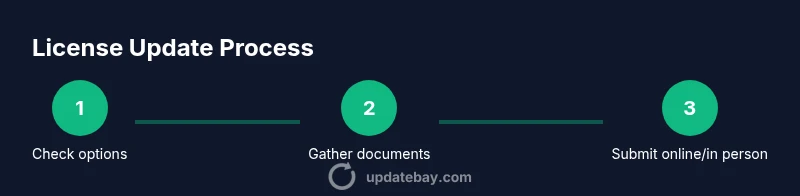
Check your DMV options
Visit your state DMV website to confirm whether you can renew/update online, by mail, or in person, and whether an appointment is required for your specific update.
Tip: Bookmark the page and note any temporary instructions for holidays. - 2
Gather required documents
Assemble identity, residency, and license details. Some updates may require extra documents for Real ID or name changes.
Tip: Make physical or digital copies to bring with you. - 3
Choose online or in-person
If online is available, start there to save time. If you must go in person, check whether an appointment is needed and reserve a slot if possible.
Tip: If you’re eligible for online, avoiding a trip reduces travel time. - 4
Complete the update
Fill out the update form online or at the DMV, ensuring your name, address, and other details are correct.
Tip: Double-check all fields before submission to prevent rejections. - 5
Attend the appointment (if required)
Arrive on time, bring all documents, and follow the staff directions for identity verification and photo capture.
Tip: Arrive 10-15 minutes early to account for lines and checks. - 6
Pay fees and confirm receipt
Submit payment and obtain your updated license or confirmation details. Store receipts in a safe place.
Tip: Keep digital backups of confirmation numbers and receipts.
Frequently Asked Questions
Can I renew my license online?
In many states you can renew or update online, but some changes require an in-person visit or appointment. Always check your state DMV site for the latest options.
Yes, many states offer online renewal, but always verify for your specific update.
Do I need to bring my current license to update it?
Yes, your current license is typically required to verify identity and process updates. Some systems may allow a digital copy, but you should bring the physical license when possible.
Usually, yes—bring your current license if you can.
What documents do I need to update my address?
Proof of residency is commonly required when updating your address. Check your state’s exact list, as requirements vary.
You’ll likely need a utility bill or lease as proof of residency.
How long does the process take in person vs online?
Online updates are usually faster, often completed in minutes, while in-person visits may take longer due to checks and photo capture.
Online is typically quicker; in-person depends on office volume.
What if I need a Real ID update?
Real ID changes often require additional verification documents and sometimes an appointment. Plan extra time and check specific requirements.
Real ID changes usually demand extra verification and may need an appointment.
What should I do if the DMV says I need an appointment?
Schedule the appointment as advised, and confirm the date, time, and required documents beforehand to avoid a second trip.
If an appointment is required, book it and bring all documents.
Watch Video
What to Remember
- Verify local DMV rules before you go
- Online updates save time when available
- Prepare required documents in advance
- Appointments aren’t always required, but may be for Real ID
- Keep receipts and confirmation numbers safe