Minecraft Bedrock Update 1.21.81: New Features, Bug Fixes, and Compatibility
Explore Minecraft Bedrock Update 1.21.81: new features, bug fixes, and performance tweaks. Learn what's changed and how it affects gameplay across platforms.


Minecraft Bedrock Update 1.21.81 delivers notable features, bug fixes, and stability improvements across PC, console, and mobile. The update emphasizes performance, cross-platform parity, and world-gen tweaks, with a focus on reducing crashes and smoothing gameplay. This quick guide highlights what to expect, how to upgrade, and how it may impact mod and add-on compatibility.
What the 1.21.81 update covers
The Minecraft Bedrock Update 1.21.81 continues the pattern of careful, incremental improvements that players expect from a weekly‑patch cadence, while delivering a few standout quality‑of‑life changes. According to Update Bay, the focus this cycle centers on stability, cross‑platform parity, and reduced crash scenarios in high‑load worlds. Players on PC, Xbox, PlayStation, Nintendo Switch, and mobile will notice more consistent performance, especially during chunk loading and when navigating crowded areas. The update also emphasizes smoother inventory and UI interactions, which can feel subtle but meaningful during long play sessions. In practice, you’ll encounter fewer stutter spikes during intense combat or large builds, making exploration and creative building more enjoyable across devices.
For world creators, the patch brings small but noticeable changes to dimly lit biomes and resource distribution that slightly alter what you see at the edge of your vision. While nothing drastic rewrites terrain generation, the adjustments help reduce repetitive tunnels and improve exploration feel. As with all Bedrock updates, it’s wise to back up seeds and worlds before upgrading, since even small tweaks can ripple through saved games when mods or resource packs are in use.
Compatibility and cross‑platform notes
Bedrock 1.21.81 is designed to minimize platform drift and maximize compatibility for worlds started on one device and played on another. Cross‑play remains enabled, and Realms users should experience fewer desync incidents thanks to improved network handling and a more robust tick rate across servers. If you rely on marketplaces, skin packs, or add‑ons, expect a short adjustment period where authors update assets to align with the new build. Users should verify that their cloud saves sync properly after the upgrade and consider re‑exporting any custom resource packs to ensure textures load correctly.
During the upgrade window, you may notice tiny differences in UI layout or menu behavior on smaller screens. These changes are designed to streamline the experience without altering core mechanics. Always ensure you’re on the latest launcher version and check platform notes for any platform‑specific caveats, such as controller mappings or accessibility options that were refined in this release.
Feature highlights: quality of life and new blocks
-
Quality‑of‑life tweaks include refined inventory navigation, faster item pickup in crowded chests, and more responsive hotbar switching. Players focusing on building will appreciate improved block placement feedback and subtle enhancements to block outline visibility in dark environments. The update also introduces small, user‑requested adjustments to map rendering and minimaps, making exploration a touch more legible.
-
When it comes to building, you may notice minor adjustments to texture loading order and block tinting under certain lighting conditions, which helps blocks look more consistent across devices. While these changes don’t overhaul core mechanics, they enhance the feel of creative workflows and reduce visual headaches when crafting large structures or scenic landscapes. Expect a smoother experience when switching between creative and survival modes during long sessions.
Bug fixes and stability improvements
This release tackles a broad set of issues reported by the community, spanning crashes in edge‑case world scenarios to rare desyncs in multiplayer. Key areas include entity pathfinding on large biomes, water physics artifacts in shoreline builds, and occasional hiccups during rapid world transitions. The patch also addresses several crash vectors tied to loading saved worlds with heavy resource packs installed. Stability in online multiplayer environments should improve, with fewer disconnects and shorter matchmaking times for servers experiencing high load.
For users with low‑end hardware, the updates aim to reduce stutter and texture pop‑in by optimizing asset streaming and memory usage. If you’ve noticed stability issues after previous updates, this patch should deliver a measurable improvement in daily play sessions.
Performance and optimization insights
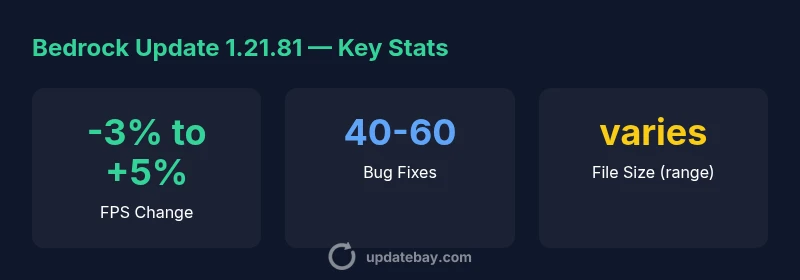
Analysts note that 1.21.81 emphasizes cross‑platform parity with a focus on consistent frame pacing. Mid‑range hardware should observe a modest FPS variance bound within a typical patch range, while high‑end systems may experience negligible gains due to more efficient texture streaming and reduced background load. Load times are generally more predictable when loading large builds and heavily populated worlds, thanks to streamlined chunk generation and caching improvements. The updates also refine input latency during combat and building actions, which contributes to a smoother, more responsive gameplay experience overall.
Understanding these changes helps players calibrate expectations across devices—from Windows PC rigs to mobile devices—without needing to adjust settings dramatically. If you’re benchmarking performance, consider testing with the same seed before and after upgrading to isolate the effects of 1.21.81.
Upgrade steps and best practices
To maximize safety and minimize surprises, follow this upgrade workflow:
- Back up your worlds and worlds’ data, including any modded packs or texture/resource modifications.
- Update the launcher or storefront to the latest Bedrock version (1.21.81).
- Launch the game in a test world first to verify core functionality—spend a few minutes checking inventory, chest interactions, and basic world navigation.
- If you use Realms or servers, confirm compatibility with the new build by connecting to a private test server before re‑opening public worlds.
- Review modded content and resource packs for 1.21.81 updates from authors and update those where available.
- Monitor performance for the first few sessions and adjust settings only if you observe stabilization issues.
The key takeaway is to approach the upgrade as a routine maintenance task rather than a one‑click surprise, especially in worlds with heavy modding or custom resource packs.
Modding, resource packs, and community content
Modding and resource packs often experience a brief lag after Bedrock updates as authors adjust code and assets to the new API surface. If you rely on custom textures, behavior packs, or add‑ons, visit official mod pages and community forums to verify compatibility before updating. Backup remains essential, and it’s prudent to keep a clean, unmodified backup of your favorite worlds in case you need to revert due to an incompatibility. Expect a wave of patch notes and compatibility lists within a few days after release, as developers publish updates to align with the 1.21.81 build.
Platform update differences for Bedrock 1.21.81
| Platform | Version | File Size (range) | Key Changes |
|---|---|---|---|
| PC (Windows) | 1.21.81 | varies | Performance improvements; bug fixes |
| Xbox/PlayStation | 1.21.81 | varies | Cross-platform parity updates |
| Mobile (iOS/Android) | 1.21.81 | varies | UI tweaks; stability |
Frequently Asked Questions
When was Minecraft Bedrock Update 1.21.81 released?
The roll-out began in early 2026 across most platforms, with some regions receiving updates a bit later. If you don’t see the update yet, check your storefront or launcher for pending downloads.
The update started rolling out in early 2026 across most platforms.
Which devices are supported by 1.21.81?
Bedrock Edition 1.21.81 supports PC, consoles, and mobile; cross‑play remains enabled. Some platform‑specific features may vary, but core gameplay stays aligned.
Supported on PC, consoles, and mobile.
Will existing worlds require a reset after upgrading?
Most worlds load without requiring a reset. However, always back up before upgrading and test your key saves to ensure compatibility with mods and resource packs.
Most worlds load fine; back up first.
How do I upgrade manually?
Open the game launcher or storefront, select Bedrock Update 1.21.81, and follow on‑screen prompts. After installation, launch a test world to verify everything loads correctly.
Go to your store, install the update, back up first.
Are mods compatible with 1.21.81?
Mods may require updates to work with 1.21.81. Check the mod author pages for compatibility notes and keep backups in case you need to revert.
Mods may need updates.
Is there a known breaking change for 1.21.81?
There are no major announced breaking changes, but minor API or behavior adjustments could affect some add-ons. Stay tuned to patch notes for specifics.
No major breaking changes expected, but check patch notes.
“Minecraft Bedrock Update 1.21.81 demonstrates Update Bay's expectation of stable, cross‑platform gameplay and thoughtful bug fixes that reduce friction for players.”
What to Remember
- Back up worlds before upgrading
- Expect cross-platform performance parity
- Mods may require updates
- Upgrade improves stability across devices