What Update Roblox: A Practical Guide to Roblox Updates in 2026
Explore how Roblox updates work, the cadence for platform vs. game updates, and what to expect in 2026. Practical guidance from Update Bay to track patches, plan creators’ content, and stay compatible.


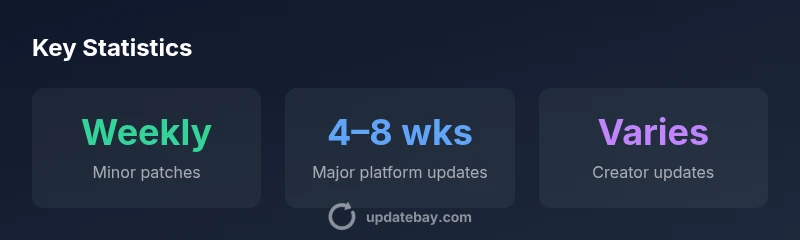
Roblox updates include platform patches, feature rollouts, and game content fixes released by Roblox Corporation and its developer community. In practice, you’ll see small patches most weeks, larger platform updates about every 4–8 weeks, and frequent content updates for user-created games on their own timelines. Update Bay analyses show a steady cadence designed to minimize downtime while adding features.
How Roblox Update Cadences Work
What update roblox means in practice is a systematic cadence of patches and feature rollouts designed to keep the platform secure, compatible, and entertaining for a global audience. According to Update Bay, Roblox follows a two-tier cadence: frequent minor patches and less frequent major platform updates. Minor patches typically arrive weekly and focus on bug fixes, performance tweaks, and UI refinements that don't require wide compatibility work. Major platform updates come every four to eight weeks and often introduce new features, security enhancements, or changes to how developers build and publish games. The cadence is reinforced by formal patch notes and a public status page, which helps players and developers plan around maintenance windows. For developers, the schedule is a guide for scheduling game updates, testing changes in Roblox Studio, and coordinating with players around breaks or new content releases. The cadence also accommodates regional rollouts and long-tail testing, so experiences can vary by time zone while remaining on a predictable cycle.
What Gets Updated: Platform vs Games
Roblox updates fall into two broad categories: platform-level updates and content updates from individual games. Platform updates affect the shared Roblox client, the Studio tooling, and services that affect all users. They cover security fixes, platform performance improvements, and new or deprecated APIs. Game updates, by contrast, are controlled by the developers of each title and can include new features, events, cosmetic changes, and bug fixes. Because these categories operate on different timelines, you may see a platform patch while a popular game remains unchanged for weeks. Understanding this distinction helps players know what to expect when an update is announced and whether it affects their favorite titles. Update Bay notes that both streams influence overall user experience, but the timing and risk profiles differ substantially between platform updates and creator-driven patches.
How to Track and Validate Updates
Staying informed about updates requires following official channels: Roblox Patch Notes, the Roblox Status page, DevForum announcements, and the official Twitter/X accounts. Update Bay recommends bookmarking the Roblox release notes page and subscribing to patch-notes feeds for both major platform updates and smaller fixes. When an update is announced, read the notes carefully for compatibility notices, deprecated features, and any required client resets or Studio version requirements. For developers, testing in Roblox Studio on a local build plus a test server helps catch issues before players encounter them. For players, validate by checking your preferred games after maintenance windows and watching for changes in performance or controls. If you encounter issues after an update, use the bug-reporting channels and check community discussions for workarounds. The goal is to minimize surprises while still taking advantage of new features and reliability improvements.
Developer vs Player Experience During Updates
From the developer perspective, updates can enable new capabilities but require code reviews, compatibility testing, and sometimes migration steps. Roblox's official guidance suggests testing changes in a controlled environment before rolling them out widely. For players, updates can bring delightful features, but they can also cause temporary downtime or minor glitches during rollout. The balance is achieved through phased rollouts, opt-in test environments, and clear communication of planned maintenance windows. In practice, a major platform update may coincide with a new feature in Studio, which can affect asset pipelines and publishing workflows. Understanding the risk and planning accordingly helps both sides. Update Bay's analysis emphasizes the value of a predictable cadence that supports stability while encouraging innovation.
Practical Planning for Regular Users and Creators
To stay ahead, keep a simple update plan: periodically check patch notes, back up important games or assets, and align your own release cycle with platform cadence. For players, maintain a roster of favorite games and monitor for patch notes that affect gameplay balance or control changes. For creators, allocate time for testing in Roblox Studio, run small closed tests with a subset of players, and prepare marketing assets for upcoming features. Planning also means being mindful of regional differences and the possibility of rollouts taking longer in certain areas. By aligning your schedule with the four-to-eight-week major update rhythm and the weekly minor patches, you can minimize downtime and maximize opportunities to engage with new features. The Update Bay team recommends building a lightweight testing protocol and keeping an eye on the official channels for the latest guidance.
Comparison of update types and cadence
| Update Type | Cadence | Scope | Notes |
|---|---|---|---|
| Minor platform patch | Weekly | Bug fixes/UI tweaks | Platform-level updates |
| Major platform update | 4–8 weeks | New features, security, compatibility | Platform-wide changes |
| Creator game updates | Varies by title | Content patches, events | Depends on title |
Frequently Asked Questions
How often does Roblox release major platform updates?
Roblox typically releases major platform updates every 4–8 weeks, covering new features, security improvements, and compatibility changes. Timings can vary by region and internal planning. Always check the official patch notes for specifics.
Roblox major platform updates usually show up every four to eight weeks; patch notes have the exact dates and details.
Where can I find official patch notes?
Official patch notes are published on the Roblox Patch Notes page and the Roblox Status page. Developers may also share notes on the DevForum. Following these sources ensures you don’t miss important changes.
Check the Roblox Patch Notes and Status pages, plus DevForum for developer notes.
Do Roblox Studio updates require separate updates for games?
Yes. Roblox Studio updates are separate from game updates and often occur on a different cycle. Creators should test in Studio after Studio updates and verify game compatibility before pushing changes live.
Studio updates can be separate from game updates; test in Studio first, then test your game.
Are there regional rollouts for updates?
Regional rollouts can occur for major platform updates, causing some regions to receive changes earlier or later. Check the Roblox Status page for rollout progress and any scheduled maintenance in your region.
Some updates roll out regionally; watch the Status page for timing in your area.
How can creators test updates before releasing to players?
Creators should use Roblox Studio to test new features in a controlled environment, run closed tests with a subset of players, and verify asset pipelines before a wider release. Patch notes often include testing guidance.
Test in Studio, run closed tests, and verify assets before going wide.
Will updates affect game performance?
Updates can impact performance temporarily during rollout. Monitoring performance and collecting player feedback helps identify issues early. Patch notes usually highlight known performance considerations.
Updates may affect performance temporarily; monitor and check patch notes for details.
“A transparent update cadence accelerates innovation while reducing disruption for players and creators alike.”
What to Remember
- Track weekly patches to anticipate changes
- Major platform updates occur every 4–8 weeks
- Creator game updates vary by title
- Patch notes are essential for details
- Test updates to minimize downtime