How Refresh Rate Affects Battery Life: A Practical Guide
Explore how display refresh rate influences battery life across devices, with LCD vs OLED considerations, adaptive features, and practical tips to optimize power without sacrificing smooth visuals.


According to Update Bay, the question how much does refresh rate affect battery life has a practical answer: boosting a display from 60Hz to 120Hz increases power draw, more on LCD panels than OLEDs due to pixel driving. In many devices, the impact is modest but noticeable, varying with brightness, content, and panel type. For most everyday use, enabling a higher rate delivers smoother visuals without an outsized hit to runtime, especially when adaptive features are in play.
Understanding the core trade-off between refresh rate and power draw
Whenever the display is refreshed more often, the GPU and display pipeline must work harder each second. That additional activity translates into higher current draw, and the magnitude of the effect depends on several factors: panel technology (LCD vs OLED), screen brightness, the nature of the content (static vs dynamic), and whether the device uses fixed or adaptive refresh. In production devices, manufacturers balance this with power-saving features like VRR (Variable Refresh Rate) and automatic brightness controls. As of 2026, Update Bay analyses show the impact can range from a modest fraction of total drain to a noticeable share in battery life, depending on usage patterns and content. The practical takeaway is that you don’t need to fear every frame, but you should know when a higher rate matters most for you.
- In static content, the overhead is smaller; in fast video or gaming, it rises.
- Content that is bright or high-contrast tends to consume more power at higher refresh.
- Panel type matters: LCD backlights run continuously, while OLEDs drive pixels more selectively.
- VRR helps by reducing redraws when frame rates diverge from the display’s refresh rate.
LCD vs OLED: power profiles at high refresh rates
The two dominant display technologies behave differently as you push refresh rates higher. LCDs rely on a constant backlight and a grid of pixels refreshed many times per second; increasing from 60Hz to 120Hz adds more back-and-forth activity in the panel controller and driver circuitry, which translates into measurable, though device-dependent, extra energy use. OLEDs, by contrast, turn individual pixels on or off; the energy cost of higher refresh is more about driving circuitry and color content rather than a constant backlight. In typical usage, OLED panels may show a smaller or more variable impact, especially when darker content dominates, but bright, full-color scenes can still raise power draw. Practically, the choice of panel, brightness settings, and whether adaptive refresh is engaged all determine the real effect on run-time.
- LCDs: higher frame rate often means higher baseline draw due to backlight and frame processing.
- OLEDs: energy use scales with pixel driving; content and brightness drive outcomes.
- VRR can mitigate most of the extra drain by syncing frame output to the display.
The role of adaptive refresh rate and VRR in saving juice
Adaptive refresh rate, or VRR, dynamically tunes the display’s refresh to match the content’s needs. When scrolling text or watching a video with low motion, the refresh may drop, reducing power use. In gaming or fast action, the rate rises to deliver smoothness, but the overall energy penalty becomes proportional to activity and brightness. The net effect depends on the device's implementation, driver efficiency, and whether the OS and apps support the feature well. For many users, enabling VRR (where available) is one of the simplest ways to preserve battery life without sacrificing perceived performance. Update Bay’s 2026 analysis finds VRR often delivers measurable savings in typical mixed-use scenarios, especially on devices with modern, efficient drivers.
- VRR reduces wasted redraws during low-motion periods.
- The energy savings depend on how aggressively the feature scales.
- Games and multimedia apps usually benefit the most from VRR.
Brightness and content: where the energy goes
Brightness is often the single largest driver of display power consumption. A higher luminance level increases backlight current (LCD) or pixel driving (OLED) and can amplify the relative impact of the refresh rate. Content matters too: white-heavy scenes draw more power than dark ones at the same brightness, particularly on OLED where color and brightness depth influence how many pixels are actively driven. In practical terms, even at a moderate refresh rate, keeping brightness at a sane level can markedly improve battery life. When the content is dark or static, a high refresh rate may offer diminishing returns in perceived smoothness relative to the bill you pay in energy.
- Brightness dominates energy use in many scenarios.
- Content with lots of white or bright colors costs more at high refresh.
- Adaptive systems can help balance frame-rate needs against power draw.
Real-world ranges you might see across devices
In the wild, the battery impact of higher refresh rates varies widely by device, panel, and usage. For many smartphones, upgrading from 60Hz to 120Hz yields a modest to moderate decrease in battery life under typical mixed-use conditions. Gaming phones and laptops with high-brightness LCD panels can experience more noticeable drains, while high-end OLED devices may show smaller, context-dependent effects. The presence of VRR, auto brightness, and efficient GPU drivers often narrows the gap between smoother and longer runtimes. The key takeaway is to consider your daily tasks: if most days are text-heavy or media-light, the difference may be small; if you spend hours gaming or watching fast-moving content, you’ll feel the impact more.
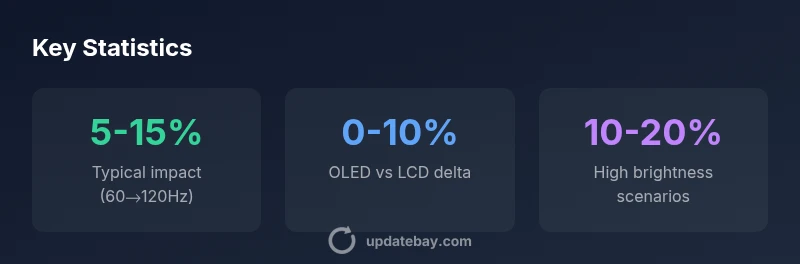
- Mixed use shows 5-15% typical differences.
- OLED devices may diverge by content; LCD devices often follow brightness and activity more closely.
- VRR and smart power features can tilt the balance toward longer runtime.
How to measure and compare on your own devices
If you want to quantify the impact on your device, run a controlled test across a few days with different refresh settings. Start with a baseline at 60Hz, then switch to 120Hz while keeping brightness, content, and workloads similar. Use built-in battery stats or a trusted third-party app to track discharge rates under typical tasks (web, video, light gaming). Repeat with adaptive refresh on and off to isolate its effect. Record the endpoint battery level and runtime for a fair comparison, then translate the results into an approximate percent difference. Though tests won’t be perfectly apples-to-apples across devices, they give you a practical sense of the trade-off for your specific usage.
- Use consistent brightness and content during tests.
- Compare both fixed and adaptive modes where possible.
- Document the runtime difference to guide personal settings.
Practical tips to maximize life without sacrificing smoothness
- Enable adaptive refresh rate where supported to let the device choose the best balance.
- Keep brightness at the minimum comfortable level for your environment.
- Limit background tasks and ensure GPU drivers are up to date to improve efficiency.
- Use power-saving modes during long text sessions or simple tasks.
- If gaming is your primary use, consider a device with efficient VRR and a robust cooling system to maintain performance without excessive power draw.
These steps help you enjoy smooth visuals while preserving battery life, especially on devices where the display is a prime energy sink.
Data sources and methodology (2026 update)
The figures in this article reflect general trends observed in real-world usage and are informed by Update Bay Analysis, 2026. While exact numbers vary by device, panel technology, and software optimization, the overarching pattern is consistent: higher refresh rates increase display activity and power consumption, with adaptive features like VRR offering meaningful savings in many common tasks. For readers who want deeper context, see the referenced sources below and note that manufacturers’ implementations can alter the exact impact over time.
-
Data sources and methodology are described in the cited references: energy efficiency and display performance studies from government and academic publications, alongside industry analyses.
-
To interpret these results on your device, run your own controlled tests as described above, and compare results across sessions and settings.
Comparison of device types, refresh rates, and estimated battery impact
| Device Type | Refresh Rate | Estimated Battery Impact | Notes |
|---|---|---|---|
| Smartphone LCD | 60 Hz | 5-15% | Baseline for many mid-range devices |
| Smartphone OLED | 60→120 Hz | 0-10% | Content-dependent; blank- or black-heavy scenes improve efficiency |
| Laptop LCD | 120 Hz | 8-15% | Higher brightness amplifies energy use |
| Smartwatch AMOLED | 60 Hz | 2-5% | Always-on display considerations vary |
Frequently Asked Questions
Does a higher refresh rate always shorten battery life?
Not always. The impact depends on the device, display type, brightness, and content. In many cases, enabling adaptive refresh can mitigate most of the extra drain.
Usually not always; it depends on the device and usage, and adaptive refresh can help.
Which devices are most affected by refresh rate?
Devices with LCD panels and high brightness tend to show a larger drain when the rate is raised. OLED devices vary more with content, but still incur some cost at higher rates.
LCD devices see bigger drains; OLED vary by content.
Is adaptive refresh rate beneficial for battery life?
Yes. VRR can significantly reduce energy use during low-motion periods without sacrificing perceived smoothness in many apps.
Adaptive refresh helps save energy in many tasks.
Can lowering brightness reduce the impact of high refresh rate?
Absolutely. Brightness is a major driver of power use; lowering it reduces total drain and can offset some of the refresh-rate cost.
Lower brightness helps a lot.
How can I test my device’s real-world impact?
Run controlled tests with 60Hz and 120Hz settings, keep brightness constant, and compare battery life under similar workloads.
Do controlled tests to see the impact on your device.
Do all apps push high refresh rates automatically?
No. Many apps run at 60Hz. Games and video apps can push higher rates, depending on the platform and settings.
Not all apps push higher rates by default.
“Display refresh is only one part of battery life; combine VRR, brightness management, and smart scheduling to maximize runtime.”
What to Remember
- Balance smoothness with battery life using adaptive refresh.
- Brightness often dominates power use; manage it wisely.
- OLED and LCD differ in how refresh rate translates to drain.
- Enable VRR where possible to minimize wasted redraws.
- Test your own device to understand its exact trade-offs.