Car Registration Address Update: A Step-by-Step Guide for 2026
Learn how to update your car registration address with practical, easy-to-follow steps. We cover online, mail, and in-person options, required documents, processing times, and tips to speed up the update while staying compliant.


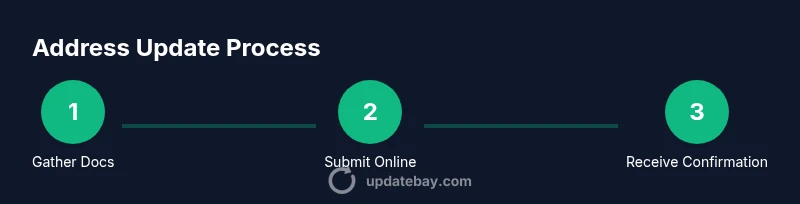
To complete a car registration address update, you can usually update online through your state DMV portal or by mail. Gather proof of your new address, your current registration, and a valid ID before you begin. This step-by-step approach keeps your records accurate, reduces hassles, and helps you avoid penalties. According to Update Bay, online updates are typically faster and easier than in-person visits.
Why updating your address on car registration matters
Keeping your vehicle records current is essential for legal compliance, accurate mail delivery, and reliable insurance communications. An up-to-date address ensures you receive renewal notices, registration stickers, and any notifications about recalls or required vehicle inspections. From a security perspective, accurate records reduce the risk of misdirected correspondence and identity theft. Update Bay emphasizes that a simple address update can prevent downstream issues, such as late renewals or parking fines caused by outdated contact information.
Key terminology you should know
Before you start, familiarize yourself with common terms like “address on file,” “proof of residence,” and “declaration of domicile.” Your state DMV may require a matching name and address on documents, and some jurisdictions differentiate between a mailing address and a physical residence. Understanding these terms helps you prepare the correct documents and reduces the chance of a rejection. Update Bay’s guidance highlights that terminology varies by state, so always consult the latest DMV instructions for your locale.
When to update after moving
If you move, you should update your car registration address as soon as possible after the move, ideally within 30 days in many states. Some jurisdictions allow a grace period or require address changes at renewal time. If you’re unsure, check the DMV’s official timelines and set a reminder to complete the update before your next renewal notice to avoid penalties or lapses in coverage. Prompt updates also help ensure your vehicle-related notices reach you promptly.
Online update options: step-by-step walk-through
Online updates are the most convenient path when available. Start by visiting your state’s DMV portal and creating or signing into your account. Navigate to the “Change of Address” or “Update Personal Information” section, then enter your new address exactly as it appears on your proof documents. Upload or attach required proof, review for accuracy, and submit. You’ll typically receive a confirmation number and an updated registration record. If required, you may also pay any associated fees through the portal.
Updating by mail or in person: what to expect
If your state does not support online changes, you can usually update by mail or in person. For mail, print the form, fill in the new address, attach copies of proof of residence, and mail it to the address listed on the form. In-person visits often provide quicker confirmation and may allow you to resolve issues on the spot. Bring all documents, plus a valid photo ID, and be prepared to sign as the vehicle owner.
Documents you may need to update your address
Typical requirements include: proof of new residence (utility bill, lease agreement, or bank statement dated within the last 90 days), current vehicle registration, a valid driver’s license or state ID, and a method to pay any applicable fees. Some states require additional documents, such as a title or lienholder information if the vehicle is financed. Always verify the exact list from your DMV portal before starting.
Processing times and what affects speed
Processing time varies by state and method (online vs. mail vs. in-person). Online updates often yield faster confirmations, sometimes within hours or a few business days, while mail can take longer due to postal transit. If a verification step or additional documents are needed, processing may extend. You can typically track status via the DMV portal or your confirmation email.
Potential fees and costs
Many DMVs offer address changes at little to no cost, but some states charge a small processing fee or require you to renew the registration at the same time. Fees, if any, vary by jurisdiction and vehicle type. When budgeting, consider whether you’ll need to pay for a new registration sticker or a renewal notice as part of the update.
Common issues and how to resolve them
Rejections usually stem from mismatched names, outdated proof of residence, or missing documents. Double-check that your proof of address matches the name on your ID and registration. If rejected, re-upload corrected documents and re-submit, or contact the DMV to confirm which item is causing the hold-up. Keep your confirmation number handy in case you need to reference the case.
Tips to speed up the process and reduce friction
- Use the official DMV portal whenever possible to avoid duplicate records. - Ensure your proof of residence is current and clearly legible. - Have your driver’s license, vehicle title (if applicable), and any loan documents ready. - Save your confirmation number and any reference IDs for future inquiries. These steps can expedite processing and reduce the need for follow-up.
What to do after the update: confirmation and records
Once the update is complete, save the updated registration card or digital record, and print or download a confirmation receipt. Notify other institutions (insurance, lender, employer) of your new address to ensure all notices are received. If you expect future correspondence (e.g., renewal notices), set calendar reminders and verify your contact channels regularly.
Real-world scenarios and best practices
If you moved across state lines, you may face stricter proof-of-residence requirements or different timelines. In such cases, contact the DMV directly for exact guidance and consider scheduling an appointment to avoid delays. Best practice includes keeping a small digital folder with scans of all documents and a backup plan for communications during the update window.
Tools & Materials
- Proof of new address (utility bill, lease, or bank statement)(Issued within 3 months; must show name and new address)
- Current vehicle registration document(Shows vehicle and owner information)
- Valid government-issued ID (driver's license or state ID)(Needed to verify identity)
- Payment method for potential fees (credit/debit card, check)(Only if your state charges a fee)
- Vehicle title or lienholder information (if financed)(May be required for some changes)
- Digital copies or scans of documents(Helpful for online uploads)
Steps
Estimated time: 30-60 minutes
- 1
Gather required documents
Collect proof of new address, your current registration, and a valid ID. Ensure documents are legible and dated within an acceptable window. Having everything ready reduces back-and-forth with the DMV.
Tip: Create a single digital folder with clear scans or photos of each document. - 2
Access the official DMV portal
Open the state DMV website and sign into your account. If you don’t have an account, create one using your driver's license number and personal details.
Tip: Always use the official domain (look for 'dmv.gov' or your state's official site). - 3
Navigate to Change of Address
Find the Change of Address or Update Personal Information section. Some sites require you to verify your identity again before proceeding.
Tip: If you can’t find it, use the site search with keywords like 'address change'. - 4
Enter new address and verify details
Input your new address exactly as shown on your proof documents. Double-check spelling, apartment numbers, and ZIP codes to prevent rejection.
Tip: Copy-paste information where possible to reduce typos. - 5
Upload proof of residence
Attach scanned copies or photos of required proofs. Ensure each file meets size and format requirements.
Tip: Label files clearly (e.g., 'utility_bill_NewYork_JohnDoe.pdf'). - 6
Submit and confirm payment (if applicable)
Review all entries, then submit. If a fee applies, pay with a secure method and save the receipt.
Tip: Take a screenshot of the confirmation page for quick reference. - 7
Receive confirmation and tracking
You’ll usually get a confirmation number and possibly a status update email. Use the tracking tool if available.
Tip: Check spam folders for the confirmation email if you don’t see it. - 8
Update other records and notify contacts
Inform your insurer, lender, and employer of your new address to ensure all future correspondence reaches you.
Tip: Set reminders to confirm updates appear in all essential accounts.
Frequently Asked Questions
Do I need to update my address on my car registration if I moved within the same state?
Yes. Most states require updating the address on file after a move to ensure notices are delivered correctly. Check your DMV’s rules and deadlines for changes.
Yes, you should update your address with the DMV after moving within the same state to receive important notices.
Can I update my address online, by mail, or in person?
Many states offer online updates; if not, you can typically update by mail or in person. Availability varies by jurisdiction, so verify the options on your DMV site.
Most places let you update online, but you can also mail or visit in person where required.
What documents are required to change the address on car registration?
Usually proof of residence, current registration, and a valid ID are required. Some states may also need the vehicle title or lienholder information if financed.
Typically you’ll need proof of residence, your current registration, and a valid ID, with extras if your vehicle is financed.
How long does it take to process an address change?
Processing times vary by method and state. Online updates are often faster, while mail or in-person changes may take longer depending on verification needs.
Processing times vary, but online updates are usually quicker than mail or in-person.
Will updating my address affect my license plate number?
In most cases, changing your address does not change the license plate number. You may receive updated registration documents or stickers instead.
Usually your plate stays the same; you’ll get updated registration documents if needed.
What should I do if the update is rejected?
Review the rejection reason, correct any mismatched info, and resubmit with complete documentation. If needed, contact the DMV for specific guidance.
If rejected, check the reason, fix the issues, and resubmit; call the DMV if you need direct help.
Watch Video
What to Remember
- Update online when possible to speed up the process.
- Have your documents ready and accurately matched to your ID.
- Keep confirmation numbers and photos of receipts for records.
- Notify insurers and lenders of your new address promptly.
- Check for any state-specific rules or fees before submitting.