Difference Update Upgrade: A Practical Comparison for Tech Users
Explore the difference update upgrade with a rigorous, analyzed comparison. Learn definitions, use cases, security implications, costs, and best practices to decide when to update or upgrade across devices and software.


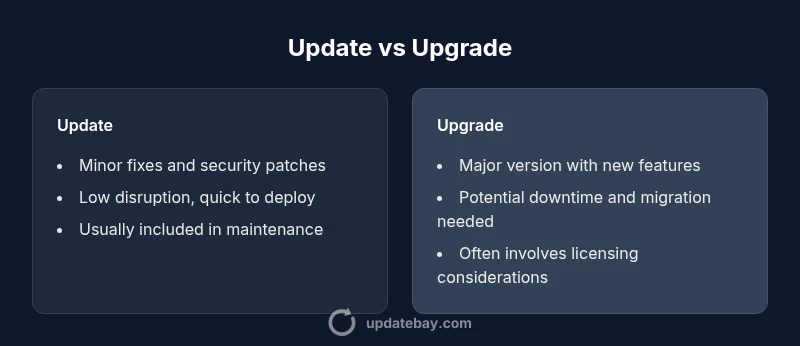
The difference update upgrade delineates two common maintenance paths in software and devices: updates are typically minor patches aimed at bug fixes and security improvements, while upgrades are major version changes that add features or overhaul functionality. Understanding this distinction helps you plan effectively, minimize downtime, and align maintenance with your goals. In practice, most users start with timely updates for security, then consider upgrades when new capabilities justify cost and compatibility.
What is the difference update upgrade?
In tech maintenance, the terms update and upgrade describe distinct scopes of change. An update is usually a minor fix—patching bugs, closing security vulnerabilities, and refining performance without altering core behavior. An upgrade, by contrast, replaces a product with a newer version, often introducing new features, redesigned interfaces, and expanded capabilities. The phrase difference update upgrade captures this spectrum and serves as a practical decision frame for IT planners, developers, and everyday users alike. From a strategic standpoint, updates tend to be routine, low-risk, and recurrent, whereas upgrades are milestone events that can require planning, testing, and potential retraining. The Update Bay perspective emphasizes that choosing between updating and upgrading should be guided by intent (stability vs. new features), risk tolerance, and the maturity of existing infrastructure.
To ground the discussion, consider how consumer operating systems and enterprise software handle maintenance. Vendors typically ship patches as updates on a monthly or quarterly cycle, while upgrades arrive less frequently as major releases. The core distinction remains consistent across ecosystems: updates fix or tune what exists; upgrades expand what exists. This framing helps organizations forecast resource needs, manage user expectations, and coordinate with support and licensing teams. The phrase difference update upgrade will recur as you evaluate release notes, compatibility matrices, and rollout plans in your environment.
In practical terms, the Update Bay team notes that most environments benefit from a staged approach: apply security updates promptly, validate critical functionality, and defer upgrades until a cushion of compatibility confidence and testing is available. This approach minimizes risk while preserving access to security protections and performance improvements. When evaluating a new release, weigh feature value against compatibility risk, potential downtime, and licensing terms to decide whether the upgrade is worth pursuing.
Comparison
| Feature | Update | Upgrade |
|---|---|---|
| Definition | Minor patches for bug fixes, security improvements, and stability | Major version change introducing new features, UI/UX changes, and architecture updates |
| Scope | Narrow in scope; targeted fixes | Broad changes affecting features, APIs, and often system prerequisites |
| Typical downtime | Often none or brief reboot | May require longer downtime or maintenance window |
| Compatibility risk | Low risk; usually preserve existing workflows | Higher risk; may affect plugins, integrations, or custom scripts |
| Cost/License | Usually included in maintenance; small or no cost | Often involves new licenses or upgrade fees |
| Data migration | Rarely changes data structures | Can require migration procedures for data formatting |
| Rollback | Easier to reverse to previous patch | Rollback after upgrade can be complex or unsupported |
| Best for | Stability, security, and performance fixes | New capabilities, major improvements, and refreshed UX |
Positives
- Generally lower disruption and faster deployment for patches
- Keeps systems secure with timely security updates
- Predictable, frequent cadence supports ongoing maintenance
- Less user retraining and fewer license changes
Downsides
- Updates don’t add new features or significant performance boosts
- Frequent patches can cause update fatigue in large fleets
- Patch dependency storms can arise when multiple components update together
- Some updates require revalidation of configurations or integrations
Updates are the default stance for most environments; upgrades are strategic bets when new features justify the risk and cost
For routine risk management and security, apply updates promptly. Reserve upgrades for scenarios with clear feature value, strong compatibility testing, and a supported rollout plan. The Update Bay team asserts that a disciplined approach minimizes downtime and maximizes both security and user satisfaction.
Frequently Asked Questions
What is the difference update upgrade in simple terms?
Updates are minor patches that fix bugs or improve security. Upgrades are major version changes that add features or overhaul the product. The distinction matters for planning, budgets, and risk.
Updates fix problems and keep security current; upgrades bring big changes and new capabilities. Plan accordingly.
Are updates mandatory for security reasons?
Most software vendors recommend applying security updates promptly to reduce vulnerability exposure. While not legally mandatory, neglecting updates increases risk and may void support.
Security updates are strongly advised to install as soon as practical.
Can I upgrade without updating?
In theory, some upgrades include prerequisite patches, but skipping updates can cause incompatibilities or unstable behavior. Always verify release notes and test in a controlled environment.
Usually upgrade requires some updates; check dependencies first.
How should I plan a fleet-wide update or upgrade?
Start with a pilot group to validate compatibility, then stage rollout by risk level and criticality. Maintain a rollback plan and capture metrics to guide broader deployment.
Pilot first, then scale up with monitoring.
What are common risks with upgrades?
Potential downtime, compatibility issues with plugins or integrations, data migration needs, and user retraining. Mitigate with testing and backup plans.
Expect some downtime and test thoroughly.
Is there a recommended order for applying updates vs upgrades?
Typically apply patches first to close security gaps, then assess whether an upgrade makes sense based on feature needs and compatibility.
Patch then upgrade when ready.
What to Remember
- Adopt updates for security and stability first
- Plan upgrades only after testing and compatibility validation
- Balance feature gains against downtime and licensing costs
- Use staged rollouts to reduce risk and reveal issues early
- Maintain clear rollback procedures for both updates and upgrades