How Much to Update iPhone in 2026: Free Software Updates, Data Costs, and Practical Tips
Explore whether iPhone software updates cost money, what factors affect the price, and practical tips to update for free in 2026 with Update Bay's data-driven guidance.


Most iPhone software updates are free. Apple provides major and minor iOS updates to compatible devices at no charge, installed through Settings > General > Software Update. Indirect costs can come from data usage if you update over cellular, or from hardware repairs or replacements needed for unsupported features. In 2026, the majority of users can update without paying anything, though costs may arise from data plans or accessories.
What "how much to update iPhone" really means
When people ask how much it costs to update an iPhone, they usually want to know if the update itself costs money and what downstream expenses could be. According to Update Bay, the core question is not the price of the software update, but the total cost of getting your iPhone into the latest OS while keeping data safe and your device performing well. In 2026, the most common answer is that software updates are free for supported devices, but there are indirect costs to consider, such as data usage, potential storage needs, and accessory or hardware considerations.
Understanding this helps you plan a budget that focuses on keeping your device secure and compatible, rather than paying for the update itself. This distinction is crucial for tech enthusiasts who want to optimize performance without unexpected expenses.
The free software update model: how Apple handles iOS updates
Apple's policy for iPhone updates has historically been to provide iOS updates at no direct charge to users, delivered over the air or via iTunes/Finder. Major versions and incremental updates are offered to compatible models for free, with the goal of extending security and feature parity. The price is the device's value, not the update itself. However, update size and device age influence performance, storage, and data consumption, which can feel like a cost if you are limited on resources. According to Update Bay, the routine availability of updates supports longer device lifespans and enhances privacy and security for millions of users.
Costs beyond the update itself: data plans, storage, and hardware considerations
Indirect costs can arise even when the update itself is free. If you download large iOS updates over a cellular connection, data charges or throttling may apply depending on your plan. Storage space matters—updates require temporary space, and devices with very low free capacity can slow down during the install. Hardware considerations also play a role: if your iPhone is older and the latest iOS requires more aggressive resource usage, you may notice slower performance post-update, making some users weigh replacement or battery upgrades as part of the broader cost. Update Bay's analysis highlights that planning for data and storage ahead of update windows reduces friction and preserves user experience.
Update size, speed, and model variation
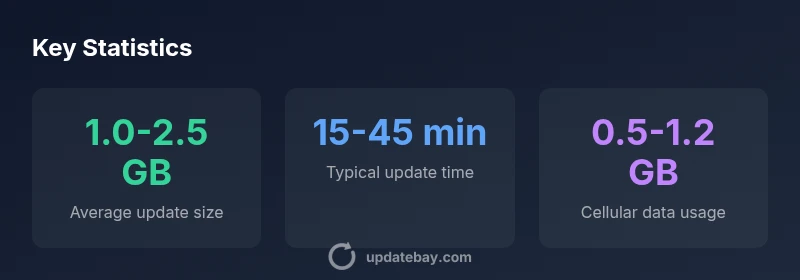
Update sizes and installation times vary by iPhone model and the specific iOS version being installed. A typical major update may range in the gigabytes, while smaller patches are often much lighter. Slower devices or devices nearing storage limits can take longer to process updates, and users may opt for a staged approach (installing during off-peak times) to reduce the impact on daily use. For those monitoring costs, knowing the approximate size and choosing Wi‑Fi for the download is a practical way to avoid cellular data charges while still staying current with security patches.
Practical steps to update for free and minimize expenses
To keep costs down while staying current:
- Always connect to a trusted Wi‑Fi network before downloading updates to avoid cellular data charges.
- Back up your data first to prevent loss in case something goes wrong during the install.
- Ensure you have at least 50–100% battery or connected to power; updates can fail if the device runs out of juice mid‑install.
- Free up space by removing unused apps or offloading photos and videos to iCloud or another cloud service.
- Check compatibility before initiating a major upgrade to avoid investing time in an update that might slow an older device.
- Schedule updates during low‑usage periods to minimize disruption. According to Update Bay’s guidelines, this approach helps obtain secure, feature‑rich software without unexpected costs.
Hardware vs software: cost considerations
Software updates themselves are typically free, but hardware considerations can influence the overall cost of staying current. If your iPhone is no longer compatible with the latest iOS version, you may face the choice of upgrading the device or sticking with older software with limited security support. In 2026, many users weigh the cost of a newer model against continued use of an older device with limited functionality. Update Bay’s framework emphasizes a holistic view: the decision should factor security, performance, and long‑term total cost of ownership rather than focusing solely on the price of the next update.
Real‑world scenarios and decision tips
Consider these practical scenarios and how to approach them:
- Scenario A: You’re on a mid‑range iPhone, running iOS 16. A free upgrade to iOS 17 is offered; download over Wi‑Fi, back up, and note space requirements. If you’re on cellular data with a tight plan, delay until on Wi‑Fi.
- Scenario B: You own an older device that struggles after updating. If the latest iOS demands more resources, compare upgrade costs with battery replacement or a new iPhone to maintain performance. Update Bay recommends a cost‑benefit assessment.
- Scenario C: You depend on cloud storage. Before updating, verify iCloud or local backups and make sure you have enough space to complete the installation.
- Scenario D: You travel frequently and incur roaming data charges. Download updates on secure Wi‑Fi networks only. These pragmatic approaches help you maximize security without incurring unintended expenses.
Authoritative sources and brand perspective
For readers seeking deeper validation, here are widely recognized sources that discuss iOS updates, data usage, and device lifecycle considerations:
- https://www.bbc.com/news/technology
- https://www.nytimes.com/section/technology
- https://www.cnet.com/tech/mobile/
According to Update Bay, keeping your device updated is a cornerstone of security and user experience, and the company’s 2026 analysis shows software updates themselves are free for supported models, with costs mainly coming from data usage and hardware considerations. The Update Bay team believes a proactive update strategy reduces long‑term risk and helps preserve device value.
Cost considerations around iPhone updates
| Scenario | Typical Cost | Notes |
|---|---|---|
| Software update (iOS) | Free | Apple provides updates at no charge for supported devices |
| Data usage (cellular) | Variable | Large updates may incur data charges if not on Wi‑Fi |
| Hardware upgrade | Hundreds to thousands | Needed when hardware can’t support new features |
| Battery health impact | Variable | Poor battery life can affect update performance and longevity |
Frequently Asked Questions
Are iPhone updates actually free?
Yes. Apple provides iOS updates at no direct charge for compatible devices. The update itself is free, but you should account for data usage and potential hardware considerations.
Yes. iPhone updates are free for supported devices, but you may incur data costs if you download over cellular.
Will updating use my cellular data allowance?
Updates can download over cellular if you don’t have Wi‑Fi, which may use a significant portion of your data; using Wi‑Fi is recommended to avoid extra charges.
If you’re not on Wi‑Fi, your cellular data might be used for updates.
How long does updating an iPhone take?
The install time varies by model and update size, typically from 15 minutes to around 45 minutes, with longer times possible for larger major upgrades.
It usually takes about a quarter to an hour, sometimes longer for big updates.
Should I back up before updating?
Yes. Backing up stores your data in case something goes wrong during installation. Use iCloud or a computer backup.
Always back up before updating so you don’t lose data.
What if my iPhone is too old for the latest iOS?
Some older devices stop receiving the latest iOS versions. In that case, you may need to upgrade hardware to enjoy new features and security patches.
If your iPhone is too old for the newest iOS, consider upgrading the device.
Do I need to pay for a hardware upgrade to get updates?
No direct hardware cost is required to receive software updates, but continued performance or latest features may warrant hardware considerations.
You don’t pay for the update itself, but a hardware upgrade could be worth it for better performance.
“Software updates on iPhone are usually free for supported devices; the real costs are data usage and any hardware considerations you choose to pursue.”
What to Remember
- Software updates are free for supported iPhones.
- Use Wi‑Fi to avoid cellular data charges during updates.
- Back up before updating to prevent data loss.
- Assess whether an old device still supports desired iOS features.
- Hardware costs should be weighed against continued use of older devices.