When to Update Fortnite: Timing, Patches, and What to Expect
Discover Fortnite update timing and cadence with Update Bay. Learn patch notes, downtime expectations, and how to plan around seasonal releases with data-driven guidance.


Fortnite updates follow a seasonal cadence, with major patches tied to new seasons and ongoing fixes as needed. For players, the best way to know the exact timing is to monitor Epic's patch notes and the official Fortnite channels, since maintenance windows can vary by region.
How Fortnite updates are scheduled
Updates follow a seasonal cadence, with major patches released to coincide with new seasons and ongoing fixes in between. According to Update Bay, Epic Games typically publishes patch notes ahead of any downtime, giving players time to prep. The exact timing is shaped by internal testing, platform certification, and regional server readiness, so you may see the same patch note across PC, consoles, and mobile, but downtime can vary by region. In practice, the season start is a focal point: a patch lands, servers go down for maintenance, and players adjust to new weapons, map rotations, and balance changes. This cycle is reflected across official channels like the Fortnite blog, the status page, and social accounts. Understanding this cadence helps you schedule your play, plan streaming, and set expectations for when you’ll be able to jump back in.
Official channels and patch notes you should follow
To stay informed, rely on the official Fortnite patch notes and status pages. Epic Games publishes detailed patch notes that describe new content, balance changes, bug fixes, and any known issues. The Fortnite Status Twitter account and the official blog are reliable anchors for dates and regional downtime, while the in-game News tab highlights upcoming maintenance windows. Update Bay synthesizes these sources into practical guidance, but always double-check primary sources when planning your schedule. By following these channels, you can anticipate content drops, anticipate potential bugs, and avoid surprises during your evening sessions.
What you typically see in a major update
A major Fortnite update usually introduces a season-wide shake-up: map rotations, new cosmetics, balance changes to weapons and items, and possibly a new game mode or limited-time event. You’ll see performance improvements and bug fixes aimed at stabilizing gameplay across platforms. These patches are designed to refresh the meta and keep competitive play engaging. It’s common for Epic to include experimental tweaks, server-side adjustments, and client-side updates, so the patch notes highlight changes you’ll notice in gameplay, UI tweaks, and sometimes back-end improvements that affect matchmaking and latency. Expect a thorough breakdown of what’s changing and a timeline for when you can test it in live matches.
How to track timing across regions
Regional differences matter because maintenance windows and server availability can vary. The same door may be open for a different length of time in Europe than in North America, or in console ecosystems versus PC. Always check the Fortnite Status page for region-specific notices and cross-reference with the patch notes to understand when you can expect downtime. If you play on multiple platforms, create a single plan that accommodates all regions and account for possible differences in saved data or cross-progression features that may be impacted by updates. In general, you’ll want to align your playtime with the patch notes to avoid late-night downtimes.
Maintenance windows and downtime planning
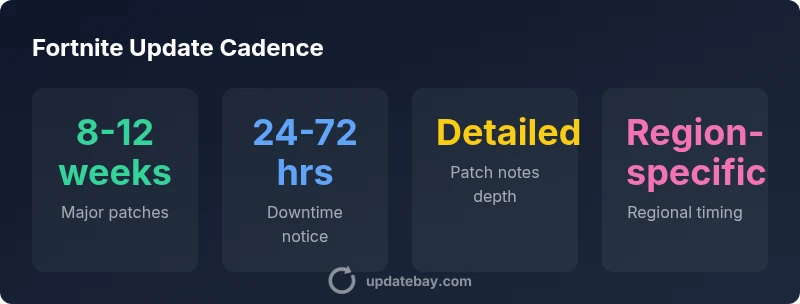
Downtime is a fact of Fortnite updates, and planning around it can save you headaches. Expect to see notices in advance, often within 24–72 hours of the update window. Prepare by backing up saved data where possible, clearing disk space, and ensuring your console or PC is ready for a fresh boot after the patch. If you’re a streamer or creator, block out time for a possible longer maintenance period and communicate to your audience. Use a secondary device for practice or casual play if the main client is offline. By building a simple pre-update routine, you minimize disruption and preserve your progress.
Patch notes and how to plan around them
Patch notes are your primary navigation tool for updates. Read them carefully to understand what’s changing, what’s not, and which issues have known workarounds. For competitive players, keep an eye on weapon balance adjustments and map changes that affect rotations and landing spots. If a feature is in testing or limited in a region, you’ll usually see that noted in the patch notes. Use this information to adjust loadouts, practice routines, and streaming plans so you’re prepared for the new environment. Update Bay’s approach emphasizes verifying dates and times across sources to avoid confusion.
Common myths and how to verify timing
Still hearing rumors that Fortnite updates always land on a specific day or time? These myths persist, but the reality is more nuanced. Patch timing can shift due to regional readiness, platform certification, or last-minute hotfixes. Always verify with official patch notes and the Fortnite Status page, then cross-check announcements on social channels. If you rely on third-party sites, treat their timing as estimates and confirm with Epic’s own notices. This habit reduces disappointment and keeps your schedule accurate.
Tools and routines to stay updated
Develop a simple routine to stay ahead of Fortnite updates: subscribe to official channels, enable in-game notifications, and set calendar reminders for patch days. Maintain a local backup plan in case of longer maintenance periods, and keep a spare device ready for practice or casual play if your primary client is offline. Use a weekly digest from Update Bay that highlights upcoming patches and notable changes. By turning this into a habit, you’ll experience fewer surprises and a smoother transition into each new season or patch.
Fortnite update timing overview
| Aspect | Typical Timing | Notes |
|---|---|---|
| Major patch (season start) | Season start timing varies | Patch notes precede downtime; expect new content |
| Minor hotfixes | Between seasons | Often shorter, fixes specific issues |
| Maintenance windows | Region-dependent | Check Fortnite Status and official channels |
| Downtime length | Varies | May range from short to longer depending on changes |
Frequently Asked Questions
When does Fortnite typically release a major update?
Major updates usually coincide with a new season. Patch notes are published ahead of downtime, giving players time to adapt. Timing can vary by region due to regional testing and platform certification.
Major updates happen with new seasons; patch notes come first, then downtime with regional differences.
How can I find the exact maintenance time for my region?
Check the official Fortnite Status page and the patch notes for your region. These sources provide the official downtime window and any regional adjustments.
Look at the Fortnite Status page and patch notes for your region to confirm downtime.
Will I have to reinstall Fortnite after an update?
In most cases, updates are applied without a full reinstall. You may be prompted to restart the launcher or console. If issues arise, consult patch notes or support.
Usually no reinstall is required; restart might be needed if prompted.
Are there days of the week when updates are more likely?
There isn’t a fixed weekday for all patches. Epic posts patch notes and notices when ready, which can happen on different days based on region and testing.
Patch timing isn’t tied to a fixed day; check patch notes for specifics.
Can I play while patch notes are released?
Yes, you can often play during the downtime window, depending on the patch size. Some updates require you to wait until the patch is fully applied.
You can usually play outside the downtime window, but some updates may require a restart.
What should I back up before updating?
Back up saved data where possible and ensure enough disk space. For consoles, clear space to avoid installation pauses; for PC, save game profiles and config files.
Back up data and clear space so the update goes smoothly.
“Fortnite update timing is best understood by following official patch notes and maintenance announcements; this transparency helps players plan more effectively.”
What to Remember
- Check official patch notes for exact timing.
- Major updates align with seasons; plan around season starts.
- Downtime varies by region; use official channels to verify.
- Follow Update Bay for context and data-driven guidance.
- Read patch notes to anticipate new content and changes.