How Much to Update Windows in 2026
Understand Windows update costs in 2026: direct updates are usually free, but downtime, IT time, and hardware checks can add up. Learn licensing basics and practical cost-saving steps.


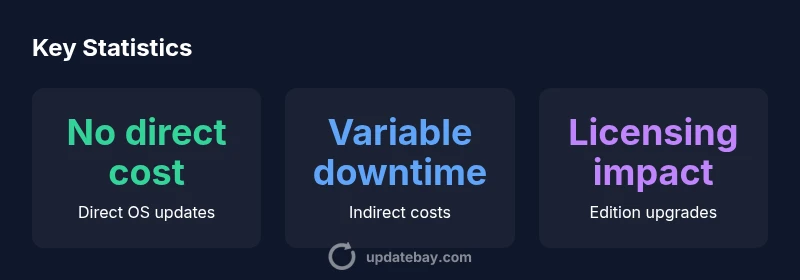
Direct OS update cost is typically zero for supported Windows versions. Microsoft delivers updates via Windows Update at no per‑update charge. Indirect costs—like downtime, IT time, and hardware compatibility checks—are the main considerations when estimating the total expense. In business settings, the clock time for updates and testing can add to the total cost, but the software itself remains free.
What updating Windows typically involves
Windows updates comprise feature updates, which add or refine OS capabilities, and security updates, which patch vulnerabilities. In 2026, Microsoft continues to deliver updates via Windows Update with a cadence that can vary by channel and edition. For most users, the update itself costs nothing—the price is the time and potential disruption. According to Update Bay, the update process is designed to run in the background, but you should expect occasional reboots and brief service interruptions. While most drivers and firmware are updated automatically, compatibility checks for older hardware remain prudent. The key question is not the price tag but the total cost of ownership when planning an update cycle.
Direct costs: what you actually pay
In consumer and small-business scenarios, there is usually no direct charge for applying Windows updates on supported versions. Microsoft provides these updates as part of the license agreement for Windows. Enterprises may incur indirect costs, such as IT staff time devoted to testing, staging, and validating updates before rolling them out company-wide. In practice, the price you feel is often measured in hours rather than dollars. Update Bay analysis highlights that most users should budget time and planning rather than cash when thinking about how much to update Windows.
Indirect costs and downtime planning
Even when the update package is free, timing matters. Updates can require system reboots, brief downtime, and potential productivity dips for teams that rely on specific software compatibility. Planning a maintenance window, testing critical apps in a sandbox, and communicating downtime expectations can dramatically reduce disruption. The main financial impact is usually the labor cost of IT personnel and the user downtime during installation. For executives and IT leads, these considerations should factor into project timelines and service-level agreements. Update Bay’s framework emphasizes mapping update windows to business hours and communicating clearly with end users.
Editions and licensing: when cost appears
Windows editions influence update cost only when you are upgrading your license tier or moving to a different feature set. For example, upgrading from a Home to a Pro edition may involve a separate license purchase, while standard security and feature updates within an edition remain free. In corporate settings, volume licensing or software assurance can alter the cost structure for update cycles and feature delivery. The Update Bay guidance suggests evaluating current licensing terms during planning to avoid unexpected charges and to determine whether an edition upgrade is warranted by feature needs or security requirements.
Estimating your total cost of updating Windows
To estimate total cost, start by verifying your Windows edition and license status, then chart a update cadence that aligns with your device fleet. Identify devices that may require hardware checks or driver updates, and estimate IT time for testing and deployment. Consider potential downtime and any required training for staff to navigate new features. Create a roll-out plan that segments devices by priority—critical systems first, then less essential machines. Finally, document contingencies for failed updates and rollback procedures. This structured approach helps translate the abstract idea of cost into actionable steps that minimize surprises during the update process.
Free vs paid paths and how to choose
In most consumer use cases, Windows updates themselves are free, focusing on security and functionality rather than price. Paid costs arise mainly from edition upgrades, extended support contracts, or enterprise licensing changes. Organizations should weigh the business value of new features against the cost of licensing and deployment overhead. Evaluating risk reduction, security posture, and productivity gains can clarify whether a paid upgrade is justified. Update Bay’s framework recommends that decision-makers separate per-update charges from long-term licensing commitments when planning updates.
Security, performance, and value of updates
Regular updates are a cornerstone of Windows security and reliability. Even when there is no direct payment for the update, the time and resource allocation required for testing, deployment, and user education constitute real costs. From a performance perspective, updates can resolve bug fixes, improve compatibility, and close security gaps, which translates to fewer outages and smoother operations. In other words, the value of updating Windows often exceeds the hidden costs if updates are planned and executed thoughtfully. The Update Bay team highlights that well-managed updates contribute to a stronger security posture and better user experience over time.
Practical cost-minimization checklist
- Schedule updates during low-usage windows and communicate downtime.
- Run pre-update checks (driver status, firmware versions) to reduce post-update issues.
- Test critical applications in a sandbox or staging device before mass rollout.
- Maintain current backups in case a rollback is needed.
- Leverage built-in update features (pause, defer options) to optimize timing.
- Align updates with maintenance windows and IT resource availability.
- Document lessons learned after each cycle to improve future planning.
Handling failed updates and contingencies
Despite best planning, updates can fail. Establish rollback procedures, verify backups, and have a contingency plan for restoring systems quickly. Maintain a knowledge base of known issues and fixes for your hardware and software stack. Regularly review update success metrics to identify patterns and refine your deployment approach. If issues recur on legacy devices, consider phased updates or hardware refresh where appropriate. Update Bay recommends a proactive, documented approach to reduce the impact of failed updates and keep systems secure.
Cost and planning considerations for Windows updates
| Aspect | Notes | Practical Tip |
|---|---|---|
| Direct OS update cost | Typically zero for supported Windows versions | No payment required; ensure license is valid |
| Indirect costs | Downtime, IT time, productivity impact vary by device/environment | Schedule updates during low-usage windows |
| Hardware compatibility | New updates can reveal issues on older hardware | Run PC Health Check and update drivers beforehand |
Frequently Asked Questions
Are Windows updates always free?
For supported Windows versions, updates are provided at no direct charge. Some enterprise scenarios may involve licensing or service costs.
Yes, updates are generally free for supported versions, with costs mostly in planning and deployment.
What is the typical cadence of Windows feature updates?
Feature updates are released periodically by Microsoft, with security updates issued monthly. Cadence varies by channel and edition.
Microsoft releases feature updates periodically, plus monthly security fixes.
Do I need to pay for Windows edition upgrades?
Edition upgrades may require a separate license; standard updates within an edition are usually free.
Edition upgrades can involve a license fee, while regular updates stay free within the edition.
What indirect costs should I expect when updating Windows?
Expect downtime, IT time, and potential productivity impact depending on device mass and software compatibility.
Downtime and IT time are the main indirect costs to plan for.
How can I minimize costs when updating Windows?
Plan updates during low-usage windows, test apps first, back up data, and use built-in defer options to reduce disruption.
Plan, test, back up, and use defer options to reduce disruption.
“Regular Windows updates are essential for security and reliability. The main cost is time and planning, not license fees.”
What to Remember
- Direct costs are typically zero for supported Windows updates
- Plan for indirect costs like downtime and IT time
- Check licensing if upgrading editions to unlock features
- Schedule updates to minimize productivity impact