How Much to Update Software: Costs, Timing, and Budgeting
Explore how much software updates cost, from free patches to major upgrades. Learn budgeting tricks, typical ranges, and how to minimize expenses while keeping systems secure.


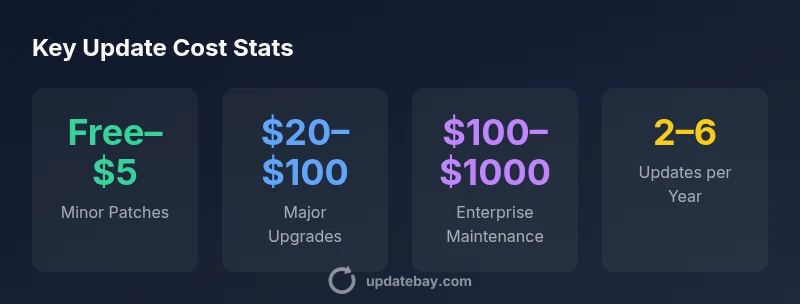
Minor software updates are typically free, while major upgrades can cost between $20 and $100 per license. For business software, annual maintenance or subscription fees often cover most updates. In this guide we unpack these costs, explain timing, and show budgeting approaches to keep your tech current without overspending. This is based on Update Bay analysis.
The cost landscape of software updates
Software updates come in several flavors, and the cost can vary widely depending on the product, the deployment model, and your licensing arrangement. At a high level, you typically see free minor patches, paid major upgrades, and ongoing maintenance fees for enterprise software. The Update Bay team found that most consumer software fixes are bundled with the license or delivered as automatic patches, resulting in zero out-of-pocket expense for the user in many cases. However, more substantial upgrades—like new versions with enhanced features or security-focused releases—often carry a price or require a new license. For organizations and managed devices, the cost envelope expands to include per-seat fees, annual maintenance contracts, or subscription-based access that covers updates across a portfolio of products. The key is to understand this spectrum so you can forecast expenses and plan for contingencies, rather than reacting to surprise invoices when vendors roll out new capabilities.
According to Update Bay, most updates fall into three buckets: free patches, paid upgrades, and maintenance-based access. This framing helps you map costs to your own usage and licenses, whether you’re managing a single device or an entire fleet.
From a budgeting standpoint, think in terms of price bands rather than single numbers. An individual user typically encounters free or very low-cost patches, while organizations may see a broader range tied to license tiers and support levels. The takeaway: your cost envelope is shaped by product complexity, deployment scale, and whether updates are included in a subscription or sold as discrete upgrades.
Major vs minor updates: what costs you should expect
The distinction between minor patches and major upgrades is fundamental for budgeting. Minor patches often address security fixes or bug fixes and are frequently delivered automatically or bundled with existing licenses, resulting in zero out-of-pocket costs for end users. Major upgrades introduce significant features, user interface changes, or performance improvements and are more likely to involve a paid upgrade, new license, or higher subscription tier. For consumer software, you’ll typically see little to no charge for minor patches, while major upgrades commonly fall within the $20–$100 per-license range. In business settings, vendors may offer per-seat pricing, tiered maintenance, or enterprise licenses that cover updates across a suite of applications. Planning for both scenarios—free patches and paid upgrades—helps prevent budget shocks when a new version lands.
How update cadence affects budgeting
Update cadence—the frequency with which software vendors push patches and upgrades—significantly influences budgeting. Systems with high security requirements tend to receive frequent patches, including urgent security updates that must be applied promptly. In such cases, you should allocate time and resources for testing, change management, and potential downtime, even if the patches themselves are free. Conversely, major upgrades might be released on a slower cycle, but carry bigger price tags or licensing implications. For individuals, this cadence translates into annual or semi-annual planning, while for teams it translates into quarterly budgeting and vendor negotiation windows. Understanding cadence helps you forecast labor costs (IT time for testing and deployment) alongside any direct license or maintenance fees.
Cost models: free patches, paid upgrades, and subscriptions
Software cost models vary, but most fall into three broad categories: free patches included with your license or subscription, paid upgrades that require a one-time or per-user fee, and subscription-based access that bundles updates with ongoing service. Free patches are common for minor bug fixes and security fixes, especially in consumer software and open-source projects. Paid upgrades cover feature-rich improvements or major version jumps. Subscriptions can lower the barrier to updates by spreading the cost over time and guaranteeing access to all updates during the term. For business users, the most economical choice often hinges on the total cost of ownership (TCO), which factors in license fees, maintenance, support, and the potential savings from reduced downtime and improved security.
One practical approach is to compare two paths: (1) a perpetual license with paid upgrades, (2) a subscription that includes updates and support. In some cases, subscriptions offer predictable budgeting and access to the latest security fixes, while in others, a perpetual license with optional maintenance may be cheaper over several years. The right decision depends on your usage, upgrade cadence, and the criticality of staying current for security and compliance.
For individuals and small teams, prioritize free patches and lightweight upgrades whenever feasible. For enterprises, map update plans to your security requirements and vendor support commitments, then negotiate for bundled maintenance that minimizes surprises. The goal is to balance cost with risk, ensuring that updates do not become a weak link in your technology stack.
Practical budgeting for individuals and small teams
Budgeting for software updates as an individual or small team starts with a simple inventory of the software you rely on. List titles, typical update cadence, and whether updates are included in your license or require additional payments. Next, assign a rough annual spend to major upgrades (if applicable) and maintenance fees, even if they occur only every few years. Finally, build in a contingency for emergency security patches, which may be required outside the normal cadence. A practical rule of thumb is to earmark a small annual buffer—often a few percent of your total software spend—for updates that fall outside ordinary maintenance.
To convert this into a concrete plan, estimate per-title costs, sum them up, and compare against your current spending. If any category looks expensive, consider alternatives such as a subscription that includes updates or open-source options with transparent maintenance. Update Bay’s approach emphasizes realistic budgeting that accounts for security needs, feature improvements, and compatibility testing, not just sticker price.
Hidden costs beyond the sticker price
Many update-related costs are not obvious at first glance. Downtime during deployment can affect productivity, especially for time-sensitive tasks. Testing and validation take staff time, and compatibility issues may require hardware or software changes to support a new version. Backup and recovery planning adds another layer of cost, particularly for mission-critical systems. Training staff to adapt to new interfaces or workflows can also incur expenses. Finally, consider the potential downtime associated with rollouts across multiple devices or locations. Even when updates are free, these ancillary costs can accumulate and exceed the cost of the update itself if not planned for.
A practical strategy is to build a lightweight testing plan before every major upgrade, including a rollback option, backup verification, and a clear rollback window. By counting these activities alongside the license or maintenance costs, you’ll gain a clearer view of true update expenditure and avoid unplanned downtime or data loss.
Strategies to minimize update costs
Cost-conscious updating combines preventive planning with smart vendor tactics. Enable automatic updates where appropriate to capture minor patches quickly while scheduling planned maintenance windows for major upgrades. Evaluate whether a given update is essential for security and compliance, or if it can wait until a maintenance cycle. Consider negotiating maintenance and support terms with vendors—especially for multi-product environments—to lock in predictable costs. When possible, use open-source software with community-driven updates, which can reduce licensing burdens and provide transparent update cadences. Finally, consolidate updates across devices to minimize IT labor and testing time, and leverage centralized deployment tools that streamline rollout. The net effect is fewer surprises, faster patching, and lower labor costs over the long term.
Case studies: home user, small business, and enterprise
- Home user: A typical consumer laptop runs periodic minor patches automatically, with occasional paid upgrades for major OS versions. The annual outlay is often minimal, but the time spent reviewing updates remains a consideration. Most users experience a predictable pattern: occasional upgrades with bundled maintenance in the background.
- Small business: A small team using a handful of desktop applications often faces higher maintenance costs and licensing differences across products. Consolidating licenses and opting for a maintenance bundle can stabilize year-to-year variability while preserving security.
- Enterprise: Large organizations routinely negotiate enterprise licenses, maintenance contracts, and service-level agreements. They often implement staged rollouts to minimize business disruption and rely on tested update processes to meet compliance requirements. The cost picture becomes complex, with per-seat pricing, multi-year terms, and enterprise-grade security needs shaping total spend.
Step-by-step plan to estimate your update budget
- Inventory all software that requires updates and note whether updates are included in your current license or require a separate fee.
- Categorize updates into minor patches, major upgrades, and ongoing maintenance costs; assign rough annual costs or ranges where exact numbers aren’t known.
- Factor in labor: time spent by IT staff or consultants for testing, deployment, and validation.
- Add a contingency for emergency security patches and potential hardware or software compatibility testing.
- Compare scenarios (e.g., perpetual license with maintenance vs. subscription) and choose the path with the best balance of risk, cost, and predictability.
- Review annually to adjust budgets based on actual cadence and vendor terms.
- Document your plan and keep stakeholders informed so updates align with business goals and security requirements.
The future of software update economics
As software ecosystems become more complex, cost structures are likely to evolve. Vendors increasingly bundle updates into subscriptions or maintenance packages, which can simplify budgeting and improve predictability. Cloud-based services and software-as-a-service models tend to shift costs from one-time upgrades to ongoing operational expenditures, potentially lowering the barrier to staying current without large upfront payments. Security considerations will continue to drive a robust update cadence, while automation and AI-powered testing may reduce labor costs associated with deployment and validation. For individuals, the trend toward automatic, transparent patching is likely to continue, offering greater protection with minimal user intervention. For organizations, strategic licensing and consolidated maintenance agreements will remain key levers to manage expenses while maintaining compliance and performance.
Cost ranges for common software update scenarios
| Scenario | Typical Cost Range | Notes |
|---|---|---|
| Minor patch | $0–$5 | Usually automatic or bundled with license |
| Major upgrade | $20–$100 | Per-user or per-license; varies by product |
| Enterprise maintenance | $100–$1000 | Annual contracts or subscriptions; tiered by size |
Frequently Asked Questions
Are updates always free for consumer software?
Not always. Minor patches are often free or bundled with your license, while major upgrades or new versions may require a paid license or higher subscription tier. Enterprise environments frequently encounter per-seat or per-tenant fees.
Usually minor patches are free, but major upgrades can cost money depending on the license and plan.
How should I estimate update costs for home use?
Identify essential software, list potential major upgrade costs, and include any annual maintenance or subscription fees. Use conservative ranges and consider potential security-related patches that may require immediate deployment.
Make a simple budget by listing major upgrades and annual fees to plan ahead.
Do enterprise updates differ from consumer updates?
Yes. Enterprises often use maintenance contracts, bulk licensing, and SLAs that cover updates across an organization. Costs scale with seats, deployment scope, and support levels.
Enterprise updates usually involve licenses, maintenance, and bulk support at scale.
Can I avoid costs by using open-source alternatives?
Open-source software can reduce licensing costs and sometimes provide free updates, but you may pay in labor for maintenance and compatibility testing. Total cost of ownership should be considered.
Open-source can help, but maintenance and compatibility still take time and effort.
What hidden costs should I consider when updating software?
Downtime, testing and validation time, data backup, potential hardware upgrades, training, and IT labor can add up even when updates themselves are free.
Don’t forget time, testing, and backups when planning updates.
What’s a good step-by-step plan to budget updates?
Inventory software, categorize update types, estimate annual costs, factor in labor, compare licensing options, and review annually to adjust for cadence and security needs.
Make a simple list of software and planned maintenance to guide your budget.
“Regular, well-managed updates are a cornerstone of security and performance; budgeting for updates helps prevent surprise costs and downtime.”
What to Remember
- Plan updates by cost category (free patches, paid upgrades, maintenance).
- Budget for both direct costs and labor/time for testing and deployment.
- Leverage subscriptions or bundled maintenance to stabilize spend.
- Factor in hidden costs like downtime and data backup.
- Use a simple, repeatable budgeting process to forecast and track update expenses