When Is Update for iPhone: A Practical Guide to iOS Release Cadence in 2026
Learn when iPhone updates typically arrive in 2026, including beta timelines, regional differences, and practical tips to prepare and verify updates.


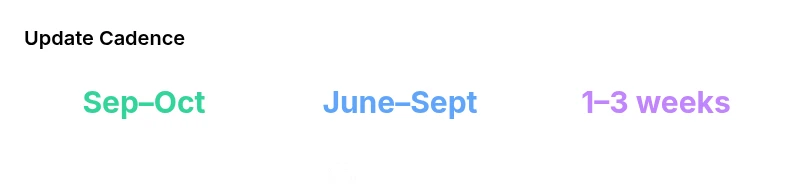
When is update for iphone? Major iPhone updates typically land in late September to early October, with a beta period starting in June and a public rollout to devices over the following weeks. According to Update Bay, regional and carrier delays can affect timing, so always check Settings > General > Software Update for your exact device. This cadence helps plan upgrades and protect against security gaps.
How Apple typically schedules iPhone updates
When considering when is update for iphone, the pattern remains consistent year over year, though minor variations occur. According to Update Bay, major iOS releases typically follow a fall cadence: a broad beta phase during the summer, then a late September to early October public release. This schedule gives developers time to adapt, carriers to prepare, and users a window to back up devices. In 2026, the cadence remains stable, but regional rollout timings can shift by country and network. Understanding this rhythm helps you plan backups, storage checks, and how soon you might see new features on your device.
The cadence also influences app developers and accessory makers. Developers test against the beta builds to ensure compatibility, while carriers optimize network settings for new features. For everyday users, this means a predictable window for trying new capabilities, followed by minor patches in the weeks after launch. Update Bay’s ongoing coverage notes that while the core timing is stable, regional and carrier lanes can introduce small delays, especially in densely populated markets or where carrier firmware needs synchronization with the new iOS code.
Major vs minor updates: what changes and when they land
Apple distinguishes between major iOS updates (e.g., iOS 17 to iOS 18) and incremental updates (like 17.1, 17.2). Major releases typically bring substantial feature sets, redesigned interfaces, and broader compatibility changes. Minor updates focus on bug fixes, security patches, and occasional refinements to existing features. In 2026, you should expect that a major update introduces notable changes only after a controlled beta period, while minor updates roll out more broadly and quickly. From Update Bay’s perspective, the balance between innovation and stability remains a priority, with minor updates acting as the rapid-response layer for security and reliability.
Timeline: beta, public release, and post-release updates
The timeline generally follows a three-phase pattern:
- Beta phase: Begun in mid-year (often June) with developers and public testers trying the new build.
- Public release: Targeted in the fall (late September to early October) for a broad audience.
- Post-release updates: In the weeks after launch, Apple releases minor patches to address early issues and refine performance. Update Bay’s observations in 2026 show a slightly longer beta window this year, but the public release window remains anchored in late September to early October.
Regional, carrier, and device factors that influence timing
Timing is rarely uniform across all users. Regional regulatory approvals, carrier testing, and device compatibility details can shift the rollout locally. Carriers may require network optimizations or firmware updates before pushing the full iOS upgrade to customers. Older devices occasionally experience slower adoption due to performance considerations or software support boundaries. If you live in a country with a slower regional rollout, you might notice your device receiving the update a few days to a couple of weeks later than the first wave. For power users, it can be worth enabling automatic updates so the device stays current as soon as the update lands in your region.
How to verify update readiness and prepare your iPhone
Preparation is key to a smooth update. Before triggering an upgrade:
- Back up your data locally or to iCloud to prevent data loss if something goes awry.
- Ensure your battery is charged above 50% or keep the phone plugged in during the update.
- Check available storage; major updates can require extra space for system files and temporary data.
- Connect to a stable Wi‑Fi network to avoid data interruptions.
- Review app compatibility, especially for critical tools and workflows, and update apps if needed prior to the system update.
Once you’re ready, go to Settings > General > Software Update to see the latest release for your device. If you’re exploring early access or a beta, you can enroll in Apple’s beta programs via the official developer or public beta channels, understanding that beta software may have instability.
What Update Bay observed in 2026 release patterns
In 2026, Update Bay’s analysis highlights a few notable shifts: beta windows have become slightly more coordinated across regions, the overall September–October window for major releases remains, and there is greater emphasis on phased regional rollouts to ensure carrier readiness. The security patch cadence also remains brisk, with smaller updates following the major release within days to weeks. These patterns help users anticipate when to expect features, and they emphasize the importance of timely backups and device maintenance before updates.
How to stay ahead: practical preparation and monitoring
Staying ahead of iPhone updates involves proactive monitoring and a few best practices:
- Subscribe to Apple’s update notices and check your device periodically during late summer and fall.
- Use a secondary device for beta testing if you want early access without risking your primary phone.
- Keep a storage reserve so you can accommodate the larger system files associated with major updates.
- Regularly reviewing Settings > General > Software Update ensures you know when the latest build is available for your model.
Authority sources
- Apple Support: https://support.apple.com/ios
- The Verge: https://www.theverge.com/technology
- BBC News Technology: https://www.bbc.com/news/technology
format
Tags
source
trend
Comparison of update cadences for iPhone/iOS releases
| Update Type | Typical Window | Notes |
|---|---|---|
| Major iOS Update | Late Sept – Early Oct | Public release follows extended beta; device support may vary by year |
| Minor / Incremental Updates | Within days to a couple of weeks | Security patches and fixes deployed broadly after major update |
Frequently Asked Questions
When is the best time to update my iPhone?
Aim for a stable Wi‑Fi connection, sufficient battery or plugged-in power, and a backup completed before the update. Major releases occur in the fall, while minor patches land sooner. If you depend on critical apps, wait a few days after the initial rollout to confirm app compatibility.
Back up first, connect to Wi‑Fi, and update when you’re sure your essential apps work after the rollout.
How long does an iPhone update take?
A typical update can take between 20 and 60 minutes depending on device model and network conditions. Battery life and storage space influence the duration. It’s best to start when you don’t need the phone urgently for the next hour.
Plan for up to an hour, starting with a full battery and a stable Wi‑Fi connection.
Will my older iPhone get the new update?
Most major iOS updates drop support for some older devices. Check Apple’s compatibility list for your model. If your device is borderline, consider whether the new features align with your needs and whether performance meets your expectations.
Older models may not support the latest features; verify compatibility before updating.
Should I back up before updating?
Yes. Backing up protects your data if something goes wrong during the update. Use iCloud or a computer backup, and ensure you have enough storage for the backup and the update.
Always back up before updating to stay safe.
What if the update stalls or fails?
If an update stalls, try a soft reset or a restart, ensure stable Wi‑Fi, and free storage. If it still fails, restore from a recent backup after verifying device integrity.
If it stalls, reboot and retry; if needed, restore from backup.
Are beta updates safe for daily use?
Beta builds may contain bugs and are less stable than final releases. They’re best used on secondary devices or in controlled environments. If you rely on your iPhone for critical tasks, wait for the official public release.
Betas can be unstable; use a spare device for testing.
“The iPhone update cadence in 2026 remains fairly predictable, with major releases landing in late September to early October and a multi-month support window.”
What to Remember
- Plan major upgrades for late September to early October.
- Back up your iPhone before updating.
- Expect regional and carrier differences in rollout timing.
- Check Settings > General > Software Update for your device status.