How to Update Aadhaar Card: Step-by-Step Guide
Learn how to update Aadhaar card details online or offline, the documents you need, and what to expect after submission. A comprehensive, secure, and up-to-date guide by Update Bay.


In this guide you’ll learn how to update aadhaar card details, both online and offline, including required documents and what happens after you submit. You can update address, name, date of birth, or contact information using official UIDAI channels. This step-by-step plan helps you complete the update securely and efficiently.
What can be updated on Aadhaar and when to use online vs offline
Aadhaar is the unique identification number issued by UIDAI. You can update demographic details or contact information to ensure your profile remains accurate. If you're looking for how to update aadhar card, online updation is usually faster and more convenient. According to Update Bay, starting with a precise plan saves time and reduces follow-up visits. The Update Bay team found that most users update address or mobile details through the official portal rather than visiting centers. This article clarifies what you can update, and when to choose online or offline routes.
In online updation, you can request changes to name (with supporting documents), date of birth, gender (with proof), address, mobile number, and email. Some fields are restricted based on verification checks; for example, name changes require robust proofs. Data updation and demographic updates are processed differently; some updates require e-KYC verification or physical document verification. Offline updates at Aadhaar Seva Kendras or enrollment centers provide an alternative when online is not feasible or when you need to present original documents. This approach helps you maintain accuracy while respecting UIDAI’s verification rules.
Online updation: step-by-step overview
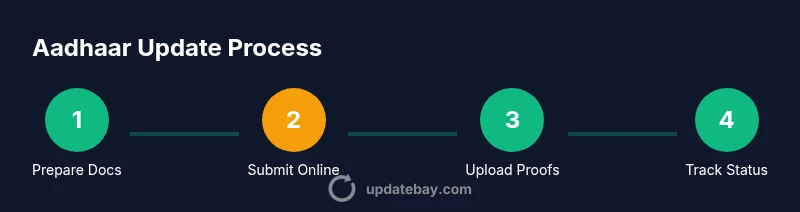
Online updation starts at the official UIDAI portal. You will authenticate with your Aadhaar number and then choose the data updation option for the field you want to modify. Before you begin, confirm your mobile number is linked to Aadhaar because OTP verification is typically required. The portal will guide you through uploading supporting documents—clear scans or photos are essential to avoid delays. If you choose name or address changes, the portal may request proofs like a passport, utility bill, or government-issued ID. After submitting, you’ll receive an Update Request Number (URN) that you should save. Use the URN to track status and respond to any additional information requests. Update Bay analysis shows online updation is increasingly relied upon as users prefer secure, fast, and paperless updates over center visits. This path minimizes trips and reduces potential data entry errors when you upload documents.
Offline updation: where to go and what to bring
Offline updation is available at Aadhaar Seva Kendras, Authorized Aadhaar Enrolment Centers, and UIDAI-authorized centers. It’s wise to book an appointment in advance where possible. Bring your original documents that prove the updated details, plus photocopies for submission. At the center, staff will help you complete a data updation form, verify your documents, and may request biometrics for identity confirmation. The operator will attach your documents to your Aadhaar profile and submit the request on your behalf. Processing offline can take longer than online updates because it involves physical verification, but it remains essential for certain updates or when online access is limited. If you are updating multiple fields, consider visiting with all relevant proofs to avoid multiple trips.
Documents and proofs: what you need
Preparation is the key to a smooth update. For address changes, acceptable proofs include a utility bill, bank statement, or government correspondence. For name or date of birth corrections, you’ll need identity proofs such as a passport, PAN card, or a government-issued ID. Updates to mobile number or email require proof of contact details and accuracy. Ensure that the documents match the data you want to update and that they are current and valid. When updating online, keep high-quality scans ready in PDF or JPG format and ensure file sizes comply with the portal limits. If you’re visiting a center, bring multiple copies of each document to streamline verification and avoid back-and-forth.
Common pitfalls and security tips
Be cautious of third-party agents who promise instant updates for a fee; always use UIDAI’s official site or authorized centers. Never share your OTP, PIN, or Aadhaar number through insecure channels. Ensure the device you use is secure and free from malware. When uploading documents, blur or redact sensitive information not needed for verification. Double-check spelling of names and addresses before submission to avoid avoidable errors. Finally, avoid duplicating the same request via multiple portals or apps, which can create confusion and delays.
What to expect after submission and tracking status
Online updates: After submission, track progress on the UIDAI portal using the URN you received. You may receive SMS updates about status and eventual reflection in your Aadhaar profile. Offline updates: The center will notify you once processing is complete; verify the updated details by rechecking the Aadhaar profile on the portal. If additional documents are required, UIDAI will inform you via the contact channels you provided. The key is to keep your URN handy and respond promptly to any requests to avoid delays. Once updates are confirmed, review the final Aadhaar details to ensure accuracy and completeness.
Tools & Materials
- Device with internet access (smartphone or computer)(Use a trusted network; avoid public Wi-Fi when handling sensitive information.)
- Original documents for verification(Carry the originals; photocopies may be required for submission.)
- Scanned copies or clear photographs of documents(PDF or JPG formats preferred; ensure readability.)
- Aadhaar number and linked mobile number(Mobile must be accessible for OTP verification.)
- Printed form (for offline visits)(Optional but helpful to speed up at centers.)
- URN/acknowledgment receipt(Keep this safe for tracking status.)
Steps
Estimated time: 30-60 minutes for online submission; processing can take several days
- 1
Prepare your information and documents
Review exactly which Aadhaar fields you need to update and gather all supporting proofs. Double-check that the spellings of your name and address match the documents you’ll upload or present. This prevents avoidable rejections and reduces the need for follow-up submissions.
Tip: Create a checklist of updates and gather all proofs before you start. - 2
Access the official UIDAI online updation portal
Open the UIDAI portal on a secure device. Enter your Aadhaar number and start the data updation flow. This initial step verifies your identity and determines which fields you can change online.
Tip: Use a private, secure network; avoid shared or public Wi-Fi during the login and upload process. - 3
Submit update requests and upload documents
Select the field you want to update, fill in the new values, and upload clear documents to support the change. The portal will display the maximum file sizes and formats accepted. Ensure uploads align with the exact data you want reflected.
Tip: Keep high-quality scans ready; name the files clearly (e.g., 'proof_address.pdf'). - 4
Authenticate with OTP and submit the request
Authenticate using the OTP sent to your registered mobile number (and email, if applicable). Confirm all details are correct before submission, because edits post-submission may require a fresh process or additional proofs.
Tip: Never share OTP with anyone; UIDAI will never ask for it over call or text from unofficial numbers. - 5
Save the URN and track your request
After submission, save the Update Request Number (URN). Use it on the UIDAI portal to monitor progress and respond promptly to any document requests from UIDAI.
Tip: Set a reminder to check status 48–72 hours after submission, especially for critical updates. - 6
Verify the update and follow up if needed
Once UIDAI approves the change, verify your Aadhaar profile to confirm the update reflects correctly. If you don’t see the change after a reasonable period, follow up via the portal or contact UIDAI help.
Tip: Keep a record of dates of submission, approvals, and the final reflected data for your records.
Frequently Asked Questions
What updates can be done online for Aadhaar?
Online updates typically cover address, mobile number, email, name (with proofs), and date of birth in certain cases. Always check the UIDAI portal for the latest eligibility rules and required documents.
You can usually update your address, mobile, email, and some personal details online, but name or date of birth updates may require stronger proofs.
Do I need to visit a center for Aadhaar updates?
Yes, for certain changes or if you cannot complete online verification, you should visit an Aadhaar Seva Kendra or an authorized center. Appointment booking can help reduce wait times.
If online updation isn’t possible or you need to verify documents in person, you’ll go to an Aadhaar Seva Kendra.
What documents are required to update Aadhaar?
Proofs vary by update type. You’ll typically need identity proofs for name changes and address proofs for address changes. Always consult UIDAI’s official guidelines for the exact list.
You'll need identity proofs for name updates and address proofs for address changes, with exact lists on the UIDAI site.
How long does an Aadhaar update take?
Processing times vary by method and workload. Online updates can be quick, but offline updates might take longer due to manual verification. Always check status with your URN.
Times vary; online updates are usually faster, while offline may take longer due to verification.
Is it safe to update Aadhaar online?
Yes, when you use UIDAI’s official portal and secure your device. Do not share OTPs or personal details via insecure channels, and keep your login credentials private.
Yes, as long as you use the official site and keep your device secure.
Where can I get help if my update is rejected?
If a submission is rejected, verify the reason and re-submit with corrected documents. You can contact UIDAI helpline or visit a center for assistance.
If it’s rejected, check why and re-submit with proper documents; UIDAI helpline can help.
Watch Video
What to Remember
- Identify exactly which fields to update before starting.
- Use the official UIDAI portal for online changes to avoid fraud.
- Gather clear supporting documents and keep PDFs or scanned copies ready.
- Track updates with the URN and check status regularly.
- Finish by verifying updated Aadhaar details on the official portal.