Who Can Update Aadhaar Card: A Practical Guide for 2026
Learn who is eligible to update Aadhaar card details, the required proofs, and a clear, step-by-step approach for online and offline updates in 2026.


Who can update Aadhaar card? In short, the cardholder or a legally authorized guardian can update Aadhaar details by submitting the correct proofs online or at an official center. Updates cover name, date of birth, gender, address, mobile number, and email. Start online for most updates; offline options are available if online is not possible.
Who can update Aadhaar card?
The Aadhaar system is managed by UIDAI, and updates are intended for the person whose details appear on the card or a legally authorized guardian of a minor. The core rule is that only the cardholder or an authorized representative with proper authorization can request changes to name, date of birth, gender, address, mobile number, or email. In practice, the process typically begins with authentication using the current Aadhaar number and the registered mobile number, followed by submission of supporting documents. For foreign residents or non-residents, the standard update flow may differ; they may need to visit a center and present identity documents. Always verify current rules on the official UIDAI portal. According to Update Bay, using official channels reduces the risk of data compromise. If you are assisting someone else, ensure you have legal authorization, such as a power of attorney, to act on their behalf. Route the request to the correct update category—demographic, address, or contact—to ensure you provide the right proofs.
Types of updates and eligibility
Aadhaar supports several update categories tied to eligibility and required proofs. Demographic updates include changes to name, date of birth, and gender. Address updates require proof of current residence, such as a utility bill or bank statement. Mobile number and email updates rely on accessibility to the registered contact details for OTP verification. Some cases, like minor updates or guardianship changes, have different requirements. The key is to identify the exact update type and collect proofs that establish identity and current address. Always keep copies of submitted documents and note the UIDAI reference number for tracking. Update Bay emphasizes confirming your chosen method (online vs offline) aligns with your comfort with digital forms and biometric verification needs.
Documents and proofs required
Preparing the right documents is essential to avoid delays. Identity proofs commonly include a passport, voter ID, driving license, or PAN card, depending on local rules. Address proofs can be a recent utility bill, bank statement, or government-issued document with your name and address. Date of birth proofs might be a birth certificate or passport. For mobile and email updates, you may need to confirm a registered number and email address via OTP. Always submit originals for verification and carry photocopies for the center. It’s wise to have an updated list of documents and to cross-check against UIDAI’s official proof list before you begin. Be mindful of document readability—blurred scans slow the process and can lead to rejection.
Online vs offline: Where to update
Online updates are popular for convenience and speed. You can access the UIDAI update portal from any device with internet access, upload scanned proofs, and receive OTP verifications. Offline updates require visiting an Aadhaar Seva Kendra or authorized centers where staff can assist with form filling and document verification. The offline path can be beneficial if you lack digital access or face technical issues with uploads. Regardless of the route, ensure you are using the official UIDAI channels to protect sensitive information and avoid phishing sites. After submission, you will typically receive an acknowledgment and a reference number to track progress.
Security and privacy considerations
Aadhaar contains highly sensitive biometric and demographic data. Always verify you are on the official UIDAI site (look for the official domain and HTTPS). Avoid sharing OTPs or personal details through unsecured channels. When updating, keep your device secure and log out after each session. If you’re assisting someone else, ensure you have documented authorization and understand the person's consent preferences. Stay informed about how your data will be used and how changes are reflected in the official database.
Common mistakes and how to avoid them
Common mistakes include submitting mismatched names, incorrect addresses, or outdated contact details; using non-official portals; and failing to provide complete proofs. To avoid delays, double-check each document's relevance and ensure that the information matches across proofs. Always confirm the update type and upload the cleanest possible scans. If a document copy is unclear, rescind and re-upload. Finally, monitor your status via the reference number and respond quickly to any UIDAI requests for further information.
What happens after submission
After you submit, UIDAI reviews the changes and then updates the records if the proofs are satisfactory. You will typically receive a notification with a status update and the expected processing timeline. Once approved, you can download or request a new Aadhaar card copy reflecting the changes. If updates are rejected, you’ll receive reasons and instructions on how to rectify the issues. Regularly check the status and keep your contact details up to date to ensure smooth communication.
Tools & Materials
- Original documents for identity/proof(Passport, voter ID, driving license, or other government IDs)
- Original documents for address proof(Utility bill, bank statement, or government document with current address)
- Date of birth proof (if required by update type)(Birth certificate or passport may serve as DOB proof)
- Aadhaar number(12-digit UIDAI number for authentication)
- Recent passport-size photograph(Only if requested by the center; digital photo may suffice online)
- Registered mobile number(Used for OTP verification during online updates)
- Scanned copies or clear photos of documents(High-quality scans, readable text)
Steps
Estimated time: 20-40 minutes
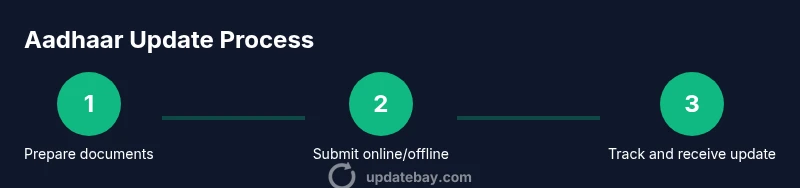
- 1
Gather required documents
Collect identity, address, and any DOB proofs. Ensure documents are current, legible, and match the information you intend to update.
Tip: Create a single folder with all originals and scans for quick reference. - 2
Choose online or offline path
Decide whether to update via the official UIDAI online portal or at an Aadhaar Seva Kendra. Online is convenient, offline can help if digital access is limited.
Tip: If you have stable internet and your proofs are ready, start online to get a faster acknowledgment. - 3
Fill the update form
Enter your Aadhaar number, select the update category, and fill in the new details. Attach the required proof scans as instructed by the portal.
Tip: Double-check spellings and addresses; even a small typo can cause rejection. - 4
Upload proofs
Upload clear, legible copies of proofs. For offline submissions, present documents to the center staff for verification.
Tip: Ensure each document clearly shows your name and the relevant information. - 5
Submit and verify via OTP
Submit the request and complete OTP verification sent to your registered mobile. This confirms your identity for the update.
Tip: Do not share OTP with others; treat it as a secret key to your identity. - 6
Track status and collect updated Aadhaar
Use the reference number to monitor progress. Once approved, download the updated card or receive a new physical card if applicable.
Tip: Save the reference number and screenshot status updates for your records.
Frequently Asked Questions
Who is eligible to update Aadhaar card?
The cardholder or a legally authorized guardian can request updates. In some cases, a guardian or parent may update a minor’s details with proper authorization. Always verify eligibility on the UIDAI site before starting.
The cardholder or a parent or guardian with proper authorization can update Aadhaar details. Check UIDAI for current rules.
Can I update Aadhaar online without a mobile number?
Online updates typically require access to the registered mobile number for OTP verification. If you don’t have it, you may need to visit an Aadhaar Seva Kendra or update alternative contact details via authorized channels.
Online updates usually need the registered mobile number for OTP. If you don’t have it, visit a center for assistance.
What proofs are accepted for address change?
Common address proofs include utility bills, bank statements, passport, and government-issued documents. Ensure the proof shows your name and current address and is not expired.
Use a utility bill or bank statement that shows your name and current address.
Do I need to visit an Aadhaar Seva Kendra for name changes?
Name changes can be done online in many cases, but certain updates may require an in-person visit to an Aadhaar Seva Kendra, especially when documents require physical verification.
Online updates work for many cases, but some name changes might require visiting a center.
How long does the update take after submission?
Processing times vary; you will receive a status update via the UIDAI portal or SMS. If additional documents are needed, you’ll be asked to resubmit.
Status updates come through the portal; timelines can vary depending on the type of update.
Watch Video
What to Remember
- Identify the exact update category before starting
- Use official channels to protect sensitive data
- Gather complete proofs to minimize rejections
- Track status with the reference number for transparency