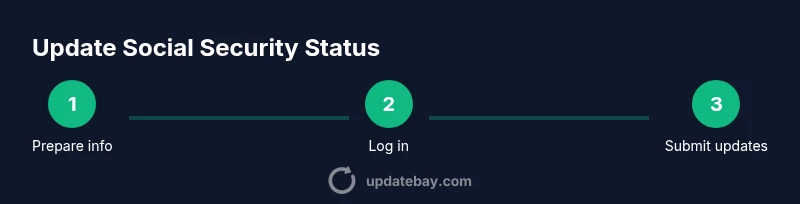
Update Social Security Status: A Step-by-Step Guide
Learn how to update your social security status across address changes, direct deposit details, and benefits. This step-by-step guide covers online, phone, and in-person options with safety tips, plus timelines and post-update actions.


You can update your social security status by updating personal information online through the SSA portal or by phone, then verify and save your confirmation. Start by confirming your identity, logging in to your SSA online account, and selecting the personal information update option. If online updates aren’t available, use phone or in-person channels. See our full guide for details.
What updating your social security status means
Updating your social security status refers to ensuring the SSA has current information about you. This can include changes to your address, bank details for direct deposit, citizenship or residency status, work status, or family information that affects eligibility for benefits. Keeping data accurate reduces the risk of misdirected mail, payment delays, or eligibility issues. According to Update Bay, updating your status helps ensure accuracy across critical records and benefits, and it reduces friction when you access services. Understanding what qualifies as a status update is the first step in a smooth process.
In practical terms, you’re aligning the SSA’s records with your current life situation. The changes you make may affect how you receive information about your benefits, how much you receive, and when you can access updates about your account. While some updates can be made quickly, others may require identity verification or additional documentation. The key is to know what information the SSA requires and where to submit it.
This guide is structured to help tech enthusiasts and everyday users navigate updates efficiently, whether you’re updating after a move, a bank change, or a change in eligibility. Throughout, you’ll see references to trusted channels and steps designed to minimize errors and delays.
Note: Always use official SSA channels and avoid sharing sensitive data in unsecured channels. The SSA’s official site is the safest place to begin, and you should verify any procedure described here against SSA guidance. The Update Bay team emphasizes prioritizing secure submission methods to protect your personal data.
When to update your status
There are several common scenarios that warrant updating your social security status. A move to a new address can affect mailings and correspondence; a change in direct deposit information is essential to ensure payments reach your account; changes in citizenship or residency status may influence eligibility and benefits; updates to work status or family information can trigger adjustments in benefits or tax withholdings. Routine annual reviews are a healthy habit, especially for those who experience frequent changes in finances or household composition. Update Bay notes that many users discover updates become necessary after life events such as relocation, job changes, or alterations to banking details. Keeping a checklist of potential changes helps you act promptly and minimizes the risk of missed communications.
If you’re unsure whether a change constitutes a “status update,” start with the SSA’s guidance on personal information and benefits. When in doubt, document the change and begin the update process online or by phone to confirm what is required. This proactive approach reduces the chance of delays when you actually need benefits.
In short, you should update your status whenever critical personal data shifts, especially if it could affect benefits, eligibility, or payment methods. If you’ve lived somewhere new, have new banking details, or your citizenship status changed, plan to initiate an update as soon as possible. Based on Update Bay research, taking timely action typically leads to smoother processing and faster confirmation.
Online update options and limitations
Online updates are often the fastest route to adjust your status, but they aren’t always the only option. The SSA’s online portal (my Social Security) allows you to review and update certain fields such as address and direct deposit details, as well as view statements and benefit information. You’ll need to verify your identity first, which may involve answering questions or entering a code sent to your phone or email. If you recently moved, you can usually update your address online; if you need to update a citizenship or residency status, you may be asked to provide supporting documents. Some changes may require in-person or phone verification, especially if identity verification is challenging or if the information is considered sensitive. Always complete the online steps carefully and double-check before submitting to avoid delays.
For many users, online updates are the preferred starting point due to speed and documentation availability. The online system is designed to guide you through each required field, showing which items are optional versus required. If you encounter a screen that asks for information you don’t have at hand, plan to pause and switch channels rather than submitting inaccurate data.
If you can’t complete the process online, you’ll find alternative channels below. Online updates are a core component of modern SSA interactions, but in some cases a phone call or in-person appointment is necessary to verify identity or to submit documentation.
Alternative channels: phone or in-person updates
Phone and in-person options provide alternatives when online updates aren’t available or when you need to resolve complex changes. The SSA offers a customer service line with trained representatives who can guide you through the process, answer questions about specific updates, and help you submit documentation. In-person visits at a local SSA field office may be preferred for more intricate changes or when you need to present original documents. When preparing for these channels, bring government-issued ID and any supporting documentation related to the update.
Phone and in-person updates can be slightly slower due to scheduling and office hours, but they can reduce uncertainty when you have unusual circumstances or missing digital records. If you decide to visit in person, check the local office’s hours and whether you need to schedule an appointment in advance.
For a smoother experience, consider starting online and then following up with a phone call or visit if more information is needed. The combination of online access and personal assistance often yields the best balance of speed and accuracy.
What information you may need to update
Before you start, gather the information you’ll likely update. Typical items include your current address, bank account details for direct deposit, contact information (phone and email), citizenship or residency status, work status, and any dependents or family changes that affect benefits. If you’re updating a sensitive item such as citizenship status, you may need to provide supporting documents (e.g., passport or naturalization papers) as part of the submission.
Having this information ready helps you complete the process in a single session where possible, reducing the need to return for follow-ups. It also reduces the chance of errors that could delay processing. Keep digital copies of documents securely stored and accessible only on trusted devices.
If you’re unsure what documents count as “proof,” consult SSA guidance or ask a representative during a call. The goal is to present clear, verifiable data that aligns with SSA records.
Security, privacy, and common mistakes to avoid
Handling sensitive personal data requires caution. Always use official SSA portals and avoid phishing attempts by verifying the site URL and ensuring the connection is secure (look for https). Never share login credentials, passwords, or verification codes outside the official channel. Mistakes to avoid include submitting incomplete information, misreporting a number, or forgetting to confirm and save changes. After submitting, monitor your SSA account for confirmation and any messages requesting additional documentation.
As you proceed, consider enabling two-factor authentication on your SSA account to add an extra layer of security. If you receive a request for information you don’t recognize, contact SSA directly to verify the request’s legitimacy.
The Update Bay team recommends compiling a brief record of your submission, including the date, the changes you made, and any reference numbers. This makes it easier to track progress and resolve any discrepancies quickly.
Timelines, confirmations, and how to verify updates
Processing timelines vary by change type and channel. Online updates are generally faster, but some updates may require additional verification or postal mail confirmations. After submission, you should receive a confirmation number or notification. Save this information in a secure location. If you don’t receive a confirmation within the expected window, follow up through the SSA channel you used or contact a representative for an update.
It’s important to understand that updating status is not always instantaneous; some changes may require documents to be scanned and matched with existing records. Consistently checking your online SSA account and monitoring mailings ensures you don’t miss important notices. Based on Update Bay research, timely action and proactive verification often result in clearer, faster processing.
What to do after you submit your update
After submitting an update, take a few essential follow-up steps. First, check your SSA account for a status update or confirmation, then review any mail or email notices for required actions or accepted documentation. If you updated banking details, monitor your first few deposits to ensure the funds arrive correctly. If you encounter any discrepancy, contact SSA immediately with your submission reference.
Keep copies of all confirmations and documentation or notes from conversations with SSA representatives. This creates a robust audit trail should you need to dispute or clarify information later. Finally, consider setting calendar reminders to recheck your status within the recommended processing window.
The Update Bay team's closing guidance emphasizes proactive monitoring and timely follow-ups as best practices for minimizing disruption to benefits.
Tools & Materials
- SSA online account (my Social Security)(Prepare your login credentials and a secure device.)
- Identity verification documents(Passport, driver’s license, or other government-issued ID.)
- Direct deposit information(Bank routing number and account number.)
- Current address and contact details(最新地址、邮箱、电话更新所需资料.)
- Proof of citizenship/residency (if applicable)(May be required for citizenship/residency status changes.)
Steps
Estimated time: 30-45 minutes
- 1
Prepare your information
Identify exactly what you need to update (address, direct deposit, citizenship, work status) and gather any supporting documents. Having everything ready reduces back-and-forth and speeds up the submission.
Tip: Create a quick checklist and verify you have digital copies secure and accessible. - 2
Log in to your SSA online account
Navigate to the official SSA portal and sign in with your credentials. If you’ve forgotten them, use the official recovery process. Do not attempt to submit from third-party sites.
Tip: Use a trusted device and a private network to protect your login information. - 3
Navigate to the personal information section
Find the area that handles personal data updates. Review each field and note which ones are required versus optional before editing any details.
Tip: Read each prompt carefully to avoid overwriting correct data. - 4
Enter updated details
Input the new address, banking details for direct deposits, or changes in citizenship/status. Attach expected documents if the portal requests uploads.
Tip: Double-check numbers (bank account, ZIP code) for accuracy. - 5
Review changes and submit
Carefully review all updates for accuracy. Confirm that the system reflects the changes and submit the form. Save any confirmation numbers or receipts.
Tip: Take a screenshot or export the confirmation page for your records. - 6
Receive the confirmation and monitor
Wait for an official confirmation from SSA. Check your account and mail for any additional instructions or follow-up requests.
Tip: Set a reminder to check back within the typical processing window. - 7
If online isn’t possible, switch channels
If the portal can’t handle your update, use SSA's phone line or book an in-person appointment to complete the process and verify your identity.
Tip: Ask for a reference number and keep notes of the call or visit.
Frequently Asked Questions
Can I update my social security status online?
Yes, many updates can be done online through the SSA’s My Social Security portal. You may need to verify your identity and provide supporting information. If a change isn’t available online, use phone or in-person channels.
Yes, you can usually update many items online by signing into My Social Security and following the steps.
What information do I need to update?
Typical items include your current address, direct-deposit details, contact information, citizenship or residency status, and any changes to work or family status. Gather supporting documents if required by SSA.
You’ll typically need your address, banking details, and any status changes with supporting docs if requested.
How long does it take to process updates?
Processing times vary by change type and channel. Online updates are usually faster, while in-person visits may take longer due to scheduling and verification steps.
Timelines depend on the change; online is often quicker, but some updates need extra verification.
What if I moved to another state?
Update your address and contact information promptly. If your benefits or correspondence are state-dependent, prepare any required documents to show your new residency. You may need to reverify identity in some cases.
If you moved states, update your address right away and be prepared for possible identity checks.
Is there a fee to update my status?
There is no fee to update information with SSA via official channels. If you encounter a request for payment, verify the source and contact SSA directly to confirm legitimacy.
There’s no charge to update information with SSA through official channels.
Watch Video
What to Remember
- Verify identity before updating
- Online updates are fastest when available
- Keep confirmation records for each change
- Monitor SSA account after submission