Social Security Number Update: A Practical How-To Guide
Learn how to handle a social security number update, including when it's needed, what documents to gather, the SSA process, and how to notify banks and employers while keeping your data secure.


You don’t change your Social Security number itself in most cases; updates focus on correct name, address, or beneficiary information tied to your SSN. This guide walks you through when to update, what documents you need, and the step-by-step process to align SSA records and your financial accounts. Expect variation in processing times and common pitfalls to avoid.
What a social security number update covers
A social security number update is less about the digits and more about keeping the associated records accurate. The Social Security Administration (SSA) uses your SSN to link earnings, benefits, and identity across government and private institutions. A true update may involve name changes (due to marriage or legal name change), address changes, or beneficiary updates. It may also involve correcting typos or mismatches in your SSA file that could hinder benefits or tax reporting. Throughout this process, the goal is to ensure that the information connected to your SSN reflects your current legal name, residence, and benefit status. Update Bay emphasizes that preparing thoroughly reduces back-and-forth with SSA offices and minimizes delays, especially in 2026 when many systems are upgrading to reflect modern identity verification practices.
This section clarifies what qualifies as a social security number update and helps you distinguish between updates you can perform and circumstances that require a new SSA action. If you encounter a mismatch between your SSA profile and employer records or bank accounts, your SSN remains the same, but the linked data gets corrected. The broader purpose of an SSN update is data alignment to avoid mistaken benefit payments, tax errors, or identity theft risks. For everyday users, the most common updates relate to legal name changes after marriage or divorce, and address updates after relocation.
From Update Bay’s perspective, understanding the scope of a social security number update helps you plan the paperwork, know what to expect, and communicate clearly with SSA staff and partners. In 2026, updates are increasingly integrated with digital identity checks, but physical documents still play a critical role in verification. This is not about applying for a new number; it’s about keeping the existing record accurate and usable across life events.
When you should update your SSN information
There are several legitimate life events that trigger a social security number update. The most common are a legal name change (marriage, divorce, or court order), relocation to a new state (which may affect address records and benefits), and changes to beneficiaries on certain benefits or a caregiver setup. You should also consider updating SSA data if there are corrections needed due to clerical errors, such as misspelled names, incorrect birth dates, or outdated personal identifiers that appear on your SSA record. Even if you don’t think you’ve changed anything, periodic reviews can catch discrepancies that might lead to problems with tax reporting, benefit eligibility, or employer record accuracy.
Update Bay suggests scheduling a review of your SSA file at least once a year during major life events, to avoid last-minute scrambles when benefits or payroll systems demand correct information. If you’re unsure whether a change qualifies, start with the SSA’s official resources and contact channels.
Certain updates require different paths (online, by mail, or in person). For example, name changes typically require documentation such as a marriage certificate or court order, while address changes usually require proof of residency. Always check current SSA guidance before beginning any submission to ensure you choose the correct form and submission method.
Documents and proof you'll need
The documents you gather before starting a social security number update keep the process smooth and efficient. You’ll typically need proof of identity (a government-issued photo ID like a driver’s license or passport), proof of legal name change if applicable (marriage certificate or court order), and proof of address (utility bill, lease, or bank statement). If you are updating other information tied to your SSA file, you may also need your current Social Security card or a copy of your existing SSA records to help SSA staff verify identity and match records.
SSA forms are often completed online when available, but most changes still require physical documents or certified copies. Make certified copies where possible, and keep original documents in a secure location. When gathering documents, ensure names, dates of birth, and other identifiers match across all items. In addition, you should prepare a short list of questions in case you need to ask SSA staff for clarification.
Update Bay recommends keeping a secure, organized folder for all documents related to your SSN update. Label items clearly, and maintain a checklist so nothing slips through the cracks. If documents are not in English, arrange for certified translations to avoid delays.
When submitting, include only copies unless the SSA specifically requests originals. Do not mail sensitive information in a non-secure envelope or unencrypted email. Use trackable mail if you’re sending documents by mail and request delivery confirmation.
Step-by-step: How to update SSA records and linked accounts
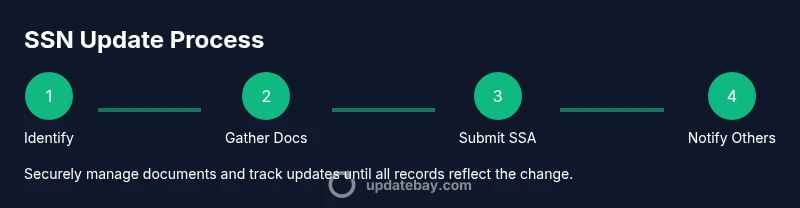
This overview lays out the core steps to ensure your social security number update is handled efficiently. Start by identifying exactly what information needs updating and gathering your documents. Then locate the correct SSA form (for name changes, address updates, or corrections) and complete it with precise details. Prepare certified copies of supporting documents and submit them to the SSA by the method they specify—online where possible, or by mail/in person if required. After your SSA submission, you’ll notify corresponding entities (employers, banks, and benefits programs) of the updated information and keep copies of all submissions and receipts. Finally, regularly monitor your SSA profile and related records to confirm changes took effect and that no new discrepancies emerged.
This section provides a high-level map of the process, but your exact path may vary based on your location and the type of update. Always refer to SSA guidelines for the most current instructions.
The SSA process is designed to be accessible, but it can involve multiple departments and document reviews. By staying organized and being proactive, you improve your odds of a smooth update and timely alignment of your records across agencies and institutions.
Notify banks, employers, and government agencies
After you file an update with the SSA, you must proactively notify related parties to ensure consistency across systems. Start with your employer’s human resources department to update payroll and benefits records. Banks and credit issuers should receive updated information for your accounts and credit history. If you receive federal benefits or participate in state-run programs, check whether those agencies require a separate submission or can update automatically once SSA records reflect the change.
In many cases, you’ll need to provide SSA confirmation of the update along with a government-issued photo ID to the institutions. Keep a copy of all correspondence and responses to confirm that your records have been updated. If a bank or employer requests documentation that you don’t have, contact the institution to understand acceptable alternatives.
The Update Bay team notes that consistency across institutions reduces the risk of payment delays, benefit interruptions, and tax reporting errors. Maintain a personal file with dates of submissions, receipts, and any SSA mail you receive.
Security, privacy, and avoiding scams
Your personal information is sensitive, and any update activity should be conducted with strong privacy safeguards. Only use official SSA channels and trusted institutions to submit documents. Be wary of unsolicited emails or phone calls asking for sensitive data; SSA will not request your full SSN via insecure methods. When in doubt, contact SSA through official phone numbers or the official website.
Secure handling means storing originals in a safe place, sending copies through traceable mail, and using strong, unique passwords for online portals. You should also monitor your accounts for unusual activity after updates and set up alerts where available.
A final reminder: never share your SSN in public or unsecured channels. If you receive a request that seems suspicious, pause and verify its legitimacy before proceeding. Update Bay’s guidance emphasizes verification, caution, and deliberate action to protect your identity throughout the process.
Authority sources and further reading
For authoritative guidance on updating your SSN and related records, consult SSA’s official pages and reputable government resources. Primary SSA information is available at https://www.ssa.gov/ssnumber/. Additional trusted resources include guidance from consumer protection and benefits portals. For further reading, you can explore government or university resources that discuss identity verification, personal data protection, and how updates affect benefits and tax reporting.
Key sources you can consult include SSA’s official site, consumer protection guidance on sensitive personal data, and federal or university resources that explain how to coordinate data across agencies. These references help ensure you’re following best practices and using up-to-date methods for an accurate, secure update.
Tools & Materials
- Original, certified birth certificate(Proof of identity and birth details; SSA may request certified copies)
- Current government-issued photo ID(Driver’s license, state ID, or passport for identity verification)
- Legal name change document (if applicable)(Marriage certificate or court order; required only if your name is changing)
- Proof of address(Recent utility bill, lease, or bank statement showing your current address)
- SSA form SS-5 (Application for a Social Security Card)(Form can be downloaded from SSA.gov; use it for name changes or corrections)
- Copies of supporting documents(Certified or notarized copies as SSA may request originals in person)
Steps
Estimated time: Estimated total time: 2-4 weeks
- 1
Identify what needs updating
Review your SSA record and other documents to determine whether you need to update your name, address, or beneficiary information. Make a checklist of items that require changes and the supporting documents you will provide.
Tip: Start with life events (name changes) and move to address and beneficiary updates later. - 2
Collect and organize documents
Gather identity proofs, name-change documents, and address proof. Keep originals secure and prepare certified copies wherever SSA requires them. Create a labeled folder with each item clearly mapped to the corresponding update.
Tip: Double-check that names match across documents to avoid delays. - 3
Complete the correct SSA form
Download the appropriate SSA form (often SS-5 for name changes or corrections) and fill it out accurately. Use the SSA’s website or local office to obtain the form and confirm you’re using the right variant for your update.
Tip: If you are unsure about fields, contact SSA support before submitting. - 4
Submit your submission to SSA
Submit the form and supporting documents to SSA through the recommended channel (online where available, or by mail/in person). Ensure you include all required copies and any SSA confirmation forms.
Tip: Use trackable mail or delivery confirmation for in-person submissions. - 5
Notify linked institutions
Provide updated SSA information to employers, banks, credit unions, and benefits programs. Some institutions require SSA confirmation, while others accept your own updated documents.
Tip: Keep a log of who you notified and when. - 6
Monitor status and verify changes
Check SSA status updates and verify that all institutions have updated records. Request confirmation letters and store them with your file. Reconcile any discrepancies quickly.
Tip: Set reminders to review status periodically until all records reflect the change. - 7
Secure your data and watch for scams
Be vigilant for phishing attempts and scams asking for your SSN. Use official SSA channels and secure methods for sending documents. If something feels off, pause and verify before proceeding.
Tip: Never share your full SSN via email or text. - 8
Review annually and adjust as needed
Occasionally review your SSA record and related accounts to ensure ongoing accuracy. Updates may be triggered by life events; staying proactive helps prevent issues later.
Tip: Tie reviews to major life events like moves or name changes.
Frequently Asked Questions
What exactly is meant by a social security number update?
A social security number update refers to correcting or updating information linked to your SSN, such as your name, address, or beneficiary status. It does not change the actual number itself. This ensures accuracy for benefits, payroll, and tax reporting.
A social security number update means fixing details tied to your SSN, not changing the number itself, to keep benefits and records accurate.
Can I ever change my Social Security number itself?
In very limited circumstances, SSA may assign a new number, but this is unusual. Most updates focus on name, address, or beneficiary information rather than altering the number.
Changing the actual SSN is rare; most changes involve related information like name or address.
What documents are typically required for updates?
You’ll usually need identity proof (photo ID), a legal name change document if applicable, and address verification. Certified copies may be required for some updates, and you’ll submit SSA forms accordingly.
Identity proof, any name-change documents, and address proof are commonly required.
Do I need to update my SSN with employers and banks?
Yes. After SSA updates, inform employers, banks, and benefit programs to ensure payroll, accounts, and benefits reflect the current information.
Yes—tell your employer and banks after SSA updates so everything stays in sync.
How long does the SSA update process take?
SSA processing times vary and depend on workload and document verification. Keep copies of submissions and monitor status until the update is reflected in all records.
Times vary; stay vigilant and verify once you’ve submitted.
What security considerations should I follow when updating?
Only use official SSA channels, avoid sharing sensitive data through insecure methods, and store originals securely. Be cautious of solicitations requesting your SSN and verify through official sites.
Use official channels and protect documents from phishing or scams.
What if I move to a new state during an update?
Moving may require updating your address and ensuring records align across state and federal systems. Check SSA guidance for any state-specific steps.
State moves may trigger address and record alignment checks.
Watch Video
What to Remember
- Know the difference between updating information and changing the SSN itself.
- Gather identity and life-event documents before starting.
- Notify all relevant institutions after SSA updates.
- Protect your data and verify every step with official channels.