Aadhaar Card Update: Documents You Need
Learn what documents and proofs are typically required to update Aadhaar in 2026, including identity and address proofs, OTP steps, and practical tips to speed the process.


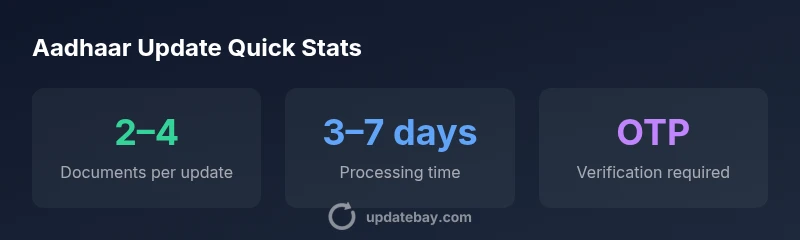
To update Aadhaar, you generally need your Aadhaar number and supporting documents to verify identity and address. Depending on the change (name, DOB, or address), provide identity proof, address proof, and any required notification or consent forms. Online updates require OTP verification on your registered mobile; some updates may require an in-person visit.
What You Typically Need to Update Aadhaar
If you are asking what are the things needed for aadhar card update, the short answer is that you must prepare identity and address proofs, along with the update reason and your Aadhaar number. While UIDAI outlines broad categories, the exact documents depend on the specific field you want to amend (name, date of birth, or address). Start by gathering a current copy of your Aadhaar, a valid identity document, and a valid address document. For online updates, ensure your mobile number is active to receive an OTP. If you prefer offline processing, plan for an in-person visit at an authorized centre. Remember, always verify the latest requirements on the official UIDAI site before you begin.
- Have your Aadhaar number handy.
- Collect proof of identity (POI) and proof of address (POA).
- Prepare any attribute-specific documents (e.g., name change certificate, birth certificate).
- Keep a recent, passport-size photo if requested by the centre.
- Ensure your registered mobile number is accessible for OTP verification.
This upfront preparation minimizes trips and speeds up the update process.
Core Documents: Identity Proof and Address Proof
The backbone of any Aadhaar update is solid documentation. Common identity proofs include government-issued IDs such as a passport, driving license, or PAN card. For address proof, options include a passport, utility bill, bank statement, or registered rent agreement. In many cases, you can submit photocopies or scanned copies, but some centres require originals for verification. If you are changing your name, you will typically need a legal name proof (marriage certificate, gazette notification, or court order) depending on local rules. When the update is related to the date of birth, a birth certificate or an official certificate from a competent authority may be necessary. Always ensure that the documents are current, clear, and legible, as blurry or expired proofs can delay processing.
- Type and format of proofs may vary by centre.
- Ensure the name on proofs matches the name in Aadhaar or the desired update.
- Bring both originals and photocopies where possible to avoid multiple trips.
Attribute-Specific Requirements
Aadhaar updates fall into several categories, each with its own documentation requirements. For a Name Change, you’ll need a legal name proof and current identity documentation. For an Address Change, POA is essential, along with a POI to verify identity. For a Date of Birth update, DOB proof plus identity proof is typically required. If you are adding or updating mobile or email, you may also need to verify via OTP or provide an email address. In some cases, you might need to provide a gazette notification or court order for sensitive changes. The key is to prepare documents that directly support the attribute you want to update and ensure they align with UIDAI’s accepted proof lists.
- Name change: legal name proof + POI
- Address change: POA + POI
- Date of birth: DOB proof + POI
- Mobile/Email update: verify via OTP and proof as needed
- Always check the latest accepted proofs at UIDAI before submitting.
Online vs Offline Update: Where to Apply
Online updates are often faster and more convenient. You’ll log in to the official UIDAI update portal, fill in the required fields, and upload scanned copies of your proofs. An OTP sent to your registered mobile confirms your identity. Offline updates involve visiting an authorized Aadhaar Seva Kendra or CSC center with your documents for in-person verification. The counsellor may guide you through the steps, collect your biometrics if required, and provide a receipt with a tracking number. In both cases, you will receive an update status; use it to monitor progress. If you encounter issues online, visit a centre for assistance.
- Online: faster, OTP-based verification
- Offline: in-person verification and biometrics where applicable
- Always carry original documents for verification at the centre
- Keep track of your update status using the registration/tracking number
How to Prepare Digital Copies and Attestations
When submitting digital copies, ensure files are clear, legible, and properly cropped. Accepted formats typically include PDF, JPG, or PNG. Scanning should reproduce every detail of the document, including the date, issuing authority, and your name. If the centre requires attestation, you can have a government-employee or authorized person attest copies. Use a consistent filename scheme to avoid confusion. Create a simple folder with sections for Identity Proof, Address Proof, and Attribute-Specific Documents. Back up your digital copies to a secure drive or cloud storage so you can re-upload if needed.
- Preferred formats: PDF/JPG/PNG
- Ensure legibility; avoid shadows and reflections
- Attestation: follow local centre guidelines
- Organize copies by proof type for quick submission
- Keep original documents ready for verification
Having well-organized digital copies reduces errors and speeds up the review process.
The Role of OTP and Biometric Verification
OTP verification is a common security step when updating Aadhaar online. A one-time password is sent to the registered mobile number you provided while enrolling for Aadhaar. This step confirms your ownership of the mobile number and helps prevent unauthorized changes. In some cases, biometric verification at an Aadhaar Seva Kendra may be required, particularly for sensitive changes like name or date of birth. Be prepared for possible queue times and ensure you bring all essential documents to avoid delays during biometric checks.
- OTP confirms device ownership and identity
- Biometric verification is sometimes mandatory at centres
- If you don’t receive an OTP, contact UIDAI helpdesk or visit a centre
- Always keep your mobile number updated to prevent future access issues
Common Pitfalls and How to Avoid Them
Several common issues can slow Aadhaar updates. Ensure the name on proofs exactly matches the name you want on Aadhaar. Mismatched addresses or outdated proofs can trigger re-submission. Expired documents or unclear scans can result in rejection. If you’re changing the date of birth, provide an acceptable DOB proof. Do not submit forged or altered documents; UIDAI retains the right to reject updates. Before submission, double-check each proof’s validity period, issuer authority, and alignment with your current details. If you encounter a rejection, request the specific reasons, gather missing proofs, and re-apply.
- Double-check name vs. desired name
- Use current, official documents
- Ensure scans are clear and complete
- Understand the acceptable proofs for each update type
Timelines, Fees, and Tracking Your Update
Processing times for Aadhaar updates vary by type and service centre. Online requests tend to be faster, but some updates may still require in-person verification. UIDAI generally does not charge for standard demographic updates online; some center-based services may have nominal fees. It’s important to check the latest guidelines on the UIDAI site or at your nearest Aadhaar Seva Kendra. After submission, track the progress using the update request number. If extra documents are required, respond quickly to minimize delays.
- Timelines vary by update type and center
- Online requests are typically quicker
- Fees can vary by service center; online updates may be free
- Track progress with the request number
- Respond to any document requests promptly
With careful preparation and a clear understanding of requirements, you can reduce friction and complete Aadhaar updates more efficiently.
Quick Checklist Before You Begin
- Note the specific change you want (name, DOB, address, etc.). 2) Gather POI, POA, and any attribute-specific proofs. 3) Prepare original copies and clear scanned copies. 4) Ensure mobile number is active for OTP. 5) Check UIDAI’s official list of accepted proofs for your change. 6) Decide online vs offline submission. 7) Complete the submission and save your tracking number. 8) Monitor status and respond to requests for additional documents promptly.
Aadhaar update document requirements by update type
| Update Type | Documents Needed | Notes |
|---|---|---|
| Name Change | Proof of Identity, Legal Name Proof | May require gazette notification or marriage certificate as applicable |
| Address Change | Proof of Identity, Proof of Address | Ensure address matches residence; some centres require a recent bill |
| Date of Birth Update | Date of Birth Proof, Identity Proof | Submit originals or certified copies for verification |
Frequently Asked Questions
Do I need to carry original documents for Aadhaar update?
Original documents are often checked for verification at the centre. Some centres may accept attested copies, but you should carry originals to avoid delays.
Original documents are usually required for verification; attested copies may be accepted at some centres.
Can I update Aadhaar online?
Yes, many demographic updates can be done online. You’ll upload supporting documents and complete OTP verification on your registered mobile number.
Yes, you can update online using OTP verification.
How long does Aadhaar update typically take?
Processing times vary by update type and centre. Online updates often complete within a few days to a couple of weeks depending on verification.
It usually takes several days to a couple of weeks.
Is there a fee for Aadhaar updates?
UIDAI updates are typically free for standard demographic changes online; some centre-based services may incur charges.
Most updates are free, but some centers may charge.
What should I do if my update is rejected?
Check the stated reason, collect any missing documents, and re-apply or approach an UIDAI centre for guidance; fees may apply.
If it’s rejected, review the reason, fix missing items, and re-apply.
“Accurate, complete documentation is the fastest path to a successful Aadhaar update. Ensure your proofs align with the attribute you want to change.”
What to Remember
- Prepare documents in advance to speed the update
- Different updates require different proofs—match proofs to the change
- Online updates use OTP; offline may need biometric verification
- Keep your tracking number and monitor status regularly
- Check UIDAI’s official lists to avoid rejected submissions