What to Update When Changing Address: A Practical Guide
Practical guide detailing what to update when changing address across government records, utilities, mail services, and online accounts to minimize disruption.


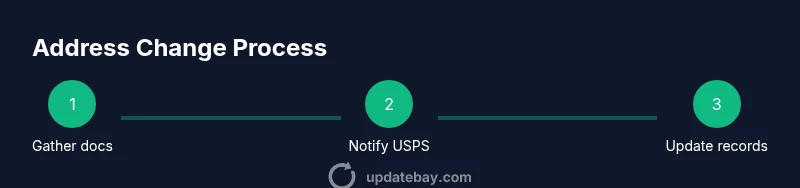
To update what to update when changing address, start by gathering proof of your new address and your current IDs, then stagger updates across essential categories: government records, financial accounts, utilities, and subscriptions. Notify USPS for mail forwarding, and maintain a master checklist to track each update. Review privacy settings after changes to protect your data.
Why updating your address across systems matters
Moving is more than packing boxes; it is a cascade of updates across people and platforms. If you neglect even a single institution, mail may be delayed, bills may go unpaid, and important documents could fall into the wrong hands. In practice, an incomplete address change creates friction and extra work as you chase down late notices, missed deliveries, and identity-verification delays. According to Update Bay, a deliberate, comprehensive address-change plan dramatically reduces disruption and helps protect personal information. A structured approach also makes it easier to catch forgotten services and avoid duplication of mailings. In this guide, we outline why a proactive plan matters and how to structure your effort so you don’t miss key categories or deadlines.
Core categories to update first
When you think about what to update when changing address, start with the big buckets that touch daily life. Official records and financial accounts are high-priority because they drive legitimacy and access. Utilities and subscriptions are next, because service continuity depends on correct contact details. Finally, online accounts and digital services are essential for security and ongoing access. Create a prioritized list, then work through it in order, updating each category before moving to the next to minimize back-and-forth.
Government records and official agencies
This category includes driving records (DMV), voter registration, tax authorities, Social Security, and other government databases that store your address. Each agency has its own process, verification requirements, and timelines. Start with the agencies that impact your day-to-day life first (DMV, tax authority, and voter registration). Many agencies require official documents or in-person verification, so gather copies of your new address proof (lease, utility bill, or bank statement) and be prepared for confirmations by mail or online portals. Allow several weeks for processing, and confirm updates after submission.
Financial accounts and billing information
Banks, credit cards, loans, investment accounts, and insurance policies all rely on a correct address for statements, identity checks, and fraud prevention. Log in to each provider or contact customer service to update your address on file. If you use direct deposit or automatic payments, update your bank details too. Consider requesting a soft credit pull or alert for any changes to your address on your credit reports. Keep a record of confirmations and note any items that require new IDs or documents.
Mail, delivery, and USPS forwarding
A change of address with the postal service is a practical step to ensure mail reaches you during the transition. File the USPS Change of Address form online or at a local post office, choosing how long to forward mail and whether to forward only first-class pieces. Update your mailing preferences with major senders (magazines, catalogs) if you have subscriptions. Monitor mail for the first 6–8 weeks to catch missed communications and update additional recipients as needed.
Utilities, healthcare, and insurance updates
Contact utility providers (electric, gas, water, internet) to update service addresses and contact points. Update health insurance, life, and disability policies; inform your healthcare providers to ensure records and appointment reminders reflect your new location. Update pharmacy records for prescription deliveries and consider changing your address with employer-provided benefits. For security, confirm postal reminders will be sent to the correct address and that any bills reflect the new details.
Digital accounts and online services
Most online services require you to update your profile addresses, billing addresses, and contact emails. Don’t forget streaming services, cloud storage, app stores, gaming platforms, and employer-provided accounts. Use a password manager to simplify updates and enable two-factor authentication where available. Review app permissions and security questions, and retire old devices that still rely on the old address. If you share a digital wallet, update the address fields as needed.
Timing, verification, and maintaining a master checklist
Coordinate updates to avoid service interruptions. Plan to submit several changes at least two to four weeks before your move, plus a final sweep after you’ve settled in. Use a single master checklist (digital or paper) and mark off each category as you complete it. Schedule reminders to verify changes two to four weeks later, since some systems propagate slowly. Keep copies of confirmations and consider saving a PDF of your master list for future moves.
Privacy and security considerations when changing address
Your new address is sensitive information. Limit sharing to verified channels, and avoid posting it publicly or in forums. Review privacy settings on accounts that store your address, and use two-factor authentication when possible to reduce risk of account compromise. Keep an eye on identity-theft signs, such as unexpected mail or bills, and report anything suspicious promptly. Update Bay guidance emphasizes keeping a personal, secure change-of-address process to protect your data.
Tools & Materials
- Master address change checklist (template)(Digital or paper notebook to track updates)
- Proof of new address (lease, utility bill, bank statement)(Scan or photograph for uploads)
- Current IDs and documents (driver’s license, passport)(Needed for verification by some agencies)
- Access to accounts (password manager, login credentials)(Keep securely stored)
- Pen, highlighter, and calendar or reminders app(Useful for marking deadlines)
Steps
Estimated time: 3-8 hours (initial pass); follow-up verifications over 2-6 weeks
- 1
Gather documents and create a master checklist
Collect proof of your new address and your current IDs. Compile a master list of every organization and service you need to notify. Create a centralized tracker so you can tick items off as you complete them.
Tip: Use a single digital sheet or notebook and label sections clearly to avoid missing steps. - 2
Notify USPS and set up mail forwarding
Submit a Change of Address request with the postal service and choose forwarding duration. Update mailing preferences for major senders and set a reminder to review forwarded mail after a grace period.
Tip: Do this at least two weeks before moving to minimize missed mail. - 3
Update government records and official agencies
Update records with DMV, tax authorities, voter registration, and Social Security where applicable. Many agencies require proof documents; upload or bring copies and confirm receipt.
Tip: Check each agency’s processing times and plan accordingly. - 4
Update financial accounts and billing information
Change addresses on bank accounts, credit cards, loans, insurers, and retirement plans. Update direct deposit and recurring payments to avoid missed statements or late fees.
Tip: Notify lenders and insurers first to prevent policy lapses. - 5
Notify employer and payroll systems
Inform HR and payroll about your new address so tax forms and direct deposits stay accurate. Update benefits address where relevant and ensure emergency contacts reflect the new location.
Tip: If you use payroll portal access, update it after HR confirms changes. - 6
Update utilities, healthcare, and subscriptions
Contact utilities, healthcare providers, insurers, pharmacies, and subscription services to update contact and billing addresses. Keep confirmations and test that reminders reach the new address.
Tip: Provide proof of address if required to speed up changes. - 7
Refresh online accounts and digital devices
Update addresses in email accounts, social networks, cloud storage, streaming services, and app stores. Enable two-factor authentication and consider password manager usage to manage changes securely.
Tip: Audit devices connected to accounts and remove old devices. - 8
Verify, track, and review after move-in
Review confirmations, monitor mail for 4–8 weeks, and re-check any updates that lag. Maintain a monthly check until you’re confident all systems are synchronized.
Tip: Set a recurring reminder to re-verify updates after settling in.
Frequently Asked Questions
Do I need to notify USPS when I move?
Yes. Filing a Change of Address with USPS helps forward mail during the transition and reduces the risk of missing important documents. Plan ahead to align timing with other updates.
Yes. You should file a Change of Address with USPS to forward mail while you update other services.
Which government agencies should I update first?
Start with agencies that affect daily life, such as the DMV, tax office, and voter registration. Each agency has its own process and timelines, so check deadlines and required documents.
Start with DMV, tax, and voter registration, then move to other agencies as needed.
How long does it take for changes to propagate across systems?
Propagation times vary by system. Plan updates over several weeks and follow up if confirmations aren’t received within expected windows.
Timelines vary; expect several weeks and follow up as needed.
Can I update many accounts at once?
You can update many online accounts in a batch if supported, but some require individual verification or in-person updates. Keep a running log of what’s completed.
Some services support batch updates, but others need individual attention.
Is it safe to share my new address online?
Share your new address only through trusted channels. Avoid posting publicly and use secure connections when submitting address changes.
Only share your new address through trusted channels with secure connections.
Watch Video
What to Remember
- Create a master address-change checklist.
- Prioritize government, financial, and utilities updates.
- Verify updates across all services and keep confirmations.
- Set reminders to re-check propagation timelines.
- Protect privacy by minimizing public exposure of your new address.