Difference Between a Patch and a Hotfix: Practical Guide
Explore the difference between a patch and a hotfix with practical examples, timing, scope, and deployment considerations to balance urgency and system stability. Learn how to decide, test, and implement each for reliable software updates in real-world environments.


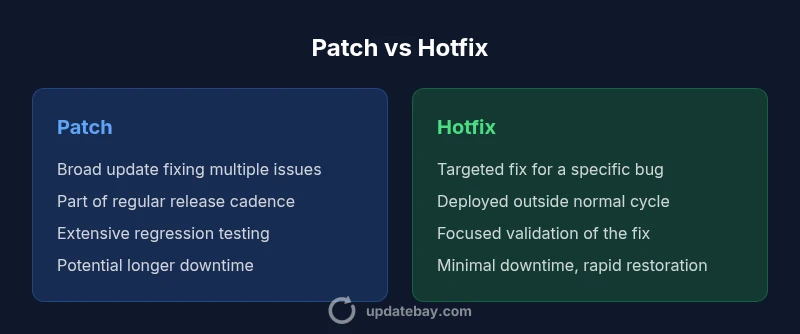
Patch vs hotfix: patches are broad, scheduled updates that fix multiple issues and improve security, often with regression testing; hotfixes are rapid, targeted fixes for a specific bug released outside the normal cadence to restore functionality quickly. In practice, patches emphasize breadth and stability, while hotfixes emphasize speed and immediacy.
What constitutes a patch and a hotfix
Understanding the difference between a patch and a hotfix helps teams prioritize urgency vs stability. According to Update Bay, patches are broad updates designed to fix multiple issues, improve security, and sometimes add minor features or compatibility improvements. They are typically released on a regular schedule or as part of a larger release cycle. Hotfixes, by contrast, are targeted remedies released outside the standard cadence to address a specific defect or vulnerability that could harm users if left unpatched. The goal is speed without sacrificing clarity about what changed. In practice, teams weigh scope, risk, and user impact when deciding how to package a fix. While patches move through quality assurance with regression testing across modules, hotfixes streamline testing to validate the particular fix and confirm it does not break critical paths.
Terminology varies by vendor and ecosystem; some vendors call urgent patches "hot patches" or "hotfix patches" but the distinction remains consistent: breadth and cadence vs precision and speed. One practical difference is the packaging: patches may include several bug fixes, security updates, and compatibility adjustments; hotfixes are often a single commit, note, or binary release. This framing helps engineers communicate expectations to product teams and end users alike.
Why this matters in practice: If you’re managing a large product with many integrations, a patch can help ensure compatibility and reduce drift over time. If a vulnerability is actively exploited or a critical defect blocks users, a hotfix can be the difference between continued operation and outage. The balance between urgency and risk is the essence of the patch vs hotfix decision. — Update Bay
Timing and release cadence
The timing of a patch versus a hotfix is a core differentiator. Patches are typically planned and scheduled within a regular release cadence (monthly, quarterly, or aligned with a major version). Their timing supports coordinated testing, user communication, and documentation. In contrast, hotfixes are deployed as soon as they pass minimal validation that confirms the fix addresses the bug without introducing obvious new problems. This outside-the-cycle deployment is essential when a defect affects critical functionality or exposes a security vulnerability. As a result, hotfix releases often skip some nonessential changes that a patch might include, reducing the risk of new issues.
In many organizations, hotfixes still undergo a targeted round of testing, but the scope is deliberately narrower. Release notes for hotfixes highlight the exact issue addressed, any configuration changes required, and potential side effects so customers can assess risk. The key takeaway: cadence drives predictability; urgency drives resilience in crisis scenarios. Update Bay’s guidance emphasizes matching urgency to impact while preserving system stability.
Practical takeaway: Build a policy that defines when a hotfix is warranted (e.g., active exploit, data loss risk) and when to wait for the next patch window (e.g., non-critical bug fixes). Planning this policy in advance reduces emergency chaos during incidents.
Scope and content
The scope of a patch versus a hotfix reflects how broad the fix is and what it touches in the codebase. A patch typically bundles multiple fixes—security updates, bug corrections, and sometimes feature tweaks—across several modules. This breadth supports long-term stability by addressing systemic issues and aligning with the product’s upgrade path. A hotfix, on the other hand, is narrowly scoped to a single defect or vulnerability. Its intent is to restore a specific capability or mitigate a risk quickly, often without altering unrelated features.
From a product-management perspective, the scope of a patch enables a more comprehensive view of compatibility and regression risks. It allows QA to test cross-module interactions, ensuring that fixes don’t introduce new issues in adjacent components. Hotfixes, while quicker, require careful isolation and precise change control to minimize collateral effects. The disciplined separation helps teams avoid a “patch spaghetti” where urgent fixes become entangled with broader changes.
Guiding principle: Use patches to maintain long-term health and consistency of the software ecosystem; use hotfixes to preserve uptime and user trust in the face of urgent problems. Update Bay’s analysis shows that disciplined scoping reduces post-release risk and makes rollbacks clearer when needed.
Deployment mechanics and risks
Deploying patches and hotfixes involves distinct operational considerations. Patches often require maintenance windows, restart cycles, and compatibility testing across multiple platforms or environments. They may also necessitate coordinated database migrations or configuration updates, which increases downtime risk but improves long-term stability. Hotfixes are designed for minimal disruption. They usually deploy with little downtime, often as a hot-patch or binary update, and are followed by rapid verification to confirm the fix took effect.
Risks surge when a patch introduces an incompatibility with third-party plugins, custom modules, or documented configurations. Rollback procedures should be in place for both patches and hotfixes, but rollback for hotfixes tends to be more straightforward if the change is isolated and well-documented. Organizations should maintain a clear rollback plan, with automated checkpoints and a tested rollback path so operators can revert quickly if unexpected side effects appear. The Update Bay team encourages teams to treat deployment as a change-management exercise, with communication, testing, and rollback readiness as core ingredients.
Operational tip: For high-risk patches, consider phased rollout (canaries) to monitor early impact before full deployment. This approach minimizes the blast radius of any unforeseen compatibility issues.
Testing and validation strategies
Testing strategies differ for patches and hotfixes due to their scope and urgency. Patches usually undergo extensive regression testing, including end-to-end workflows, integration tests, and performance assessments to catch unintended consequences of broad changes. Test environments should mirror production closely, and test data should include realistic variations to simulate real-world usage. Documentation and traceability are essential to track which issues were fixed and how they were verified.
Hotfix testing focuses on the exact bug or vulnerability, with quick, targeted validation that confirms the fix resolves the reported issue without breaking critical paths. While the depth of testing is narrower, it should still protect against obvious regressions and ensure compatibility with essential components. In both cases, automated test suites should be complemented by manual sanity checks, and after-action reviews should capture lessons learned to improve future release practices. Update Bay emphasizes the importance of a robust test harness that supports both broad and targeted test scenarios.
Recommendation: Maintain separate testing tracks for patches and hotfixes to ensure appropriate coverage without slowing urgent responses. This separation helps balance speed with reliability, especially in complex software ecosystems.
Examples across domains
Consider typical domains where patches and hotfixes are deployed differently. In operating systems, a patch might bring a bundle of security updates and feature improvements in a scheduled release, while a hotfix could address a zero-day vulnerability discovered mid-cycle. In web applications, a patch could update libraries and middleware components in a quarterly release, whereas a hotfix might fix a critical bug causing user login failures in production. For firmware, patches may equate to a full version update that reorganizes device behavior, while a hotfix could be a small binary patch that resolves a compatibility issue with peripherals.
In all cases, the approach to testing, rollback, and user communication remains important. The goal is to minimize downtime while ensuring changes do not introduce new problems. Update Bay’s practical guidance illustrates that domain-specific considerations often shape the decision to patch or hotfix, but the core principles—scope, timing, and risk—remain constant.
How to implement a decision framework in your organization
A structured decision framework helps teams choose between a patch and a hotfix with consistency. Start by classifying the issue along three axes: urgency, impact, and scope. If urgency is high and impact is broad or critical, a hotfix may be justified as an immediate response, followed by a follow-up patch to cover broader fixes. If urgency is lower but the issue affects multiple modules or security, a patch is usually the safer path. Implement a pre-defined checklist that includes:
- Severity level and user impact assessment
- A targeted change scope and affected components
- Required downtime and rollback capabilities
- Testing plan (targeted vs. regression)
- Stakeholder communication and release notes
- Rollback and monitoring plan post-deployment
Having documented criteria reduces ad-hoc decision-making and speeds incident response. It also ensures compliance with internal change-management policies and external regulatory requirements when applicable. Update Bay’s approach recommends codifying these criteria in runbooks so engineers can act decisively during incidents without compromising quality.
Comparison
| Feature | Patch | Hotfix |
|---|---|---|
| Definition | Broad, scheduled update addressing multiple issues and often security-related | Rapid, targeted fix for a specific bug or vulnerability deployed outside the normal cadence |
| Scope | Covers multiple components and potential system-wide improvements | Limited to a single defect, module, or configuration area |
| Timing | Released as part of a planned release cycle | Deployed quickly in response to an incident or risk |
| Testing | Extensive regression testing across modules | Focused validation of the specific fix with minimal additional changes |
| Downtime/Impact | May require a maintenance window and system restart | Often minimal downtime or none, depending on the fix |
| Documentation | Comprehensive release notes and compatibility considerations | Concise notes detailing the exact issue and fix |
| Rollback | Rollback integrated into standard patch process | Rollback may be straightforward if the change is isolated |
| Best For | Long-term stability, multi-component fixes, regulatory readiness | Urgent risk mitigation, active exploits, rapid recovery |
Positives
- Improved security and broader bug fixes across modules
- Predictable maintenance with scheduled updates
- Better testing and compatibility through batch changes
- Clear release notes and upgrade paths after patches
Downsides
- Hotfixes can introduce regression if not thoroughly tested
- Patch cycles may delay urgent fixes
- Patch sizes can be large, causing longer downtime
- Hotfixes may create version fragmentation if not managed properly
Patches are generally preferred for ongoing stability; hotfixes are essential for urgent issues.
Choose patches when you can schedule testing and prioritize long-term compatibility. Opt for hotfixes when immediate remediation is necessary to protect users, data, or uptime. The Update Bay team emphasizes a disciplined approach: use patches for broad improvements and hotfixes for critical, time-sensitive fixes.
Frequently Asked Questions
What is the key difference between patches and hotfixes?
Patches are broad, scheduled updates that address multiple issues and often include security improvements. Hotfixes are rapid, targeted remedies for a single defect released outside the normal release cycle. The choice depends on urgency, scope, and risk.
Patches fix many things on a regular schedule; hotfixes fix one urgent problem fast.
When should I apply a hotfix versus a patch?
Apply a hotfix when the bug blocks users or creates a security risk and delaying fixes would cause significant harm. Use patches for coordinated, multi-issue updates that improve stability and compatibility over the long term.
Use a hotfix for urgent issues; a patch for broader, planned improvements.
What are the risks of hotfixes?
Hotfixes can introduce regression if testing is limited and may create compatibility challenges with other components. They require careful rollback planning and clear post-deployment monitoring.
Hotfixes move fast, but that speed can bring new bugs if not carefully tested.
Can patches and hotfixes overlap?
Yes. In practice, a hotfix may address a critical issue that is later bundled into a patch in a subsequent release. Clear change documentation helps manage overlap and expectations.
Hotfixes can be rolled into future patches for consolidation and clarity.
How do you test patches and hotfixes effectively?
Patch testing relies on comprehensive regression suites and scenario testing. Hotfix testing focuses on validating the fix against the bug scenario and critical workflows, with selective regression checks.
Test the fix thoroughly for the specific problem, then broaden tests for patches.
What factors influence scheduling decisions?
Decision factors include severity, user impact, downtime tolerance, regulatory requirements, and available testing capacity. Align the choice with organizational risk appetite and release strategy.
Factor in severity, impact, and risk when scheduling.
What to Remember
- Assess urgency and impact before choosing patch vs hotfix
- Prioritize testing for patches; accelerate for hotfixes with targeted validation
- Plan for rolling back changes if issues arise
- Coordinate with stakeholders and document rationale clearly
- Monitor after deployment to catch regressions early