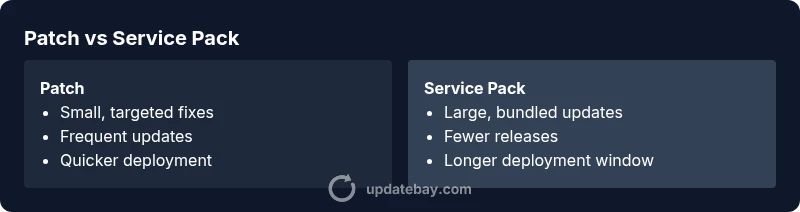
Difference Between a Patch and a Service Pack: A Practical Guide
A thorough, practical comparison of patches and service packs, explaining purposes, impact on system stability, rollout methods, and best-practice timing for IT pros and home users.


The difference between a patch and a service pack lies mainly in scope, impact, and deployment style. A patch fixes a specific issue or security flaw and is usually small and fast to apply, whereas a service pack bundles multiple patches and updates into a larger, consolidated package intended to refresh functionality and stability in one go. For most environments, patches are used for rapid risk mitigation, while service packs are chosen for periodic, comprehensive upgrades.
What the Difference Really Means: Definitions in Practice
The difference between a patch and a service pack often confuses even seasoned IT professionals. At its core, a patch is a small, targeted code change designed to fix a single issue, close a security hole, or address a specific bug. A service pack, by contrast, is a larger bundle that combines many patches and sometimes feature updates into a single, cumulative installer. As Update Bay notes in our ongoing software-update analysis, these two update approaches serve different operational goals and planning horizons. For the typical home user, understanding this distinction helps you schedule maintenance windows, avoid surprise restarts, and prioritize security.
In practical terms, patches are the “bite-sized” actions that keep software safe and functional between major releases. Service packs are the equivalent of a renovation project: they refresh a broad swath of components, often with broader compatibility considerations and longer deployment times. The essential takeaway is that the difference between a patch and a service pack is not just size; it is the breadth of changes and the deployment dynamics that come with each strategy.
According to Update Bay, many organizations still misclassify updates, which leads to planning missteps and longer downtimes. By recognizing that patches are your first line of defense against emerging vulnerabilities, while service packs offer a consolidated upgrade path, you can design a more predictable maintenance cadence. This clarity helps teams coordinate testing, back-out plans, and user communications more effectively.
In this guide, we’ll explore the two concepts side by side, illustrate how vendors package updates, and provide decision criteria that you can apply across Windows, macOS, and Linux environments. The goal is to give you a consistent framework for choosing between patch-level fixes and full service-pack rollups when pushing updates to production systems.
-content-structure
content-layer
Comparison
| Feature | Patch | Service Pack |
|---|---|---|
| Scope | Small, targeted fixes for a specific issue or vulnerability | Broad collection of fixes and possibly feature updates rolled into one release |
| Size/Download | Typically small delta patches | Larger bundles that cover multiple components and fixes |
| Installation Time | Usually quick; minimal downtime | Longer deployment with extended downtime window possible |
| Frequency | More frequent, incremental updates | Less frequent, comprehensive updates |
| Impact on Compatibility | Lower risk of introducing new features; easier rollback | Higher risk of regression; testing is often required |
Positives
- Patches install quickly with minimal downtime
- Allows rapid mitigation of security and bug risks
- Low risk of introducing large compatibility changes
- Service teams can prioritize urgent fixes and hot patches
Downsides
- Requires multiple patches to achieve broad improvements
- Users may miss intermediate fixes between patches
- Patch fragmentation can complicate testing and auditing
- Frequent updates can lead to update fatigue for end users
Patches are the agile choice for ongoing risk mitigation; service packs are the consolidation path for major, low-friction upgrades.
Choose patches for rapid, targeted fixes and minimal downtime. Opt for service packs when you need a consolidated, tested package that delivers broad improvements in one deployment.
Frequently Asked Questions
What is the core difference between a patch and a service pack?
A patch is a small, targeted update designed to fix a specific issue or vulnerability. A service pack is a larger bundle that combines multiple patches and sometimes feature updates into a single installation. The essential distinction is scope and deployment impact.
A patch fixes a single issue quickly; a service pack updates many things at once.
Are service packs obsolete in modern software?
Service packs are less common for consumer software today but remain relevant in some enterprise and operating system contexts where a bundled upgrade provides stability and simplified deployment. They are typically scheduled as major updates.
Service packs aren’t obsolete, they’re just used less often where bundled upgrades are preferred.
How should I decide when to apply patches vs. a service pack in an organization?
Assess the urgency of the fix, the breadth of impact, testing capacity, and downtime windows. If the goal is quick risk reduction, apply patches. If a broader, tested upgrade is needed, plan for a service pack.
Weigh urgency, risk, and testing resources to choose between patches and service packs.
Do patches include security updates?
Yes, patches frequently include security fixes as well as bug patches. However, some critical security issues may require an immediate patch outside of a service-pack cycle.
Patches usually include security fixes, but critical holes may require urgent patches.
What about Linux distributions—do patch and service pack concepts apply the same way?
Linux distributions typically release patches as incremental updates or kernel patches, while service packs are less common in Linux because updates are more modular and patch-based. The concept exists but is implemented differently.
Linux updates tend to be patch-based and modular rather than service-pack style.
What to Remember
- Prioritize patches for urgent security fixes and small bugs
- Use service packs when planning a major upgrade or refresh
- Balance update frequency with testing capacity to minimize downtime
- Test patches in a staging environment before production rollouts
- Maintain clear rollback plans for both patches and service packs