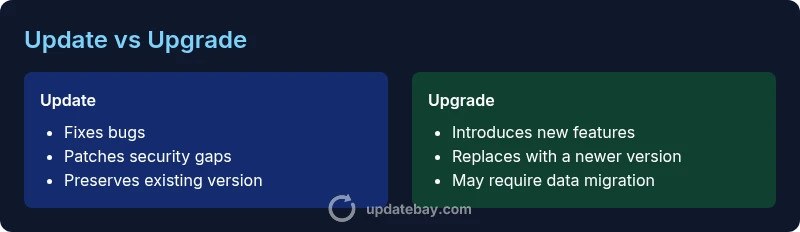
Difference between update and upgrade: An analytical guide
A detailed, analytical comparison of update vs upgrade, clarifying definitions, scope, costs, risks, and practical guidance for software, firmware, and services.


In tech contexts, an update fixes bugs, patches security flaws, and improves stability within the current version, while an upgrade moves to a newer generation with significant features and architectural changes. Understanding the difference between update and upgrade helps plan maintenance, budgeting, and feature adoption across software, firmware, and services. This TL;DR identifies when each path is appropriate and what to expect in terms scope, risk, and impact.
Defining Update and Upgrade
The terms update and upgrade describe two distinct paths for improving software, firmware, or services. The difference between update and upgrade hinges on scope, impact, and intent. An update applies to the current release, addressing issues or improving security without changing the core version. An upgrade moves to a newer generation, often introducing substantial features, redesigned interfaces, and potential compatibility shifts. Grasping this distinction helps users anticipate maintenance needs and allocate resources accordingly. Across personal devices, IT environments, and enterprise roadmaps, the choice between updating and upgrading shapes planning, testing, and rollouts. In practice, updates are the ongoing glue that keeps ecosystems stable, while upgrades signal a strategic leap forward. This article uses the exact phrase difference between update and upgrade to anchor explanations and examples in software, firmware, and services, ensuring readers understand when each path is appropriate and why the distinction matters for decision-making.
Scope and Impact
Scope defines how broad a given change is and what it touches. Updates usually address defects, security vulnerabilities, and performance regressions within the current architectural frame. They preserve compatibility with existing data formats and configurations, and they typically aim for minimal disruption. Upgrades, by contrast, often replace the underlying framework, introduce new capabilities, and may require data migrations, changes in workflows, and updates to integrations. The impact can ripple across dependent systems and third-party components. From a project-management viewpoint, updates are incremental risk-reducing moves, whereas upgrades carry higher strategic value and risk due to potential cascading effects. When deciding between updating or upgrading, organizations weigh the risk of breaking changes against the potential benefits of new features and improved efficiency.
Typical Lifecycles and Vendor Practices
Vendors communicate updates and upgrades through release notes, changelogs, and patch schedules. Updates tend to occur on shorter cycles, with smaller, iterative improvements that users can apply with minimal planning. Upgrades follow longer planning horizons, with beta programs, compatibility testing, and pilot deployments. The lifecycle of an update usually includes development, testing, staging, and rapid deployment, while an upgrade may involve a phased rollout, compatibility checks, and user-migration assistance. For individuals, the lifecycle is simpler: apply updates when prompted, and plan upgrades when a clear business case exists. For enterprises, governance, change management, and rollback strategies become important, given the potential for larger-scale disruption.
Practical Scenarios: When to Update vs When to Upgrade
- Security-first environments prioritize updates to patch vulnerabilities quickly and maintain baseline protections. Updates are often non-disruptive and can be automated.
- Feature-driven contexts benefit from upgrades when users need new capabilities, performance reforms, or architectural changes that unlock future growth.
- Legacy systems may require careful upgrades with compatibility testing, while updates continue to address security gaps within the existing setup.
- Consumer devices generally favor updates for everyday stability, with upgrades planned during major device refresh cycles or operating-system refresh events.
- Compliance and auditing considerations may dictate updates to remain in line with regulatory requirements, while upgrades are scheduled to align with end-of-life timelines.
Technical Nuances: Software, Firmware, and Services
The distinction between update and upgrade spans software applications, system firmware, and cloud-based services. Software updates patch defects, tighten security, and tune performance without changing the core release, whereas upgrades replace the software with a newer generation or module. Firmware updates enhance hardware-level control but rarely alter the device's fundamental purpose; upgrades may introduce new hardware features or compatibility requirements. Services, too, differentiate updates (policy changes, bug fixes) from upgrades (new tiers, substantial feature launches). Understanding environment-specific nuances helps users anticipate dependencies, licensing implications, and data-migration needs. Across the board, the goal is to minimize downtime while maximizing reliability and value.
Costs, Time, and Reversibility
Costs associated with updates are typically lower, with many updates bundled into existing support plans or offered at no extra charge. Upgrades often involve license changes, hardware considerations, or subscription tiers that can raise total cost of ownership. Time-to-implement for updates is shorter, with automated or semi-automated deployment common in modern ecosystems. Upgrades may require more planning, testing, and user training, and in some cases rollback is possible but not guaranteed. Reversibility varies by product and vendor: updates are usually reversible through standard rollbacks, while upgrades can be reversible only through a full reversion path or data-migration process.
Security and Stability Considerations
Updates are the frontline defense for security and reliability, addressing known vulnerabilities and performance regressions. Routine updates reduce exposure to threats and improve stability without reshaping user workflows. Upgrades deliver strategic value by introducing new API surfaces, improved scalability, and refreshed user experiences. However, upgrades carry the risk of introducing compatibility issues, deprecated features, or altered configurations. Organizations should plan upgrades with impact assessments, testing, and communication strategies to minimize disruption and maintain security postures during and after the transition.
How Vendors Communicate Updates and Upgrades
Release notes are the primary channel for conveying information about changes. Updates are described in concise bullet points focusing on fixes, security patches, and minor improvements. Upgrades are communicated with feature summaries, migration guidance, and potential data considerations. Vendors often provide upgrade pathways, supported upgrade paths, and timing windows to help users plan. For IT teams, automated deployment pipelines, rollback procedures, and testing environments are essential to ensure a smooth transition. Consumers should follow official channels to avoid installing unofficial or potentially harmful updates or upgrades.
Authoritative Outlook: Best Practices for Individuals and Enterprises
Adopting a disciplined approach to update and upgrade decisions yields long-term benefits in reliability and value. Proactive updates reduce security risk, while well-planned upgrades unlock meaningful productivity gains. Organizations should establish governance frameworks, define criteria for when upgrades are justified, and maintain clear rollback and data-migration plans. Individuals can adopt a simple rule: apply updates promptly for protection and stability, and schedule upgrades when there is a documented business or usability rationale. By aligning maintenance with strategic goals, users can minimize downtime and maximize return on investment.
Historical Context and Evolution of Terminology
The language of software maintenance has evolved as technology ecosystems grew more complex. Early software cycles emphasized major releases and patches; modern platforms blend continuous delivery with strategic upgrades. The distinction between update and upgrade reflects different intents: updates maintain the status quo with incremental improvements, while upgrades push the system beyond its current capabilities. Understanding historical context helps readers interpret vendor communications and anticipate future trends in software evolution.
Practical Checklist for Decision-making
- Identify the problem: is this a bug, a security issue, or a feature gap?
- Determine the scope: does the change affect the core version or require a new generation?
- Assess compatibility: will data formats, integrations, or hardware require changes?
- Estimate downtime: can deployment be automated or scheduled without business disruption?
- Plan rollback: is there a tested path to revert if needed?
- Align with governance: are approvals, testing, and documentation in place?
- Schedule and monitor: set a timeline and track results post-deployment
Comparison
| Feature | update | upgrade |
|---|---|---|
| Definition | A fix within the current version addressing issues and improving stability | A major change that replaces the current version with a newer one, often adding substantial features |
| Scope | Bug fixes, security patches, and minor improvements within existing architecture | New features, architectural changes, and potential data migrations or reconfigurations |
| Typical frequency | More frequent, driven by security and bug reports | Less frequent, typically aligned with product cycles and roadmap milestones |
| Cost | Usually low or bundled in existing support | Can involve licensing, hardware, or premium services |
| Required downtime | Often minimal, can be automated | Can require planning and scheduled downtime or user training |
| Reversibility | Usually reversible via standard rollback | Rollback may be challenging after major migrations |
| Impact on compatibility | Low to moderate impact on data formats and integrations | High impact due to data migrations or API changes |
Positives
- Keeps software secure and stable with minimal disruption
- Delivers bug fixes and performance improvements quickly
- Requires lower upfront cost and less planning for routine maintenance
- Enables continued vendor support and compliance readiness
Downsides
- Upgrades can introduce compatibility or migration challenges
- Updates may not deliver meaningful feature gains, requiring separate planning
- Upgrades often need testing, user training, and downtime
- Frequent updates can accumulate change fatigue if not managed well
Updates for security and stability; upgrades for strategic feature gains
For most users, routine updates are the safest, most reliable path to maintain security and performance. Plan upgrades when there is a clear business case for new capabilities and architectural improvements. A disciplined approach balances risk and reward across both paths.
Frequently Asked Questions
What is the fundamental difference between update and upgrade?
The fundamental difference is scope: updates fix issues within the current version, while upgrades move to a newer version with substantial changes. This distinction guides when to apply each and how to assess risks and benefits.
Updates fix bugs in the current version; upgrades bring a new version with major changes. Think of it as patching vs migrating to a newer release.
Do updates always require a restart?
Many updates can be applied without a full restart, especially on modern platforms that support live patching. Some updates, however, may require a restart to complete the installation or to load new components.
Often a restart is not required, but it can happen, depending on what’s being updated.
Can updates be rolled back easily?
In many cases, updates are reversible through a standard rollback path or restore point. The ease of rollback depends on the system and how the update was applied.
Generally, you can revert an update if something goes wrong, but it’s not guaranteed for every product.
Are upgrades optional or mandatory?
Upgrades are often optional, but vendors may require upgrading to stay supported or to access security features. Enterprises may implement upgrade policies to maintain compliance.
Upgrades aren’t mandatory everywhere, but staying current often matters for support and security.
What about security implications of upgrading?
Upgrades can bring significant security improvements but may also introduce new vulnerabilities if not properly tested. A controlled upgrade process helps balance these risks.
Upgrades can boost security, but you should test and plan to minimize new risks.
Is an upgrade the same as a new product release?
An upgrade is a transition to a newer version of the same product, often with improvements. A new product release may introduce an entirely different product line or architecture.
An upgrade is about the same product line getting better, not a completely new product from scratch.
What to Remember
- Prioritize updates to maintain security and stability
- Schedule upgrades for meaningful feature improvements
- Assess compatibility and data-migration needs before upgrading
- Balance downtime with business impact in enterprise contexts
- Communicate plans clearly to users and stakeholders