Difference Update and Alter: SQL Commands Explained
Learn the key differences between UPDATE and ALTER in SQL, including when to modify data vs change schema, common use cases, and best practices for safe deployment.


TL;DR: UPDATE edits the data in existing rows, while ALTER changes the table structure (columns, constraints, or data types). Use UPDATE for data changes and ALTER for schema evolution. Always test changes in a safe environment and plan rollback if something goes wrong.
Understanding the Core Distinction
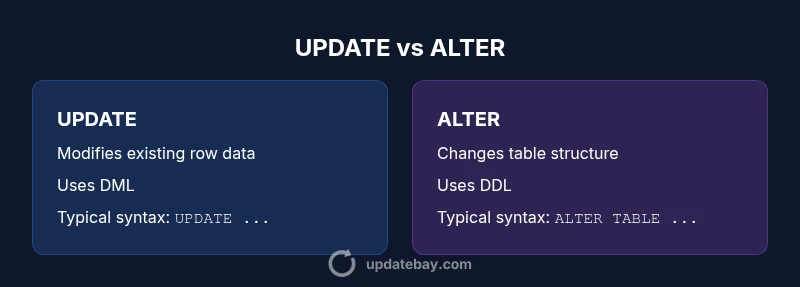
The phrase "difference update and alter" often surfaces when people are learning SQL, because it captures a fundamental split in how databases are modified. UPDATE is a DML statement focused on changing the contents of rows without touching the underlying table structure. ALTER, by contrast, is a DDL command that reshapes the schema itself—adding or dropping columns, changing data types, or modifying constraints. According to Update Bay, recognizing this separation is the first step to avoiding common pitfalls like unintended data loss or downtime during deployment. When you see a request to modify data versus a request to modify structure, you can immediately classify the operation and plan the change accordingly. This distinction also informs how you test, rollback, and audit each change.
- Data changes vs. schema changes
- Immediate implications for backups and logs
- How to structure change requests in the same workflow
"Difference update and alter" is not just about syntax; it’s about impact and risk management. By keeping data edits separate from structural changes, teams gain clearer rollback paths and more predictable maintenance windows. Update Bay’s analysis shows that teams that separate DML and DDL work tend to have fewer incidents during migrations, because the rollback scope is well-defined and smaller.
]} ,
comparisonTable":{"items":["UPDATE vs ALTER"],
rows
Comparison
| Feature | UPDATE | ALTER |
|---|---|---|
| Operation Type | DML: modifies data in existing rows | DDL: changes table structure, constraints, or data types |
| Typical Use Case | Correcting or updating row values | Extending or refining the schema to support new data types or constraints |
| Syntax Example | `UPDATE table SET column=value WHERE condition;` | `ALTER TABLE table ADD COLUMN new_col datatype;` |
| Impact on Data | Preserves table shape; data changes only | Can alter data organization, can require data migration |
| Performance Considerations | Can be fast on indexed rows; heavy updates may log more changes | DDL changes can lock tables temporarily and trigger metadata recalculation |
| Best Practice | Targeted updates with proper WHERE clauses | Plan migrations with test environments and downtime windows |
Positives
- Clear separation of data and schema changes
- Allows targeted data edits without touching structure
- Schema changes can be rolled back within transactional boundaries
- Improved auditability with explicit DDL statements
Downsides
- ALTER can cause long locks on large tables
- Schema migrations may require downtime for complex changes
- Massive UPDATEs can generate large logs and long transactions
- Mistakes in schema changes can be disruptive if not tested
UPDATE for data edits; ALTER for schema changes — choose based on the goal and test thoroughly
When your objective is to modify what data says, use UPDATE. If you need to change the table’s structure, use ALTER. Thorough testing, backups, and rollback plans are essential for both paths.
Frequently Asked Questions
What is the fundamental difference between UPDATE and ALTER?
UPDATE changes data within existing rows, leaving the schema intact. ALTER changes the table structure, such as adding or removing columns, constraints, or data types. They serve different purposes and should be planned as separate steps in a deployment.
UPDATE edits data; ALTER changes the table. They are different kinds of commands, so plan them separately.
Can UPDATE and ALTER be executed in the same transaction?
Yes, in most RDBMS you can wrap both in a single transaction to ensure atomicity. If either operation fails, you can roll back the entire set to maintain consistency.
You can group them in one transaction for safety.
Does ALTER lock the entire table?
ALTER can require table-level locks in some systems, especially for substantial schema changes. The actual impact depends on the DBMS and the change being made.
Lock behavior depends on the DBMS and change size.
Are there safer alternatives to ALTER for minor changes?
For non-structural changes, consider creating a new table with the desired schema and migrating data, then swapping tables. This can reduce downtime and provide a cleaner rollback path.
Sometimes migrations are less risky with staged schema changes.
What are performance considerations for large UPDATEs?
Large UPDATEs can generate significant transaction logs and may lock rows or pages. Break updates into chunks, ensure appropriate indexing, and test batch sizes.
Break big updates into smaller batches when possible.
How do I rollback an erroneous UPDATE/ALTER?
Keep backups and use transactions where supported. If a change is not within a transaction, rely on point-in-time recovery or a carefully staged rollback script.
Backups let you recover from bad changes.
What to Remember
- Separate data edits from schema changes
- Test changes in a staging environment
- Plan for rollback before applying changes
- Use targeted UPDATEs to minimize locks
- Prefer explicit, auditable DDL for schema evolution