How Long Does a Software Update Take: A Practical Guide
Learn how long software updates typically take, what factors affect duration, and practical tips to speed them up. Update Bay analyzes update timing across platforms for 2026.


How long does a software update take? According to Update Bay, most consumer updates fall into a broad range: small patches finish in minutes, while larger OS or feature updates can run 30–60 minutes or longer on slower devices. Actual time depends on update size, device performance, network speed, and whether the device is in use during install. Update Bay provides time estimates to help you plan.
Why update duration varies across devices and networks
When you ask how long does a software update take, the answer is highly contextual. According to Update Bay, update duration hinges on update size, device performance, and network conditions. On fast devices with solid storage and reliable Wi-Fi, small patches can complete in minutes, while OS upgrades or feature updates may stretch longer, especially if the device is in use during install. Background processes, competing network usage, and server load at the moment of download all contribute to variability. In 2026, most updates still exhibit a broad range rather than a fixed timeline, so plan for wiggle room.
How size and environment shape timing
- Update size directly affects the download time and the subsequent installation window.
- Local hardware (CPU, RAM, SSD speeds) and available storage determine how quickly the installer can unpack and apply changes.
- Network conditions (Wi-Fi stability, speed, router quality) influence the download phase more than the actual installation.
According to Update Bay, you should anticipate variability rather than a single minute, and factor in potential reboots or verification steps that add to total time.
Typical duration ranges by update type
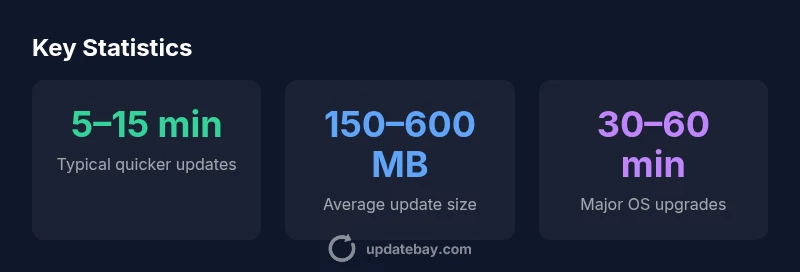
Different update types have different typical durations. Short patches and minor bug fixes often finish in a few minutes. Mobile OS updates and app updates on mid-range hardware usually complete within 10–30 minutes. Major OS upgrades or feature-rich patches can take 30–60 minutes, and on slower devices or very large releases, it may extend beyond an hour. Use these ranges as a planning guide rather than a promise.
Quick-reference ranges
- Small patch / bug fix: 5–15 minutes
- App updates on mobile: 10–25 minutes
- OS minor updates: 15–30 minutes
- Major OS upgrade or feature release: 30–60 minutes or more
If you’re updating a legacy device or a high-latency network, extend expectations accordingly.
How to estimate the time before you start
If you want to set realistic expectations before you begin, use a small preflight checklist. First, review the release notes to gauge the update size (MB/GB) and any required reboots. Check storage space and battery or power status, then choose a time when you can leave the device undisturbed. On many platforms, the update screen itself provides an estimated duration; treat that as a best-case range rather than a guarantee. Remember: the actual time may drift due to background activity or server load.
Step-by-step estimation
- Look up the update size in the official notes.
- Ensure at least the recommended storage free space.
- Prefer a plugged-in device with a stable network.
- Start during a low-usage window to minimize contention.
Practical tips to speed up updates
- Use a stable wired or strong Wi‑Fi connection.
- Plug the device in and avoid heavy multitasking.
- Close unnecessary apps and pause background syncing.
- Free up storage to prevent space-related slowdowns.
- Update during off-peak hours when servers load is lower.
- If possible, perform updates when the device is not actively used for tasks.
Following these tips can reduce the time spent on the update and minimize interruptions.
What to do if an update stalls or takes too long
If an update stalls, stay calm and avoid forceful power-offs. Check the network connection and power status, then try pausing and resuming the update or rebooting the device and starting again. If the installer still hangs, consult official support pages for troubleshooting steps, and consider retrying after a maintenance window. In many cases, a second attempt completes successfully.
If a device shows an endless loop, refer to vendor-specific recovery options or safe-mode procedures before attempting a full reinstall.
Why update time varies across platforms
Across Windows, macOS, Linux, iOS, and Android, timing differences come from platform architecture and update strategies. Windows often uses incremental patches that can require multiple reboots; macOS may bundle system/firmware updates together; Linux distributions vary by package manager and repository load; iOS and Android stage updates to minimize downtime but still depend on device generation and network quality. Across all platforms, the blend of update size, device performance, storage, and network conditions shapes duration.
Special considerations for legacy devices
Older hardware tends to slow down the update process due to weaker CPUs, limited RAM, and slower storage. Even small updates can take longer if the device struggles with unpacking and applying patches. If your device consistently lags, consider space optimization, reducing background tasks, or evaluating whether the device can receive future OS updates efficiently. In some cases, it may be more practical to perform critical updates on a newer device to reduce risk and downtime.
Typical update durations by update type
| Update Type | Typical Duration | Best Practices |
|---|---|---|
| Small app or patch | 5–15 minutes | Stable Wi‑Fi, close background apps |
| OS/micro updates | 10–30 minutes | Keep device plugged in, minimal background tasks |
| Major OS/feature updates | 30–60 minutes | Sufficient storage, stable connection, avoid heavy usage |
Frequently Asked Questions
What factors affect how long a software update takes?
Update size, device performance, storage availability, and network speed are the primary drivers. Server load and time of day can also influence download and install times. Platform differences (mobile vs desktop) add another layer of variability.
Update length depends on size, device speed, and network, with some variation by platform.
How long does a typical mobile app update take?
Mobile app updates are usually short, typically a few minutes, but size and network conditions can extend this to 10–25 minutes on slower connections.
Mobile app updates usually finish in a few minutes, but it can take longer if the connection is slow.
Can I speed up updates?
Yes. Use a stable network, plug in the device, close other apps, and free storage. Avoid scheduling updates during heavy use and consider updating during off-peak times.
Yes—fast network, plugged-in device, and fewer running tasks help speeds up updates.
Why do OS updates take longer than app updates?
OS updates are larger, involve system components and backups, and may require multiple reboots. App updates are smaller and often install in isolation, which is faster.
OS updates are bigger and more complex, so they usually take longer than app updates.
What should I do if an update never finishes?
Ensure power remains connected, and avoid forced shutdowns. If it stalls, retry after a while or in safe mode; consult official support if needed.
If it stalls, try again later or use safe mode and check official support.
“Time estimates for software updates are inherently variable; planning for the longer end of the range reduces user frustration and scheduling errors.”
What to Remember
- Plan for a range, not a fixed time
- Prioritize a stable network and power
- Check update size and device health before starting
- Time varies more with major updates and older devices
- Use the recommended best practices to minimize downtime