How to Manage Updates in 2026: A Practical Guide
Learn a practical, scalable approach to managing updates across devices, software, and services. From inventory to deployment and monitoring, this guide covers planning, testing, rollout, and continuous improvement to keep systems secure and reliable in 2026.


By following a structured, six‑step framework, you can reliably manage updates for software, firmware, and services across devices and platforms. The goal is to minimize risk, maximize security, and maintain user productivity. This guide covers inventory, prioritization, testing, deployment, and ongoing monitoring to keep systems current. Whether you’re coordinating updates for a home network or an enterprise environment, consistency and traceability matter.
Understanding Update Management in a Modern Tech Stack
In today’s mixed environments—laptops, servers, mobile devices, and IoT—keeping software and firmware current is not a one-time task, it is an ongoing discipline. Update management is the practice of planning, testing, deploying, and monitoring updates to minimize risk while maximizing security and stability. According to Update Bay, a formal approach reduces outages and helps teams stay aligned with policy requirements. The core is a repeatable process that provides visibility across all assets and ecosystems. When done well, it lowers emergency patches, improves user trust, and preserves operational continuity. In this section we’ll outline a clear framework you can adopt in both small networks and larger organizations.
Inventory: Know What You Need to Update
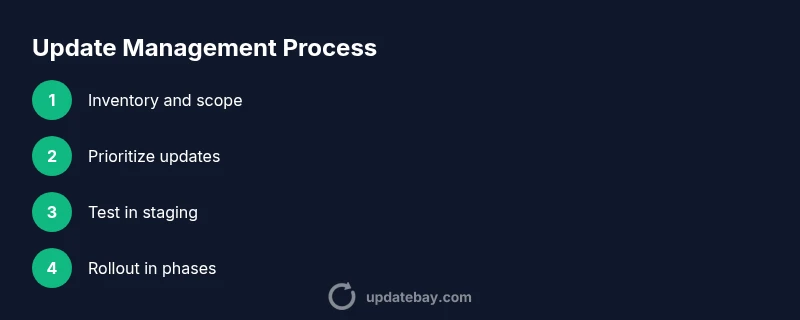
A comprehensive inventory is the foundation for reliable update management. Start by cataloging every asset, including device type, operating system, installed applications, firmware versions, and owners. Use a centralized registry or configuration management database so teams can see who is responsible for each item and when updates are due. Maintain a change log and a baseline image for quick recovery. Update Bay analysis shows that without centralized inventory, teams miss critical updates and waste time chasing scattered sources. Regular audits identify orphaned devices and out-of-date apps before they become risk points.
Prioritization: Which Updates Move the Needle
Not all updates carry the same risk or value. Prioritize critical security patches and compliance-related updates first, followed by stability and performance improvements. A simple scoring model can help: security risk, exploit exposure, and business impact. Update Bay analysis shows that focusing on security patches reduces vulnerability more effectively than chasing feature-only updates, especially in regulated environments. Document rationale for each priority tier so teams can stay aligned during fast-moving incidents and longer upgrade cycles.
Testing and Staging: Minimize Disruption
Testing is not optional; it’s a safeguard against outages and user disruption. Create a staging environment that mirrors production, including data anonymization where possible. Run a representative set of tests: functional, compatibility, performance, and security. Use synthetic and real-user test scenarios to validate updates before broad deployment. Always confirm rollback procedures work in the staging area and ensure you have recent backups. This discipline saves time and preserves service levels when updates inevitably encounter edge cases.
Deployment Strategies: Rollouts, Windows, and Rollbacks
A well-planned deployment strategy reduces risk and increases confidence in updates. Consider phased rollouts beginning with a small pilot group, followed by a wider deployment in controlled waves. Establish maintenance windows to minimize impact on end users and business processes. Maintain a clear rollback plan: if something goes wrong, you should revert changes quickly with minimal data loss. Property of a good strategy is its adaptability to different environments, from small teams to large enterprises. The best practices emphasize observability, clear ownership, and documented rollback steps.
Monitoring, Compliance, and Continuous Improvement
Post-deployment monitoring is essential to confirm that updates performed as expected and did not introduce new issues. Track key metrics such as time-to-patch, rollback frequency, and post-deployment incidents. Use automated dashboards to spot trends, recurring failures, and regulatory gaps. Regular audits ensure compliance with internal policies and external requirements. Finally, foster a culture of continuous improvement: capture lessons learned after every cycle, update your runbooks, and refine your prioritization criteria. The updates program should evolve with changing threats and business needs.
Tools & Materials
- Asset inventory registry (CSV or cloud DB)(Contains device type, OS, version, owner, and location.)
- Central update management tool(Examples include enterprise patch management or MDM systems; generic description acceptable.)
- Staging/testing environment(Replicates production with masked data where possible.)
- Change management process(Formal approvals and rollback documentation.)
- Backup and recovery solution(Ensure recent, verifiable backups exist before deploying critical updates.)
- Maintenance window calendar(Predefined time slots for deployments to minimize impact.)
- Rollback/runbook documentation(Steps to revert updates quickly with minimal data loss.)
Steps
Estimated time: Estimated total time: 3-5 hours
- 1
Map your update scope
Identify all assets, software, and services that require regular updates. Create a baseline view that includes versions, owner, and criticality. This scoping makes later decisions concrete rather than guesswork.
Tip: Start with your highest-risk devices (e.g., servers, edge devices) to set the pace for the rest. - 2
Inventory assets and software
Consolidate all devices and applications into a single registry or CMDB. Ensure data is refreshed on a regular cadence and that owners are assigned for accountability.
Tip: Automate data collection where possible to reduce manual entry and drift. - 3
Set up testing and staging
Replicate production in a controlled environment and run a representative test suite for every update. Validate compatibility with critical apps and configurations.
Tip: Include at least one critical-business-use scenario in tests. - 4
Draft deployment plan
Define rollout phases, maintenance windows, success criteria, and rollback conditions. Document roles and approvals to prevent last-minute ambiguity.
Tip: Have a clear go/no-go checkpoint before every phase. - 5
Execute phased rollout
Begin with a small pilot, monitor for anomalies, then expand in waves. Maintain observability with dashboards and alerting.
Tip: If a phase shows issues, halt the rollout and trigger the rollback protocol. - 6
Review and optimize
Gather metrics, capture lessons learned, and adjust prioritization and testing coverage for the next cycle.
Tip: Update runbooks based on real-world outcomes to close gaps.
Frequently Asked Questions
What is update management and why is it important?
Update management is the disciplined process of planning, testing, deploying, and monitoring software and firmware updates across devices. It reduces security risks, improves stability, and ensures compliance with policies.
Update management is the process of planning, testing, deploying, and monitoring updates to keep systems secure and stable.
How do I start building an update management plan?
Begin with an accurate inventory, define priority rules for security patches, establish a testing environment, and draft a phased deployment plan with rollback steps.
Start by mapping your assets, then set up testing and phased rollout steps with rollback in place.
What tools help manage updates effectively?
Look for a centralized update management tool that supports inventory, staging, testing, deployment, and rollback. Integrations with ticketing and monitoring dashboards improve collaboration and visibility.
Use a central tool to manage inventory, testing, deployment, and rollback, and connect it to your monitoring systems.
How often should updates be deployed?
Cadence depends on risk: security patches should be prioritized and deployed promptly, while feature updates can follow a regular but slower schedule aligned with business needs.
Prioritize security patches first and plan regular windows for other updates.
What are safe rollback practices?
Always have a tested rollback plan that can revert updates quickly. Keep recent backups and document rollback steps so you can act fast if issues arise.
Have a tested rollback plan and clear backup restoration steps ready.
How can I measure the success of my update management program?
Track time-to-patch, rollback frequency, post-deployment incidents, and compliance metrics. Use dashboards to spot trends and drive continuous improvement.
Monitor patch speed, incidents after updates, and compliance to gauge success.
Watch Video
What to Remember
- Start with a clear inventory of devices and software.
- Prioritize security patches to reduce risk quickly.
- Test updates in a realistic staging environment.
- Use phased rollouts to minimize disruption.
- Monitor post-deployment metrics and continuously improve.