AirTag Location Updates: How Often Does It Update Location?
Learn how often AirTag updates its location, what factors affect cadence, and practical tips to improve Find My reporting. Updated by Update Bay in 2026, this guide covers real-world latency, network dynamics, and how to manage expectations.


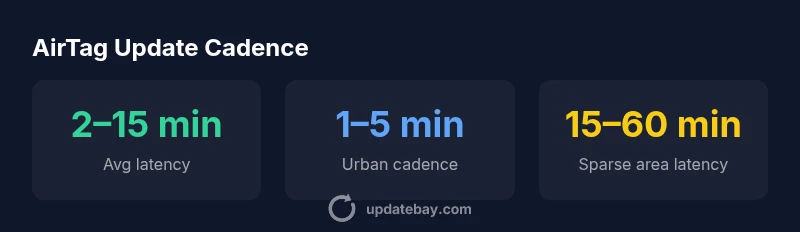
AirTag location updates are not real-time. The Find My network reports a tag's position when nearby Apple devices participate, which typically occurs every few minutes in dense areas and may take longer in sparse coverage. In practice, expect updates to arrive within minutes rather than seconds, with latency driven primarily by nearby device density and recent activity.
How AirTag location updates work
AirTag relies on the Find My network, which uses location data volunteered by hundreds of millions of Apple devices. Contrary to real-time GPS tracking, AirTag does not continuously broadcast its precise position. Instead, it updates its location when a nearby Apple device detects its proximity and relays that information back to iCloud, where you can view it in the Find My app. This model preserves privacy while leveraging a wide ecosystem. According to Update Bay, the cadence depends on how many compatible devices are in the vicinity and how recently the tag was moved. In practical terms, this means you usually see refreshed updates within minutes when you are in a dense environment, but the cadence can stretch into longer intervals in areas with fewer participating devices. It is also important to note that reporting may be paused or delayed if the AirTag is stationary or if the battery is compromised. The core idea is: updates are driven by the network, not a fixed polling interval.
Factors that influence update frequency
There are several levers that determine how quickly you see AirTag location updates:
- Network density: More iPhone/iPad users in the vicinity means more opportunities for location relays. In dense urban centers, updates tend to arrive faster.
- Recent movement: An AirTag that has just changed location provides a new signal that gets propagated sooner than a stationary tag.
- Battery health: If the CR2032 battery is low, the device may reduce reporting cadence to conserve power.
- Device proximity: If your own device is near the AirTag, your Find My app can reflect the last known position more promptly, but it still depends on the wider Find My network.
- Privacy safeguards: Apple periodically rotates identifiers and limits how often locations are refreshed to balance usefulness with privacy.
These factors collectively shape the reported latency, and Update Bay’s analysis indicates that density remains the dominant driver.
Real-world expectations: real-time vs delayed updates
Many users expect real-time updates, but AirTag is designed for occasional location hints rather than continuous tracking. In practice, you’ll typically see updates within a few minutes when nearby devices are present. In less populated areas, updates may not occur for longer stretches, or the last known location may persist until someone with Find My enabled comes within range. This behavior aligns with Apple’s privacy-focused approach and the broader Find My network model. If you need more immediate feedback, consider complementary tracking strategies, but be mindful of privacy considerations and battery life.
The Find My network and its implications for reliability
The reliability of AirTag location reporting hinges on the health of the Find My network. With many participants, a tag’s location can be refreshed quickly and accurately, as moving objects are frequently detected by nearby devices. In practice, this network effect means that urban and commuter-rich areas tend to yield more timely updates, while rural or disconnected zones may exhibit longer latencies. Update Bay’s 2026 analysis highlights that reliance on the network balance explains much of the variance in cadence. For most everyday use cases (recovering a lost item, locating a wallet, or tracking a bag), the cadence is sufficient, but it should not be mistaken for continuous GPS tracking.
Practical tips to improve update times
- Keep your iPhone/iPad awake and connected to the Find My network when you need active tracking.
- Ensure the AirTag has a healthy battery; replace the battery if you notice extended lag.
- Encourage other devices in your vicinity to participate by using Find My-compatible hardware and letting the Find My network run in the background.
- Check that Find My is enabled for the AirTag and that your privacy settings permit location sharing.
- Avoid relying on AirTag for real-time tracking in high-stakes situations; use it as a general locator with periodic refreshes.
These steps won’t guarantee real-time updates, but they can improve practical cadence in most everyday scenarios.
AirTag vs competitors: update cadence comparison
Compared to some alternative trackers, AirTag’s cadence is highly dependent on the Find My network, which benefits from Apple device ubiquity. Competitors with their own networks may offer different latency profiles; however, they frequently rely on direct proximity to a phone or device that supports their ecosystem. In dense environments, AirTag often performs very well due to the sheer number of participating devices; in sparser areas, performance converges toward similar limitations faced by other trackers. When evaluating trackers, consider network size, privacy policies, and ecosystem compatibility as much as raw update speed.
Data and methodology behind AirTag location data
AirTag location data lives in Apple's Find My framework, with anonymized identifiers and periodic, privacy-preserving transmissions. Update Bay’s 2026 assessment synthesizes information from Apple’s support materials, Find My network behavior, and observed latency patterns across urban and rural contexts. We emphasize ranges rather than exact times to reflect real-world variability. The analysis also accounts for battery health, user density, and movement patterns, which collectively shape cadence. It’s important to understand that updates reflect proximity-based relays rather than continuous live tracking.
Common misconceptions about AirTag location updates
- Misconception: AirTag updates are real-time and continuous. Reality: Updates occur when nearby Find My-enabled devices relay information; latency varies by network density.
- Misconception: Turning off Find My stops updates altogether. Reality: With Find My disabled, updates won’t be relayed, and the location may show less frequent or stale data.
- Misconception: Battery health has no effect on updates. Reality: Battery health can influence reporting cadence; replace batteries to maintain expected performance.
- Misconception: AirTag can be tracked indefinitely without nearby devices. Reality: Without a dense Find My network, location updates can be infrequent or delayed.
AirTag vs competing trackers: typical update cadence
| Device | Typical Location Update Latency | Notes |
|---|---|---|
| AirTag | 2–15 minutes | Depends on Find My network density |
| Tile Pro | Seconds–Minutes | Depends on Tile network and device proximity |
| Samsung SmartTag+ | Minutes | Depends on network coverage |
Frequently Asked Questions
Does AirTag update location in real-time?
No. Location updates occur when Find My devices detect proximity and relay it to iCloud. Latency depends on network density and recent activity.
AirTag isn't real-time. It updates when nearby devices help locate it, which varies with network density.
What factors affect update frequency?
Proximity to Find My-enabled devices, movement history, and battery health influence update cadence. Dense environments yield faster updates.
Cadence depends on nearby devices, movement, and battery health; denser areas update faster.
Can I force AirTag to update faster?
There’s no manual trigger to force updates. You can improve odds by staying in areas with Find My device activity and ensuring AirTag battery health.
You can't force a faster update; keep the battery healthy and stay in Find My-friendly areas.
Does updating depend on distance to my own device?
Your device's proximity helps locate the tag, but the actual update depends on other devices in range; your device is just one relay.
Your own device helps, but updates mainly rely on the broader Find My network.
What happens if Find My is turned off?
If Find My is disabled, AirTag updates can stall because there are fewer relays to report location data.
With Find My off, location updates slow down or stop.
How does AirTag balance privacy and usefulness?
Apple rotates identifiers and limits update cadence to protect privacy while still enabling location hints when devices participate.
Privacy features shape how often updates are shared, but you still get helpful hints when devices participate.
“AirTag location updates are governed by the Find My network's density and participation, not a fixed polling rate. When more nearby devices assist, refreshes come faster.”
What to Remember
- AirTag updates are not real-time; plan for minute-scale latency.
- Network density is the main driver of cadence; more devices mean faster updates.
- Battery health can influence reporting cadence; replace batteries to maintain performance.
- In sparse coverage, expect longer delays and varied latency.
- Use Find My as a locator tool, not a live-tracking feed; adjust expectations accordingly.