How long updates are underway Windows 11: Timeline and guidance
Learn how long Windows 11 updates take to roll out, what factors influence duration, and how to plan maintenance windows with Update Bay's data-driven guidance.


The typical Windows 11 update cycle isn’t a single event; updates can be underway for weeks to months before broad rollout. Feature updates often spend several months in staged deployment, while cumulative patches typically install within hours to a couple days on most devices. Update Bay Analysis, 2026.
How long updates are underway windows 11: a practical overview
In practice, the question of how long updates are underway windows 11 depends on the type of update and the deployment strategy Microsoft and device makers choose. For most users, feature updates are not delivered to every machine at once. Instead, a phased, staged rollout unfolds over weeks or months, with devices progressively gaining the update as telemetry confirms compatibility and stability. Cumulative security patches, on the other hand, tend to arrive more predictably and complete installation within hours to a day on many devices, depending on network conditions and system health. Understanding these phases helps you plan maintenance windows and reduce disruption. This nuance matters for admins managing fleets and for enthusiasts installing updates on personal machines. Update Bay’s analysis emphasizes that the duration is not fixed; it shifts with rollout policy and device class, so expect variability across devices and regions.
Phases of the Windows 11 update rollout
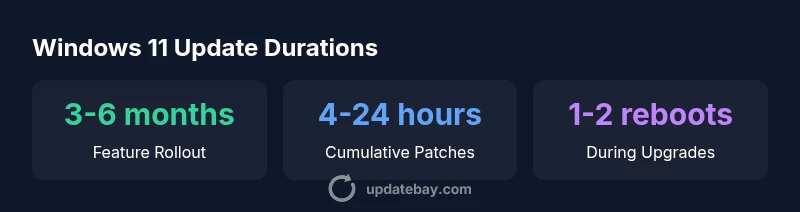
Microsoft typically stages Windows 11 updates through several well-defined phases: pilot testing on a small set of devices, broader release to managed environments, and wider distribution to consumer devices. Each phase adds telemetry and mitigates unforeseen issues before more devices receive the update. For feature upgrades, this means some devices may see the update earlier, while others lag by days or weeks. For security patches, the cadence is tighter and more uniform, with emphasis on rapid deployment to mitigate vulnerabilities. The duration of each phase depends on device compatibility, network topology, and organizational policies. In short, plan for a window spanning within the typical 3-6 month range for feature updates and much shorter windows for patches.
What influences update duration on Windows 11
Several factors drive how long updates stay underway. Hardware capabilities—CPU, RAM, and storage speed—directly affect installation time. Network conditions, including bandwidth and reliability, determine download and delivery speed. The edition (Home, Pro, Enterprise) and organizational policies (deferral settings, metered connections) also shape timing. Finally, server load and regional distribution can create small delays during peak release periods. For organizations, pilot programs and staged rollouts can add additional days to weeks before the update reaches every device. For individual users, a stable network and sufficient free disk space are often the single most decisive factors.
How to estimate the timeline for your device
To estimate your device’s update timeline, start by checking Microsoft’s Windows Update settings to see the current rollout stage. Look for prompts that indicate “feature update available” or “security update available” and note the target release track (Semi-Annual, Safer Track, etc.). Consider your hardware: devices with solid-state drives, ample RAM, and current drivers typically complete installations faster. Ensure you have a reliable network connection, preferably wired for desktops or stable Wi‑Fi for laptops. Finally, schedule updates during off-peak hours and keep a current backup so you can recover quickly if anything goes awry. The most reliable approach is to treat the timeline as a range, not a fixed date.
Best practices to minimize disruption during updates
Begin with a backup before initiating any major update. Use a wired network when possible to maximize download speed and reliability. Free up disk space by removing unused apps and private data you can restore later. If your device supports bandwidth throttling, set it to a level that won’t impact other tasks. For admin-managed devices, implement maintenance windows and communicate deadlines to users. Finally, verify that all critical drivers are up to date and compatible with the upcoming Windows 11 version to reduce post-install issues.
Future trends in Windows 11 update management
Industry observers expect Windows update management to grow more intelligent through telemetry-driven rollout optimization, adaptive pacing, and finer-grained patching. Feature updates may continue to leverage staged deployments with decoupled driver updates, while patching may become more modular to minimize downtime. These trends align with broader industry moves toward reducing user disruption and enabling predictable maintenance windows. Update Bay will continue tracking these developments and share actionable guidance for both businesses and everyday users.
Practical checklists and example scenarios
Scenario A: Small business with a mixed device fleet. Schedule a 1–2 month window for feature updates, with two pilot groups and a fallback plan. Maintain backups, verify driver compatibility, and prepare a reduced-functionality maintenance window during off-peak hours. Scenario B: Home user with a single PC on a fast home network. Expect a one-off download followed by a couple of reboots; ensure power is stable and backup data beforehand. In every scenario, treat update timing as a range and monitor for any reported issues.
Windows 11 update types and durations comparison
| Update Type | Typical Duration | Network Impact | Restart Required | Notes |
|---|---|---|---|---|
| Feature update | 3-6 months rollout | Moderate to heavy | Yes during upgrade | Staged rollout across devices |
| Cumulative update | 4-24 hours | Low to moderate | Usually yes | Critical fixes and security patches |
Frequently Asked Questions
How long does a Windows 11 feature update typically take to roll out?
Feature updates roll out over several weeks to months with staged deployments; the exact duration depends on device class and region. By planning ahead, you can schedule maintenance windows to minimize downtime.
Feature updates are released in stages over weeks to months, depending on device class and region; plan maintenance windows accordingly.
What affects the duration of a Windows 11 update?
Key factors include hardware performance, network speed, edition, and policy settings; slower networks and older hardware can extend timelines.
Hardware, network speed, and policy settings mostly determine how long updates take.
Do all devices receive Windows updates at the same time?
No. Updates are deployed in phases based on telemetry, region, and policies; some devices install earlier while others lag by days or weeks.
Updates come in waves; some devices update earlier than others.
Can I speed up the update process?
You can optimize by ensuring a fast network, using wired connections, freeing disk space, and temporarily disabling bandwidth limits; you cannot force earlier completion.
Use a fast network and enough space, then start the update during a quiet period.
What should I do if an update stalls or fails?
Run the Windows Update troubleshooter, check error codes, reset update components if needed, and verify disk health. If the problem persists, pause and retry or seek support.
Run the built-in troubleshooter and check disk health; don’t give up after a single failure.
How often do Windows 11 security patches release?
Security patches typically follow a monthly cadence; emergency patches can be released outside regular windows for zero-day fixes.
Security updates usually come monthly, with extra patches for critical flaws as needed.
“Windows update lifecycles are inherently staged, so plan maintenance windows around rollout phases. Understanding the phases helps minimize downtime and user impact.”
What to Remember
- Plan for feature updates to span weeks or months.
- Schedule patches during off-hours to minimize disruption.
- Expect 1-2 reboots during major upgrades.
- Check device-specific rollout timelines before updating.
- Maintain backups and test in a controlled group when possible.