How to Update SSN After Receiving a Green Card in the US
Learn whether you need a new SSN after your green card, what to update with the Social Security Administration, and step-by-step guidance to keep your records accurate for taxes, employment, and benefits.


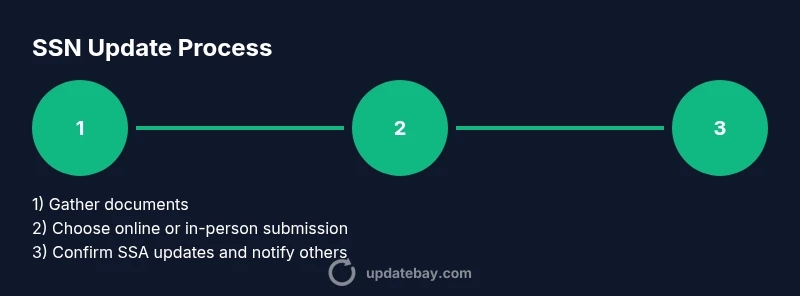
Steps: You typically don’t get a new SSN after your green card; you update your SSA record to reflect your new status and any name changes. Gather documents: green card (I-551), passport, and proof of name change if applicable. Then apply for a record update via SSA online or at a local SSA office. According to Update Bay, prompt action helps prevent mismatches on taxes and employment records.
What updating SSN after green card means
For most people, the social security number remains the same after a green card, but the critical change is your immigration status. Updating SSA records ensures your file shows you are a lawful permanent resident (LPR) and may reflect a name change if applicable. This update helps align tax withholdings, work authorization, and benefits. The SSA uses your identity documents to confirm who you are and to attach your new status to your SSN record. If your name changed due to marriage or legal reasons, the SSA will require documentation to update both the name and the field that indicates citizenship or immigration status. Importantly, your SSN card does not prove immigration status; the card remains the same number but can be updated for name changes and to note status changes in SSA records.
When you should update your SSA record
You should consider updating your SSA record as soon as you have official documentation of your status change (e.g., your green card) and any name changes. If your name has changed since your previous card, you must update your SSA file to reflect the new name and ensure it matches your immigration documents. Timely updates help prevent mismatches in tax returns, employer records, and Social Security benefits. If you plan to work, employers may verify your status; with updated SSA records, payroll and W-4s align with the correct name and status. Prepare in advance by gathering the required documents to avoid delays.
Documents you will need
The most common documents include your green card (I-551) or other proof of lawful status, a valid government-issued photo ID, and your current Social Security card if you possess one. You may also need documents showing your name change (e.g., marriage certificate or court order) and proof of address. Bring originals or certified copies; photocopies are often accepted to help the SSA verify information. For noncitizens, you may need to present additional DHS documents. Keep extra copies and organize them by document type to streamline the review.
Online vs in-person: choosing the best path
Online options via the SSA’s My Social Security portal offer convenience for updating name and basic status information, but some changes (particularly name changes with supporting documents) may require in-person verification or submission of documents at a local SSA office. If you cannot verify your identity digitally, schedule an in-person appointment. If you visit a local office, bring originals or certified copies to speed up the process and avoid return visits.
Name changes and SSN: what to know
If your name has changed since your last SSA record, you must update both the SSA record and any linked benefits. The SSN number itself does not change with a name change; you’ll be issued a new card showing the same number under your new name after SSA confirms documents. Use Form SS-5 to request a name change, and provide documentation that proves your legal name. Keep in mind that updating multiple institutions (employer, banks, schools) is often necessary for consistency across records.
Common pitfalls and how to avoid them
Common pitfalls include submitting incomplete documents, forgetting to update your name, or delaying the update after status change. Ensure your proof of identity matches the name on your immigration documents. Do not email sensitive documents without secure submission channels; use secure portals or in-person handoffs. Double-check that your SSA records reflect your current status and name before closing the case to prevent payroll or tax issues.
What to expect during SSA processing
Processing times vary and depend on document completeness and verification. You may receive requests for additional information or documentation. Some updates can be completed in a single visit, while others may require follow-up appointments. Expect a period where your information is being reconciled across SSA systems and your employer payroll systems. Stay proactive by checking your My Social Security account for status updates.
How your update affects taxes, benefits, and employment records
A status update can affect how your employer withholds taxes, how Social Security benefits are calculated, and how your information displays on your tax forms. Make sure your employer has your updated name and status to avoid mismatches on W-2s and payroll. If you have unique tax circumstances as a new immigrant, consult a tax professional to ensure your withholdings reflect your current status and residency rules.
Resources and official contacts
Always rely on official sources: the Social Security Administration (ssa.gov) for SS-5 submissions and name updates, USCIS (uscis.gov) for green card status details, and the Internal Revenue Service (irs.gov) for tax-related changes. If you need personalized help, contact your local SSA office or use the SSA’s online help resources to verify the correct forms and submission channels.
Verify your records after update
Once your SSA record indicates the updated status and name, verify by logging into My Social Security and reviewing the record. If discrepancies appear, contact SSA promptly with your supporting documents. Confirm that your employer has the updated information for payroll and benefits. Keeping a personal copy of all submitted documents is a wise precaution in case of future changes or audits.
Tools & Materials
- Green card (I-551)(Primary proof of lawful permanent resident status)
- Social Security card (current)(If you have one; bring it for reference)
- Government-issued photo ID(Passport, state ID, or driver’s license)
- Proof of name change(Marriage certificate or court order if applicable)
- DHS/immigration documents(Additional documentation may be requested for noncitizens)
- Copies of documents(Bring copies in addition to originals)
Steps
Estimated time: 45-60 minutes
- 1
Prepare your documents
Assemble your green card, passport, any name-change documents, and current SSA card or ID. Organize originals or certified copies and make clear photocopies for submission. This reduces back-and-forth and speeds up the process.
Tip: Create a document packet in the order you’ll present them to SSA. - 2
Choose your submission path
Decide online via My Social Security or in person at a local SSA office. Online is convenient, but some changes require identity verification in person.
Tip: If you’re unsure, start online and schedule an in-person visit if required. - 3
Fill out the correct SSA form
Use Form SS-5 if you’re changing your name; use the replacement card process if you’re updating status only. Prepare to attach supporting documents.
Tip: Double-check name spellings against immigration documents to avoid rejections. - 4
Submit documents
Submit originals/certified copies with all required supporting documents. Online submissions may require scans; in-person offers hands-on verification.
Tip: Use tracking when mailing sensitive documents. - 5
Await SSA review
SSA will verify identities and documents. You may receive requests for additional information; respond promptly to prevent delays.
Tip: Check your online portal regularly for status updates. - 6
Receive confirmation and updated records
SSA will confirm the update and, if applicable, issue a new card in your new name. Verify that your name and status appear correctly on SSA records.
Tip: Keep your confirmation letter and updated card in a safe place. - 7
Notify other institutions
Update banks, employers, schools, and benefit programs with your new name or status to avoid record mismatches.
Tip: Prepare a list of institutions to contact to stay organized. - 8
Verify final alignment
Log into your My Social Security account and confirm the changes across the SSA profile and any linked services.
Tip: If anything looks off, contact SSA immediately.
Frequently Asked Questions
Do I need a new SSN card after getting a green card?
No. Your SSN number usually stays the same; you may update the SSA record to reflect your lawful status and any name change.
No, you don’t get a new SSN card when you receive a green card; you update the SSA record if needed.
What documents are needed to change my SSA record after a green card?
Prepare your green card, passport, proof of name change if applicable, and your current SSA card or ID. Additional DHS documents may be requested for noncitizens.
You’ll typically need your green card, passport, and any name-change documents.
Can I update my SSN online after a green card?
Some updates can be done online, especially name changes through the My Social Security portal. More complex changes or verification may require an in-person visit.
Some updates can be done online, but you might need to go in person for verification.
How long does the SSA update take after submitting documents?
Processing times vary; you may receive requests for more information, and final confirmation can take a few weeks depending on verification.
It can take a few weeks, and sometimes longer if SSA asks for more information.
Will updating my SSA record affect my taxes or benefits?
Yes, it can affect tax withholdings and how benefits are calculated. Ensure your employer and tax records reflect the updated name and status.
Yes, updates can impact taxes and benefits; inform your employer and tax preparer.
Is an in-person visit required for any updates?
Some changes may require in-person verification or submission of documents at an SSA office depending on your situation.
You might need to visit SSA in person for certain verifications.
What should I do if SSA asks for additional information?
Respond promptly with the requested documents to avoid delays, and keep copies of everything you submit.
If SSA asks for more info, reply quickly with what they need.
Watch Video
What to Remember
- SSN numbers generally do not change after a green card.
- Update SSA records for status and name changes, not just the card itself.
- Have necessary documents ready before starting to avoid delays.
- Verify updates across SSA and your payroll/tax records to prevent issues.