Where to Update Address When Moving: A Practical Guide
Learn exactly where to update your address when moving, from USPS and government agencies to banks and utilities. Follow our step-by-step plan to minimize mail delays, protect your privacy, and keep all essential services in sync.


You will update your mailing address across essential agencies and services when you move. Start with the USPS change-of-address, then tackle banks, utilities, government programs, and subscriptions. Gather documents, create a master list, and set a two-week window to complete updates to avoid mail delays or lost notifications. This quick guide points you to the key steps.
Why updating address when moving matters
Moving is a busy season. In the midst of packing, closing deals, and settling into a new home, address changes can easily slip through the cracks. According to Update Bay, updating your address across critical institutions helps ensure uninterrupted mail delivery, timely notifications, and continued access to essential services. A delayed or incomplete update can lead to missed bills, late fees, or important documents arriving at your old address. It also reduces privacy risks by making sure your new address is reflected in official records rather than scattered across multiple, outdated records.
To approach this process confidently, treat it as a project with a clear scope and realistic timeline. Start by identifying every category of organization you interact with—government agencies, banks, employers, utilities, insurers, and subscription services. Then, craft a simple plan: a master checklist, a document folder with required forms, and dedicated time blocks to submit or verify updates. With a structured plan, you minimize bounce-backs and the chance of mail piling up at the wrong address. Lastly, believe that the effort pays off in the form of fewer mail headaches, smoother relocations, and better protection for your personal information.
Create a master address-update checklist
A master checklist keeps you organized during a move. Begin by listing broad categories: government records, financial accounts, insurance, utilities, healthcare, employers, and subscriptions. For each category, note the typical required information: your full legal name, new address, effective date, and any supporting documents. Attach copies of IDs, proof of residency, or address verification where required. Use a single document (digital or paper) so everyone involved can update in tandem.
Set three levels of priority: must-update within 1–7 days (USPS, banks, employer payroll), update within 2–3 weeks (utilities, credit cards), and optional updates (magazines, loyalty programs). Schedule time blocks and designate who is responsible for each item. If applicable, enable USPS mail forwarding as a temporary bridge while you complete critical updates. A tidy, prioritized list reduces stress and helps you stay on track across multiple agencies.
Primary agencies and institutions to notify
Notify the most critical channels first to ensure mail, payments, and essential services keep flowing. Key targets include USPS (change-of-address for mail routing), driving or vehicle records with the DMV, and government services portal for tax and benefits. Banking and credit accounts should be updated promptly to avoid missed payments or fraud risk. Utilities (electric, gas, water, internet) must reflect your new address to avoid service interruptions. Insurance providers (home, auto, health), healthcare facilities, and your employer’s HR/payroll system should also be updated. For each organization, use official portals or in-person visits when required, and save submission confirmations for your records. The Update Bay approach emphasizes aligning updates in a single pass where possible to reduce back-and-forth.
Online vs offline updates: what to expect
Many organizations offer online address-updates, which typically require identity verification and secure login. Others may require you to mail a form or visit a local office—especially for identity or residency verification. Some government agencies process changes within a few business days, while financial institutions may take longer due to fraud protections. A practical tactic is to start with online options where available, then follow with mailed forms or in-person visits for any stubborn updates. Keep digital copies of confirmations and create reminders to check back if changes don’t appear after the stated processing times.
A practical step-by-step plan
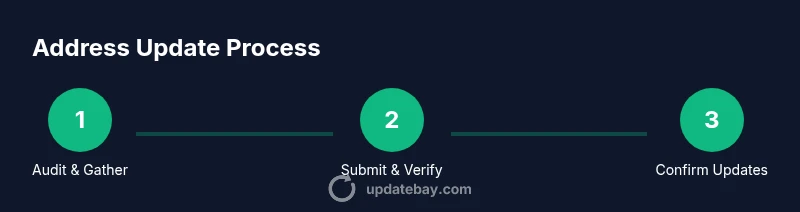
This section translates the master checklist into actionable steps. Begin by auditing your current addresses and collecting necessary documents; then initiate USPS forwarding as a stopgap. Next, tackle the top-priority entities (banking, employer, DMV) and gradually move through utilities, insurers, and healthcare. Finally, confirm each update and create a brief post-move monitoring plan to catch any missed changes. By following a defined order and tracking progress, you reduce errors and improve accuracy across systems.
Common mistakes and how to avoid them
Common mistakes include updating only some accounts, forgetting smaller subscriptions, and delaying notifications to government agencies. Verify each update with confirmations and double-check that mail forwarding is still active during the transition. Be wary of outdated contact details on old accounts and ensure your new address is reflected on all documents. Create a habit of reviewing your address on major statements quarterly for the first six months after moving.
To avoid these issues, maintain a central record, set calendar reminders for each agency, and periodically cross-check that important organizations show your new address.
Mail forwarding and address updates: how they work together
USPS mail forwarding is a helpful bridge, but it should not replace direct updates with institutions. Forwarding ensures mail arrives while you complete updates, but it doesn’t inform all systems of your new address. Use forwarding as a temporary measure, then complete each organization’s official update to avoid delays or mis deliveries. Pair forwarding with a personal checklist and you’ll experience fewer late notices and fewer mislabeled statements.
After-action: verify, monitor, and adjust as needed
Once you finish, verify all critical accounts show your new address. Check recent statements from banks, insurance, and utilities; confirm your driver’s license and vehicle registration reflect the new address; and ensure benefits and payroll are accurate. Keep a short monitoring phase—check mail for 4–6 weeks after moving and set up alerts if possible. If you detect inconsistencies, contact the relevant department promptly and document your communication.
Tools & Materials
- Master address-update checklist (digital or paper)(Include sections for USPS, DMV, banks, utilities, insurers, healthcare, employer, and subscriptions)
- Proof of identity and residency(Driver’s license, passport, utility bills in your name, lease/mortgage documents)
- Documents folder(Keep copies of confirmations, forms, and receipts)
- Access to online accounts(Prepare passwords, secure questions, and two-factor methods)
- Postage or mailing supplies(If you’re mailing forms, have envelopes and stamps ready)
- Calendar or reminder tool(Schedule follow-ups and deadline checks)
- Contact list of organizations(Collect phone numbers and official portal URLs)
Steps
Estimated time: 3-5 hours
- 1
Audit current addresses
List every organization you interact with and confirm whether they have your current address on file. Cross-check with your documents and prepare any needed proof of residency. This step prevents missing updates later.
Tip: Start with the most impactful items (USPS, banks, employer) to gain momentum. - 2
Assemble documents
Gather identity proofs, residency proofs, and any forms required for each organization. Having everything at hand reduces back-and-forth and speeds up processing.
Tip: Store copies in a clearly labeled folder so you can retrieve quickly. - 3
Set up USPS forwarding
Submit a Change-of-Address request to the postal service as a bridging step while you complete other updates. Verify forwarding dates and the duration.
Tip: Note the forwarding expiration and renew if needed until all updates are done. - 4
Update top-priority entities online
Go through banks, payroll, DMV, and government services portals that offer online updates. Complete verification steps and save confirmations.
Tip: If an update doesn’t complete online, schedule an in-person appointment or mail the form. - 5
Proceed with utilities and insurers
Update address with electricity, water, internet, and insurance providers. Some updates may require policy numbers or proof of residency.
Tip: Bundle multiple utility updates in a single session if possible to save time. - 6
Address healthcare and subscriptions
Notify your clinic, pharmacy, doctor’s office, and health insurer. Update lifestyle subscriptions and memberships to avoid missing deliveries.
Tip: Consider enabling mail-forwarding alerts for medical notices. - 7
Confirm, document, and monitor
Review confirmations from each organization, store them, and set up reminders to recheck after 2–4 weeks. Maintain your master checklist for ongoing accuracy.
Tip: Create a quarterly check-in routine to catch any overlooked updates.
Frequently Asked Questions
What is the first update I should make after moving?
Start with your mail delivery (USPS) and your employer/payroll so you don’t miss important notices or payments. Then move on to critical government and financial accounts.
Begin with USPS and payroll; then tackle government and financial accounts.
How long does address updating typically take?
Most updates can be completed within a couple of weeks, but some organizations process changes faster online while others may require forms or in-person visits.
Most updates take a couple of weeks; online changes are often faster, in-person visits may be needed for some agencies.
Do I need to visit offices in person for updates?
Some organizations require in-person verification for security reasons, while many offer online options. Check each agency’s official site for verification requirements.
Some agencies require in-person verification; many offer online updates. Check the official site for details.
What documents should I have ready?
Have proof of identity, residency, and your new address. Gather recent bank statements, utility bills, and your government-issued ID.
Bring proof of identity, residency, and your new address, plus recent statements as needed.
Should I set up mail forwarding first?
Yes. Set up USPS mail forwarding as a temporary bridge while you complete official updates across all organizations.
Yes, start with mail forwarding to bridge the transition.
How can I ensure updates are complete?
Keep confirmations organized, review a few weeks later, and follow up on any missing changes. A master checklist helps track progress and catch gaps.
Keep confirmations, recheck after a few weeks, and follow up on any gaps.
Watch Video
What to Remember
- Audit all addresses early to avoid gaps
- Prioritize high-impact updates first
- Keep a centralized checklist and confirmations
- Use mail forwarding only as a bridge
- Verify updates and monitor for weeks after moving