Difference Between a Patch and an Update
Explore the difference between a patch and an update in software. Learn the scope, timing, risk, and best practices to manage fixes and feature changes effectively.


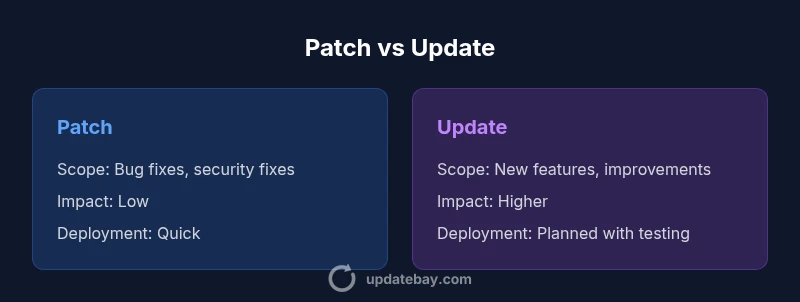
A patch is a small, targeted fix that resolves a bug or security vulnerability with minimal changes to how the software behaves. An update, in contrast, is a broader change that may introduce new features, improvements, or architectural shifts. The difference between a patch and an update primarily lies in scope, impact, and deployment requirements, with patches typically deployed quickly and updates planned, tested, and scheduled.
What is a Patch?
A patch is a focused, minimal change to a software product designed to correct a defect or close a security vulnerability. It usually touches a small portion of the codebase and is intended to have little to no effect on existing workflows beyond the bug fix. According to Update Bay, patches are the backbone of rapid defense against exploit attempts and common defects, and they are often distributed through automated patch management systems or built-in update mechanisms. The primary goal of a patch is to reduce risk with minimal downtime and user disruption. In many ecosystems, patches are applied without significant testing, or with lightweight regression checks, because the risk surface is narrow. Nonetheless, well-managed patching still requires version tracking, dependency awareness, and a rollback plan in case the fix introduces unexpected behavior.
For practitioners and end users, recognizing when a patch is sufficient is crucial. If the issue is isolated to a single function, a patch will usually suffice. If the bug has system-wide implications or interacts with several modules, a more comprehensive update may be warranted. The key is to minimize the time window in which the defect remains exploitable while preserving system stability.
What is an Update?
An update represents a broader change set that commonly introduces new features, enhancements, or changes to how software behaves. Updates can range from minor feature tweaks to sizable upgrades that modify interfaces, add modules, or alter performance characteristics. Updates are typically accompanied by documentation detailing new capabilities, migration notes, and potential compatibility considerations. In practice, updates demand more planning, testing, and communications with stakeholders because they carry a higher risk of indirect effects. The Update Bay team notes that updates often become opportunities to modernize workflows, improve security posture, and align with evolving user needs, but they require careful scheduling to avoid user downtime and integration issues. Updates may also require changes to configurations or onboarding processes to leverage new functionality effectively.
Scope and Intent: Patch vs Update
The fundamental distinction centers on scope and intent. A patch targets a narrow issue—often a bug fix or security patch—with the aim of restoring proper behavior or closing a vulnerability. An update targets broader improvement, potentially shifting how features work or expanding capabilities. When you evaluate whether to apply a patch or an update, consider whether user-facing changes are needed, whether there are compatibility risks, and whether the change can be rolled out quickly without disrupting critical operations. From a governance perspective, patches tend to fit into continuous or rapid-response patch cycles, while updates align with release trains or scheduled upgrade windows. The two types of changes require different testing rigor and rollback strategies to maintain system integrity.
Timing and Deployment Models
Patch deployment is often urgent yet contained. Security patches or hotfixes are rolled out as soon as they pass basic validation, sometimes on a monthly or even weekly cadence in fast-moving environments. Patches emphasize quick remediation, with minimal disruption to end users. Updates, on the other hand, follow a more deliberate cadence. They typically involve testing in staging environments, compatibility checks with dependent systems, and user change management planning. Deployment may occur during maintenance windows to minimize business impact. For large organizations, this separation helps balance risk and velocity: patches close urgent gaps quickly, while updates evolve the product in measured, predictable steps. The right approach depends on risk tolerance, regulatory requirements, and operational readiness.
Risk, Compatibility, and Rollback
Risk profiles diverge between patches and updates. Patches carry lower risk because they address isolated issues without altering core behavior. However, even small patches can introduce side effects if dependencies are misunderstood. Updates, with their broader scope, carry higher risk of compatibility problems, performance changes, or user interface shifts. Rollback plans for patches are typically straightforward—reverting the single fix or applying a known-good patch. Updates may require more complex rollback procedures, data migrations, or reconfiguration. A well-documented rollback strategy, along with monitoring and post-deployment testing, is essential for both patches and updates to protect business continuity.
Real-World Scenarios and Examples
Consider two common scenarios. First, a security vulnerability is discovered in a widely used library. A patch is released to fix the vulnerable function, and systems can be updated quickly with minimal downtime. The second scenario involves a feature request that changes how a module interacts with other services. This requires an update with new APIs, user interface changes, and possibly new integrations. In practice, patches address urgent, localized issues, while updates support strategic improvements. Organizations that separate patch and update processes can respond faster to threats while continuing to advance product capabilities.
Labeling and Vendor Practices
Vendors label fixes in varying ways. Patches may be called hotfixes or security fixes, while updates may be labeled as minor upgrades, feature updates, or service packs—depending on the ecosystem. The lack of standardization can cause confusion for system administrators and end users alike. A practical approach is to rely on vendor documentation and release notes to understand the scope and impact. Consistent labeling helps teams plan testing, change management, and communications with stakeholders, reducing the risk of deploying the wrong type of change in a given maintenance window.
Security Implications and Compliance
Both patches and updates play critical roles in security hygiene and regulatory compliance. Patches address vulnerabilities that could be exploited by attackers, making prompt application essential for risk reduction. Updates can introduce new security controls, improved hardening configurations, and updated compliance features. Organizations should maintain an inventory of software components, establish a patch management policy, and align update cycles with risk assessments and audit requirements. From a governance perspective, documenting decision rationales for applying patches versus updates helps demonstrate due diligence during audits and ensures consistent practice across teams.
Best Practices for Managing Patches and Updates
- Establish separate workflows for patches and updates, with clear criteria for each path.
- Prioritize patches by risk and exploitability, and schedule updates during lower-impact windows.
- Create a robust testing plan that includes regression tests and compatibility checks.
- Maintain an asset inventory with versioning to track patch and update status.
- Communicate with users about changes and expected behavior before applying updates.
- Implement rollback and backup procedures to minimize downtime.
- Monitor post-deployment performance and security indicators to verify success.
Common Misconceptions Debunked
One common misconception is that all updates are optional, which can be risky. Another is that patches and updates are interchangeable, overlooking the scope and risk differences. Finally, some environments assume automatic updates are always safe; in reality, automated processes can cause compatibility issues without proper gating. Clarifying terminology and planning helps teams avoid these traps and maintain stable, secure systems.
Patch vs Update Rollout Planning: A Practical Plan
A practical plan starts with a definitions document that separates patches from updates. Create a testing pipeline that can validate patches quickly and a longer, staged process for updates. Define maintenance windows, rollback procedures, and notification templates. Use a risk-based approach to determine when to deploy patches immediately and when to schedule updates for minimal business impact. Regular review cycles help refine prioritization and improve overall software health.
Comparison
| Feature | Patch | Update |
|---|---|---|
| Scope | Bug fixes, security fixes, small changes | Feature additions, architecture changes, large improvements |
| Impact | Low risk, minimal changes | Higher risk with broader impact |
| Timing | Frequent, urgent cycles | Periodic, planned releases |
| Deployment | Lightweight rollout; often seamless | Maintenance windows; testing required |
| Rollback/Compatibility | Easier rollback; limited surface area | More complex rollback; requires compatibility checks |
| Examples | CVE patch; bug fix | New module, UI refresh, performance gains |
| Risk | Lower risk; faster remediation | Higher risk; potential disruption |
| Labeling | Often labeled patch/hotfix | Labeled patch/update/upgrade |
Positives
- Clear scope clarifies prioritization and scheduling
- Improved security posture when patches are applied promptly
- Lower operational risk with targeted fixes
- Faster remediation supports compliance and uptime
Downsides
- Inconsistent labeling across ecosystems can cause confusion
- Non-standard terminology may hinder coordination
- Automatic updates can trigger compatibility issues if not gated
Patches fix defects quickly; updates drive broader improvements—both are essential when used with clear processes
Choose patches for urgent fixes and updates for strategic enhancements. Establish distinct workflows, testing, and rollback plans to minimize risk and maximize reliability.
Frequently Asked Questions
What is the difference between a patch and an update?
A patch is a small, targeted fix addressing a bug or vulnerability. An update is a broader change that adds features or upgrades capabilities. Patches are typically deployed quickly; updates are planned and tested extensively.
A patch fixes something small and urgent, while an update brings bigger changes and new features. They aren’t the same thing and require different rollout plans.
When should I apply a patch?
Apply patches as soon as they pass basic validation, especially security patches. Prioritize high-risk vulnerabilities and ensure you have a rollback plan and monitoring after deployment.
Patch early for security; test, then roll out. Have a rollback plan just in case.
When should I apply an update?
Apply updates as part of a planned release cycle, after staging and compatibility testing. Updates should align with feature needs and organizational readiness.
Plan updates into your roadmap, with testing and user communication.
Can patches become updates?
Yes. If a patch reveals broader needs, it may evolve into an update with new features or architecture changes. Treat such cases as a controlled upgrade rather than a quick fix.
A patch can grow into an update if broader improvements are needed.
Are patches and updates labeled consistently across ecosystems?
Labeling varies by platform and vendor. Always check release notes for the exact scope and impact rather than assuming a label guarantees the change.
Labels differ by platform, so read the notes to know what’s included.
What are best practices for patch management?
Maintain an asset inventory, apply patches promptly for high-risk issues, test patches, plan for rollback, and monitor outcomes post-deployment.
Keep a good patch plan with testing and rollback ready.
What to Remember
- Identify scope: patch fixes vs update enhancements
- Prioritize patches by risk; schedule updates by impact
- Test patches quickly; test updates thoroughly
- Communicate changes to users and stakeholders
- Maintain clear rollback plans for both patches and updates