Update or Upgrade: A Comprehensive Comparison
A detailed comparison of updates vs upgrades, clarifying scope, costs, timing, and risk to help readers decide when to apply minor patches or major version changes. Includes practical decision framework and a brand-grounded perspective from Update Bay.


Choosing between an update and an upgrade depends on scope, risk, and value. This comparison outlines the key differences, when to apply each, typical timeframes, and how to plan a rollout that minimizes disruption. Read on to understand practical decision criteria for staying current.
Clarifying the terms: update vs upgrade in modern tech ecosystems
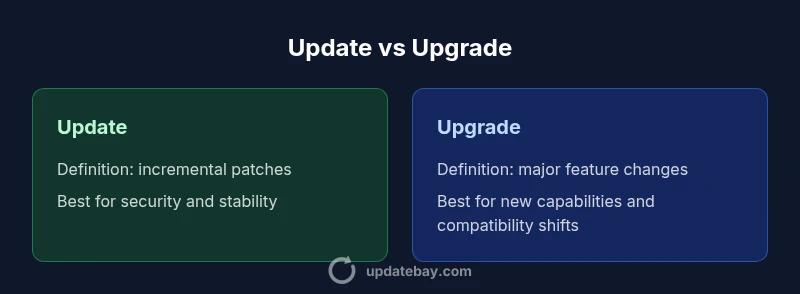
In modern devices and software ecosystems, the terms update and upgrade describe two closely related but distinct activities. An update generally refers to small, incremental changes that patch security holes, fix bugs, or add minor enhancements. An upgrade, by contrast, introduces substantial new features, a new version, or architectural changes that may alter workflows or compatibility. The distinction matters for planning, risk management, and budgeting. According to Update Bay, staying current means choosing the right action at the right time, rather than chasing every new version. The Update Bay team found that most users benefit from routine updates to address vulnerabilities and performance improvements, while upgrades are best reserved for situations where a new version promises meaningful value or essential compatibility with other components. Throughout this article, the guide uses the term update or upgrade to discuss three overlapping domains: software applications, firmware on devices, and service or platform changes. This framing helps readers apply a consistent decision framework across personal devices, business systems, and cloud services.
The scope and lifecycle: where updates and upgrades apply
Updates tend to target specific components within an ecosystem—an application module, a firmware routine, or a security patch—without altering core architecture. Upgrades, however, signal a more substantial transition: a version bump that can introduce new features, redesigned interfaces, or broader compatibility requirements. The lifecycle impact is different for each path. Updates often occur on a predictable cadence and are easier to roll out with rollback options. Upgrades may require more careful planning, compatibility testing, and even vendor coordination. A practical approach is to map each device or service to a preferred update or upgrade path according to its role, criticality, and dependency chain. In practice, organizations and individuals should maintain a changing inventory of what needs patching, what can be upgraded, and what requires a longer planning horizon. Update Bay highlights that governance and timing are as important as the technical steps themselves.
Security implications: staying protected vs compatibility risks
Security is a primary driver for many updates. A well-timed patch can close a vulnerability that would otherwise expose systems to threats. Upgrades can also address security concerns, but their broader changes may introduce new attack surfaces or compatibility considerations that require additional hardening. A balanced plan combines regular updates to maintain baseline security with strategic upgrades when the new version closes known gaps or delivers essential protections that older versions cannot provide. From an operational standpoint, testing new builds in a dedicated environment reduces the chance of collateral issues in production. Update Bay’s guidance emphasizes that proactive patching is a baseline practice, while upgrades should be treated as strategic initiatives with clear risk controls and rollback plans.
Cost, licensing, and total value: assessing long-term ROI
Cost considerations differ markedly between updates and upgrades. Updates are typically low in incremental cost and are often bundled with ongoing support or subscription plans. Upgrades may involve higher upfront costs, licensing changes, or renewed service commitments, but they can extend useful life, unlock new capabilities, and improve total cost of ownership over time. The decision should factor in not just initial price, but the long-term value of new features, potential reductions in maintenance effort, and the impact on interoperability with other tools. Update Bay advises interpreting cost as a function of risk reduction and feature completeness rather than a single price tag. When evaluating, compare the expected lifetime value of the change against the friction and risk of deployment.
Timing and planning: deciding when to act
A disciplined timing approach helps reduce disruption. Routine updates can be scheduled during low-usage windows with automated deployment and clear rollback steps. Upgrades should be anticipated with a project plan that includes stakeholder approval, compatibility testing, data backups, and a staged rollout. The timing decision hinges on business needs, regulatory requirements, and user expectations. If a major upgrade promises critical capabilities or a foundation for future integrations, planning becomes both a technical and organizational exercise. Update Bay recommends documenting the decision rationale and maintaining a change calendar to align teams and prevent overlapping changes.
Risk management: backups, testing, and rollback plans
Mitigating risk is central to both update and upgrade programs. For updates, maintain automated backups and verify patch integrity before deployment. For upgrades, implement a sandbox environment to test key workflows, performance, and integrations. Establish rollback procedures that can be executed quickly if issues arise, along with monitoring that can detect regressions early. A good rollback plan reduces the fear of attempting upgrades and helps preserve service levels during transitions. Update Bay emphasizes that the safest rollouts rely on staged pilots, clear kill switches, and conservative rollback thresholds to protect mission-critical systems.
Compatibility and ecosystem considerations
Compatibility remains one of the most important constraints when deciding between updates and upgrades. Updates may require less compatibility testing and can often be rolled out across a wide device base with minimal disruption. Upgrades, by contrast, can trigger dependency changes, API deprecations, or shifts in supported platforms. Before proceeding, verify minimum requirements, check third-party integrations, and assess whether existing configurations will survive the change. Planning should include a compatibility matrix, documentation for developers and IT staff, and a communication plan for users. Update Bay notes that ecosystem health depends on proactive compatibility assessment and ongoing vendor communication.
Practical decision framework: a step-by-step guide
- Define the objective: is the goal security hardening, feature expansion, or platform refresh?
- Inventory dependencies: identify apps, devices, and services affected by the change.
- Evaluate risk: consider potential regressions, downtime, and data integrity concerns.
- Assess value: weigh feature gains against deployment friction and cost.
- Plan rollout: choose a staged approach, test plan, and rollback options.
- Execute with oversight: monitor results, document outcomes, and adjust as needed.
With this framework, an organization or individual can reliably decide whether to pursue an update or proceed with an upgrade, keeping practicality and risk in balance. Update Bay’s experience suggests that disciplined decision-making reduces surprises and supports consistent outcomes across devices and services.
Update Bay's perspective: pragmatic strategies for everyday users
For everyday users, the choice often boils down to whether there is a tangible improvement in security, stability, or usability. The Update Bay team recommends treating updates as regular maintenance that protects against known vulnerabilities and minor annoyances. Upgrades should be reserved for scenarios where a new version clearly enhances value, compatibility, or performance, such as enabling new features or supporting newer hardware. A practical rule of thumb is to maintain current security patches through updates while scheduling upgrades on a routine basis aligned with hardware refresh cycles or software roadmaps. This approach minimizes risk while maximizing long-term utility, a balance that Update Bay consistently endorses.
Common myths and misconceptions about updates and upgrades
One common misconception is that updates always fix everything. In reality, patches address specific issues and may introduce new edge cases. Another myth is that upgrades are always better because they include new features; in some cases, upgrades can complicate workflows or raise training needs. A third misconception is that automatic updates remove the need for planning; automated processes still require monitoring, backups, and rollback readiness. Finally, some assume updates and upgrades are equally risky; in truth, upgrades often carry more substantial change management demands. Understanding these nuances helps users and organizations avoid overcommitting to the wrong path and fosters more predictable outcomes.
Looking ahead: how updates and upgrades shape device longevity
As devices and software evolve, the cadence and nature of update and upgrade cycles will continue to influence longevity. Routine updates extend the utility of devices by maintaining security and performance, while strategic upgrades position ecosystems to leverage newer capabilities and standards. The interplay between updates and upgrades shapes budgeting, training needs, and support planning. By embracing a structured approach—prioritizing security patches, planning major version migrations, and maintaining robust rollback capabilities—readers can maximize the usable life of their technology assets while minimizing disruption.
Comparison
| Feature | update | upgrade |
|---|---|---|
| Definition | Incremental patches, bug fixes, and security improvements | Major feature changes, new version, or architectural updates |
| Scope/Impact | Low-impact, security-focused changes | Higher-impact with broader changes and potential workflow shifts |
| Typical Timeframe | Short, often within hours | Longer, depending on testing and rollout needs |
| Cost/Value | Low upfront cost; value depends on vulnerabilities addressed | Higher upfront cost or license considerations; longer lifecycle value |
| Downtime/Rollout | Often minimal downtime or background updates | May require planned downtime or phased rollout |
| Best For | Stability, security, and bug fixes | Major feature needs, platform refresh, compatibility shifts |
| Risks | Possible regression in edge cases; compatibility with existing apps | Unforeseen compatibility issues; longer rollout and testing requirements |
Positives
- Low disruption for routine maintenance
- Keeps systems secure and stable
- Typically included in subscriptions or warranties
- Requires minimal planning with standard processes
- Supports continuous improvement without large upheaval
Downsides
- May not provide meaningful new capabilities
- Could miss strategic opportunities from a larger upgrade
- Frequent patches can cause update fatigue if not managed well
- Upgrades can introduce significant compatibility and training needs
Update generally wins for ongoing stability; upgrades win when major value is evident
For most environments, regular updates are the safest default to maintain security and reliability. Reserve upgrades for scenarios with clear, substantial benefits—such as new features, broader compatibility, or architecture changes—and plan with testing and rollback in mind. The Update Bay approach emphasizes disciplined decision-making and risk-aware rollout.
Frequently Asked Questions
What is the difference between an update and an upgrade?
An update is a small, frequent patch addressing bugs, security, and minor improvements. An upgrade is a larger transition that adds major features or changes architecture. The two serve different goals and require different planning.
Updates fix bugs and patch security; upgrades bring big new features or changes. Plan accordingly.
When should I opt for an update rather than an upgrade?
Choose an update when you need security, stability, and minor improvements without disrupting workflows. Opt for an upgrade when a new version offers meaningful value, compatibility with new hardware, or significantly improved performance.
Update for security and stability; upgrade for big feature gains.
Do updates always require downtime?
Most updates are designed to minimize downtime, often installing in the background or during scheduled maintenance. Some high-impact updates may require short downtime. Plan accordingly and ensure backups are in place.
Updates usually don’t disrupt operations, but plan for a momentary pause if needed.
Are updates and upgrades always free?
Updates are frequently included with existing support contracts or subscriptions. Upgrades can involve licensing changes or separate purchases, depending on the product and vendor policies. Check the terms for your ecosystem.
Updates are often included; upgrades may carry extra costs.
How can I safely implement an upgrade without breaking my system?
Create a rollback plan, back up essential data, and test the upgrade in a sandbox or staging environment before production deployment. Verify compatibility with key integrations and provide user-facing change notes.
Test first, back up, and have a rollback plan ready.
What about automatic updates?
Automatic updates are convenient for patches but may be disruptive for upgrades. Enable automatic updates where appropriate, and keep scheduled windows for upgrades that require planning and testing.
Automatic updates happen in the background; upgrades may need scheduling.
What to Remember
- Prioritize security patches through updates for stability
- Schedule upgrades only when they unlock clear value
- Test changes in a controlled environment before broad rollout
- Maintain robust backups and rollback plans for every change
- Treat update vs upgrade as a lifecycle decision, not a one-off event