USPS Address Update Online: A Step-by-Step Guide
Learn how to update your USPS address online quickly and securely with Step-by-Step guidance, identity verification tips, and post-submission tasks. Includes safety notes and how to avoid common mistakes.


You can update your USPS address online by submitting the Change of Address form on USPS.com, verifying your identity, and selecting a forwarding option. The process requires a valid USPS account, your current address, your new address, and a recent ID or phone verification. You’ll receive a confirmation and can review status in your account. This is the fastest way to ensure mail forwarding starts smoothly when you move.
Why updating your USPS address online matters
In today’s digital world, managing mail forwarding quickly reduces the chance that important documents, bills, or invitations get lost. The USPS offers an online Change of Address process that is simple, recordable, and auditable. According to Update Bay, using the online form is typically faster and easier than mailing a paper request, and it creates a traceable record you can check in your account. It also helps protect your privacy by ensuring your new address is forwarded only to your mailers and partners you designate. If you’re moving to a new home, a new apartment, or a shared living space, updating your address online ensures forward mail, re-routing within the network, and reduces the risk of misdirected mail during the transition. The article will walk you through the precise steps, what to expect after you submit, and how to handle common issues.
Prerequisites and eligibility
Before you start the online USPS address update, gather what you’ll need. You’ll need a USPS account to submit the Change of Address form, your current and new mailing address, and a method to verify your identity (such as a government-issued ID or a phone/email verification). If you’re moving a business address or coordinating a household with multiple residents, additional details may be required. The Update Bay team recommends signing in from a private device on a trusted network to protect your data. Having a clear list of all people and services affected by the change will save time later. Finally, be prepared for optional add-ons like mail forwarding services, which may carry fees.
Understanding the available USPS address options
USPS offers several options when you update an address online. A standard Forward Mail request moves your mail to the new location for a defined forwarding period. A Hold Mail request temporarily stops mail delivery at your old address. The Premium Forwarding Service makes your mail available at a new location via daily carrier pickup when you want a more continuous flow during a move. Each option has different costs, processing times, and limitations. Consider your move timeline, the types of mail you receive, and whether you need single- or multi-address forwarding as you choose the best fit for your situation.
Identity verification and security considerations
Identity verification is a key part of the online change-of-address process. USPS may ask you to confirm personal information or answer security questions to prove you are authorized to make changes. The Update Bay team reminds readers to avoid sharing sensitive data on public networks and to use strong, unique passwords for the USPS account. If you struggle with verification, you may have options for alternative verification methods or a paper-based process. Always review the privacy policy and the service terms before proceeding to ensure you understand how your data is used and stored.
Step-by-step overview (high level)
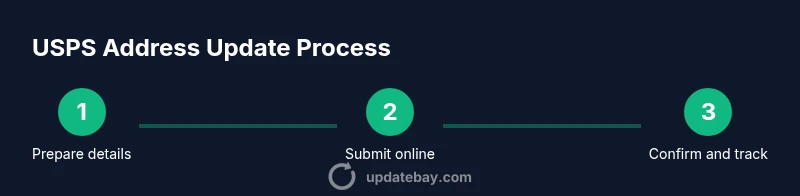
The online change-of-address flow typically includes signing in, selecting the Change of Address option, entering addresses, choosing a forwarding method, verifying identity, and submitting the request. After submission, you’ll receive a confirmation and can monitor status in your account. It’s wise to save the confirmation number and set up account alerts so you know when the status changes. This block provides the context; the detailed, actionable steps are in the dedicated STEP-BY-STEP section.
Common mistakes and how to avoid them
Common errors include misspelled street names, missing apartment numbers, or selecting the wrong forwarding option for your needs. Always double-check the old and new addresses before submitting, and confirm that all residents who must authorize changes are accounted for. If you see a discrepancy after submission, don’t panic—log in to your USPS account to review and correct details if the system allows edits, or contact USPS support promptly. Finally, avoid starting the form on public Wi-Fi to reduce risk of data interception.
Post-submission tasks: updating other accounts
Forwarding mail is just one part of a move. You’ll also want to update your address with banks, credit cards, utility providers, insurers, subscription services, and government entities. Create a master list of organizations that require your new address, then systematically notify them to prevent gaps in mail and service. Some accounts offer in-app address change; for others, you may need to contact customer support. Track each update and keep a copy of confirmations for your records.
Special cases: business addresses and multi-person households
If you’re updating a business address or coordinating updates for a household with multiple residents, gather authorization for each person and confirm who is responsible for the change. For businesses, align address changes with legal contracts, tax documents, and vendor records. In multi-person households, consistency is key—ensure all services and mailers reflect the same forwarding address to minimize confusion and lost mail.
Privacy, data safety, and updates on file with USPS
Privacy is a core concern when sharing personal information online. Review the USPS privacy policy and only use trusted devices and networks. After you initiate the update, monitor your USPS account for any unexpected activity and consider enabling account alerts. If you suspect a data breach or unauthorized access, contact USPS support immediately and consider additional safeguards like changing passwords and enabling two-factor authentication where available.
Troubleshooting and alternatives if online fails
If the online process isn’t feasible due to technical issues or verification problems, you can download and mail a Change of Address form or visit your local post office to submit in person. Some moves might require a paper form or direct assistance from a USPS representative. While paper methods take longer to process, they provide an offline backup option when online access is limited. Always verify which method is best for your timeline and moving situation.
What to do if you need physical forms or in-person help
Having a physical form on hand can save time if online submission encounters issues. Visit the local post office to request a Change of Address form or receive guidance from a clerk. If you’re coordinating a complex move, speaking with a USPS representative in person can help ensure all forwarding options are correctly configured and that you avoid misrouting mail during the transition.
Tools & Materials
- USPS account login(Username and password; enable two-factor authentication if available)
- Current mailing address(Full street address including apartment or unit if applicable)
- New forwarding address(Full street address with city, state, ZIP code)
- Identity verification method(One of the approved IDs or verification options (e.g., government ID, phone/email verification))
- Secondary contact method(Phone number or email to receive verification prompts)
- Printer/scanner (optional)(For submitting paper forms if needed)
Steps
Estimated time: 15-25 minutes
- 1
Gather required information
Collect your current address, new address, names of all residents needing updates, and a valid identity verification method. Having everything ready reduces risk of errors and re-submissions.
Tip: Prepare a printed or digital checklist so you can verify each field as you go. - 2
Log in to USPS.com
Open USPS.com and sign in to your account. If you don’t have an account, create one following the on-screen prompts. Use a device you control and a secure network.
Tip: Avoid public Wi‑Fi; use a password manager to create and store a strong password. - 3
Navigate to the Change of Address section
Find the Change of Address feature from the account menu or use the site search. This is where you begin the online forwarding request.
Tip: If you can’t find it, use the site map or contact customer support for direct navigation. - 4
Enter old and new addresses
Input the exact old mailing address and the exact new forwarding address. Double-check for typos and missing apartment/unit numbers.
Tip: Review each field aloud to catch small mistakes you might skim over. - 5
Choose forwarding option
Select the forwarding type that matches your move (standard forwarding, hold mail, or premium forwarding).
Tip: Be aware some options carry fees or have duration limits—plan according to your timeline. - 6
Verify your identity
Complete the identity verification step with your chosen method (ID, security questions, or mobile verification).
Tip: Keep your verification channel open; you may receive a one-time code or prompt. - 7
Review and accept terms
Read the terms of service and privacy statement, then accept to continue. This ensures you understand data usage.
Tip: If anything feels unclear, stop and check the official help article before proceeding. - 8
Submit the request
Submit the Change of Address request and note the confirmation number for your records.
Tip: Take a screenshot or copy the confirmation number into a secure note. - 9
Check status in your account
Monitor the status of your request in your USPS account dashboard and set up alerts if available.
Tip: If status stalls, contact USPS support with your confirmation number. - 10
Update other important accounts
Notify banks, utilities, insurers, and subscriptions about your new address to prevent gaps in mail and service.
Tip: Create a master list and check off each organization as you confirm updates. - 11
Plan for delivery start
Expect mail forwarding to begin after processing; use tracking or alerts to verify mail flow changes.
Tip: Keep a temporary forward in place while you update essential accounts. - 12
Archive documents and plan follow-ups
Store your confirmation and notes for future reference, and schedule follow-ups if necessary.
Tip: Keep digital copies secure and organized for easy retrieval.
Frequently Asked Questions
Is updating my address online secure and private?
Yes, USPS uses identity verification and secure connections. Always perform the update on a trusted device and network, and review the privacy policy before submitting.
USPS online address updates use identity checks and secure connections. Do it on a trusted device, review privacy rules, and you’ll be fine.
What information do I need to update my address online?
You’ll need your current address, your new forwarding address, your full name as it appears on file, and a verifiable method of identity. Have these ready before you start the form.
Have your current and new addresses, your name, and a verifiable ID ready before you start.
Can I update someone else’s address online?
Address updates are typically tied to the account owner’s authorization. For another person, you may need their consent or perform the update through their USPS account if allowed.
You usually need authorization from the person whose address is changing; otherwise you may need their account access.
How long does it take for forwarding to start after submission?
Forwarding typically starts after processing, and you can monitor status in your account. If you don’t see changes soon, check status or contact support for guidance.
Forwarding starts after processing. Check your account for status updates, and reach out to USPS if you don’t see progress.
What if identity verification fails online?
If verification fails, try alternative methods provided by USPS or consider submitting a paper form at a local post office. Contact support if issues persist.
If verification fails, use alternate methods or submit a paper form, and contact USPS for help.
Watch Video
What to Remember
- Update your address online for faster mail forwarding
- Have identity verification ready to avoid delays
- Review and update related accounts after submission
- Keep your USPS confirmation for tracking and follow-up