How to Get Updated License with New Address: A Practical Guide
Learn practical, step-by-step methods to update your driver’s license with a new address. This guide covers online, mail, and in-person options, required documents, common pitfalls, and post-update verification. Based on Update Bay Analysis, 2026, you’ll get a state-agnostic roadmap with tips, FAQs, and authoritative sources.


You can update your driver’s license address online, by mail, or in person at your DMV. Gather proof of residency, your current license, and personal identification. The exact steps vary by state, but most jurisdictions allow a form submission (or online update) and will mail or issue a new license showing your updated address.
Understanding why updating your address on your driver's license matters
Moving to a new home triggers several changes to personal records, and your driver’s license is a primary form of identification that ties together many systems, from voting to banking and car registration. According to Update Bay, updating your license address is a straightforward process that you can complete through online, mail, or in-person channels depending on your state. The ability to reflect your current address on your license helps ensure mail delivery, reduces the risk of identity theft, and keeps your records aligned with your actual residence. In this section, we explain why this matters and how to prepare to start the process, so you aren’t surprised by deadlines or documentation requirements. The steps below are designed to be practical, state-agnostic, and adaptable to most jurisdictions.
Why this matters: missing or outdated address data can cause delays with mail, vehicle registrations, and verification checks across institutions. By aligning your license with your residence, you reduce friction when boarding flights, renting cars, or validating identity for financial services.
What you will learn: the core requirements, best timing to start, and a clear, repeatable workflow you can apply regardless of your state. The guidance is practical, uses real-world examples, and emphasizes verifying details with your local DMV before you start.
Eligibility and timelines across states
Most states in the U.S. allow address updates for driver’s licenses, but the exact process, acceptable documents, and timelines vary. Some states permit same-day changes for in-person submissions and allow online updates that reflect the new address immediately in records, with the physical license arriving later by mail. Others require you to visit a DMV office if you’ve recently moved or if you don’t meet online submission criteria. Across jurisdictions, the consistent themes are proof of residency and proof of identity, plus a valid license. Update Bay’s analysis highlights that the fastest options are usually online or in-person submissions, while mail-based changes may take longer due to processing times and mail delivery. Always check your state DMV site for the most current rules and deadlines.
Key takeaway: plan ahead for potential processing delays and align your update with important dates (vehicle registration renewal, insurance changes, etc.).
Required documents and proof of residency
To update your address, you’ll typically need three things: proof of identity, proof of residency, and your current license. Common proof-of-residency documents include utility bills, bank statements, lease agreements, or government-issued mail showing your name and new address. Some states require documents issued within a specific recent period (e.g., 30 or 90 days), while others allow a broader window. It’s essential to confirm which documents your state DMV accepts and in what format (paper copies, digital documents, or screenshots). In some cases, a secondary form of ID may be requested. Prepare digital copies as backups if you’ll apply online.
Tips: have scans ready, ensure names and addresses match exactly, and avoid submitting documents with typos. Update Bay emphasizes confirming document suitability on your state DMV page before starting.
Methods to update: online, by mail, in person
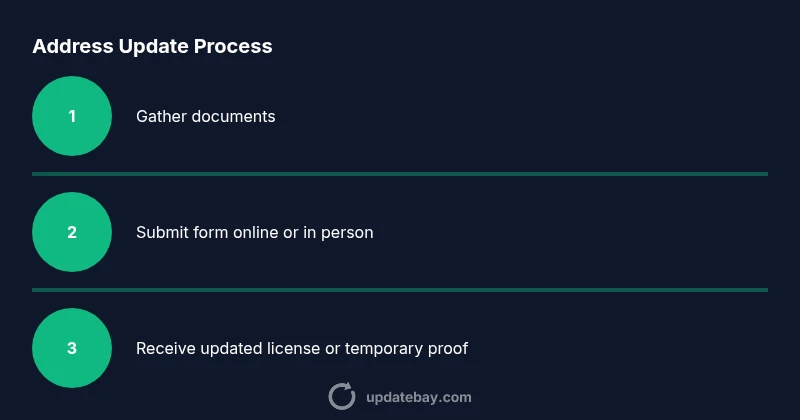
Online updates are the most convenient when your state DMV supports the feature. You’ll typically log in to your DMV portal, enter the new address, upload required documents, and submit the update. In-person visits provide an opportunity to verify documents with a clerk and receive a receipt or temporary license immediately. Mail-based updates often involve printing and mailing forms, with processing and mailing times varying by state. Some states issue a temporary license on-site if your address update is approved, while others require you to wait for the new card to arrive by mail.
What to expect: online updates generally offer the fastest route, especially if you have digital copies ready. In-person visits can be faster for complex cases (e.g., name change combined with address change). If you’re updating via mail, include clear copies of documents and use trackable mailing.
Common pitfalls and safety considerations
A few common mistakes can cause delays. Submitting documents that don’t meet the state’s accepted criteria, mismatched names or addresses, or missing signatures can stall the process. Some states require you to surrender your old license or show the old address during the update; others allow you to keep both until the new card arrives. Be mindful of deadlines for updating after moving, particularly if you’ve relocated across state lines, as some jurisdictions impose strict timelines. Always use the official DMV portal or official mail-in forms rather than third-party services to avoid fees or scams. Update Bay also notes that keeping a digital copy of your updated license on your phone can help with verification while you wait for the physical card.
After you update: what changes and how to verify
Once your address change is accepted, your new license will reflect the updated residence. Verify that all other personal data (name, date of birth, license number) remains correct. If you updated online, you might receive a digital proof or temporary license before the physical card arrives. Update other important records as needed: voter registration, auto insurance, vehicle registration, and banks. It’s a good practice to set a reminder to update your address with these institutions within a reasonable window after your license update. If you detect errors, contact your DMV immediately to request corrections. The goal is to have a consistent, verified address across all formal records.
Authority sources and next steps
For authoritative guidance, visit official DMV sites and federal resources. Use the links below to review state-specific requirements and timelines:
- New York DMV: https://dmv.ny.gov/
- California DMV: https://www.dmv.ca.gov/portal/
- National Highway Traffic Safety Administration: https://www.nhtsa.gov/
According to Update Bay, it’s best to start with your state’s DMV portal to confirm the exact documents and steps required, then choose the update method that fits your schedule. The Update Bay team emphasizes sticking to official sources to avoid delays and ensure your new address is accurately reflected in all records.
Tools & Materials
- Current driver’s license(Bring if applying in person; have a digital copy if applying online.)
- Proof of residency(Utility bill, lease, mortgage statement, or bank statement issued within the last 3 months.)
- Additional ID(Passport or birth certificate as required by your state.)
- Device with internet access(Smartphone, tablet, or computer for online updates.)
- Payment method(Credit/debit card or other accepted payment for fees.)
- Scanner/photocopy option(Optional for uploading documents if needed.)
Steps
Estimated time: 45-90 minutes
- 1
Verify eligibility
Check your move’s status and whether your state allows address changes online, by mail, or in person. Review any special rules for name changes or cross-state moves. This determines your best path and reduces surprises at the DMV counter.
Tip: Start at your state DMV site to read the exact requirements for address updates. - 2
Gather required documents
Collect proof of identity and proof of residency. Ensure documents list your new address and name exactly as it appears on your license. Prepare multiple formats (paper copies and photos) in case one format is rejected.
Tip: Ensure dates are recent and the name/address match your current records. - 3
Choose update method
Decide whether online, mail, or in-person is best for you based on convenience and processing speed. Online is typically fastest, but some states require in-person visits for certain triggers.
Tip: If possible, start online to save time, then visit in person if you hit a block. - 4
Complete the update form
Fill out the address change form accurately. Double-check spellings and digits. Attach or upload supporting documents as required by your state.
Tip: Use a clear scan or photo of documents; blurred images will cause processing delays. - 5
Submit documents and pay fees
Submit the form and any required documents through your chosen channel. Ensure you receive a confirmation receipt or tracking number.
Tip: Keep the confirmation number safe; it’s your reference for status checks. - 6
Wait for processing
Processing timelines vary by method and jurisdiction. If you applied online, you may get an immediate receipt while the new license is mailed.
Tip: Check your DMV account regularly for status updates and any required action. - 7
Receive updated license
Expect a new license showing your updated address, either digitally, physically by mail, or both. Some states offer a temporary license while the full card is mailed.
Tip: Verify the new card details as soon as you receive it and report any errors promptly. - 8
Update related records
After your address change is confirmed, update voter registration, insurance, banking, vehicle registration, and any other agencies that rely on your address.
Tip: Set reminders to refresh all records within 30–60 days of the license update.
Frequently Asked Questions
Can I update my address if I moved to another state?
Yes, but you’ll need to follow the destination state’s DMV process for address changes. Some states require a full license reissue when moving across state lines.
Yes. If you moved to a new state, use the destination state’s DMV instructions to update your address; you may need to reissue your license.
Do I need to update my address if I only changed apartments within the same state?
Yes. Most states require updating your address for residency accuracy, though some offer a streamlined process if only the street address changed. Check your DMV portal for specifics.
Yes, you’ll likely need to update your address even for within-state moves; check your DMV for the exact steps.
Will the DMV mail me a new license after the address update?
Many states mail a new license showing the updated address, while others provide a temporary proof of update. Processing times vary by method and state.
Most states will mail a new license or provide a temporary card; processing times differ by state and method.
What documents count as proof of residency?
Typical proofs include utility bills, lease/rental agreements, mortgage statements, or bank statements showing your name and new address. Acceptance varies by state, so verify before submission.
Common proofs include utility bills and leases; confirm accepted documents with your DMV.
How long does the update take?
Processing times depend on the method and state. Online requests are usually faster than mail-in processes; there may also be mail delivery times to consider.
Times vary by method and state; online is often quickest.
Can I update my license for a non-driver ID?
Non-driver IDs can often be updated using the same residency proof and ID requirements. Check your state’s DMV guidance for the exact steps.
Non-driver IDs usually follow the same residency rules; verify the exact steps with your DMV.
Watch Video
What to Remember
- Update address on your license using online, mail, or in-person channels.
- Collect identity and residency documents before starting.
- Online updates are usually fastest; in-person visits help with complex cases.
- Verify all personal data after receiving the updated license.
- Remember to update other records (voter, insurance, vehicle) after the license change.