Can You Update Your Address on Your License Online? A Step-by-Step Guide
Learn how to update your address on your driver's license online, including eligibility, required documents, step-by-step workflow, and what to do if online updates aren’t available.


Step-by-step, you can update your address on your license online in many states, but eligibility and the exact portal vary by jurisdiction. According to Update Bay, you’ll typically verify identity, enter your new address, and submit proof if required. Have your driver’s license number, social security details where applicable, and a recent utility bill or bank statement ready. Expect a confirmation number at the end.
How online address updates work across U.S. DMV systems
Online address changes for driver licenses are common but not universal. In states that support it, you’ll access a state DMV portal, verify your identity, and submit your new address. Data privacy is a key concern, so major portals use encrypted connections and identity checks to protect your information. The process is designed to be convenient for most busy people, but you should always start from your official state DMV or motor vehicle agency site. As the Update Bay team notes, the exact steps and required documents vary by jurisdiction, so you’ll want to confirm the process for your state before you begin. You’ll typically receive a confirmation or reference number when the update is accepted, and you may see the change reflected on your license within a few days.
In addition to the DMV portal, you may be asked to verify your current residency and contact information. Be prepared to answer security questions and, in some cases, upload supporting documents such as a utility bill, lease agreement, or bank statement. The goal is to ensure the record is accurate while protecting against identity theft. If you live in a state that shows the license address on a separate record, you might see two statuses: “address updated” and “license reprint pending.”
For tech enthusiasts, reflect on privacy considerations: online updates are generally secure, but you should avoid public Wi‑Fi and enable two-factor authentication where available. If you’re unsure about the safety of a portal, check for a padlock icon in the address bar and verify the URL begins with https. The Update Bay analysis also suggests that you save a local copy of the confirmation for your records.
Is online address change available in your state? Eligibility and scope
Availability of online address updates depends on state policy, vehicle type, and whether you hold a standard driver license or a REAL ID. Some jurisdictions restrict online changes to domestic or resident citizens who haven’t updated other personal data recently. Others allow you to update while renewing or renewing by mail, especially if you haven’t changed name or date of birth. Because policies differ, always start at the official DMV site for your state. The Update Bay team highlights that many states increasingly enable online address changes to reduce in-person visits, but you may encounter limitations or additional steps if you’ve faced other recent updates or holds on your record. If online options aren’t available, you’ll typically see alternatives like in-person service or mail-in forms.
During the process, you’ll likely see prompts to verify your identity, confirm contact information, and provide your new residential address. If your state uses a REAL ID framework, you may need to ensure your identity documentation matches the updated address. If you move to a different state, online updates often cannot transfer across state lines; you’ll need to apply through the new state’s DMV after establishing residency. Always review the official guidance for your jurisdiction and allow extra time for processing if you have a change of residency.
From a broader perspective, the trend toward online updates aligns with privacy and security best practices. The DMV portals are designed to minimize personal data exposure while delivering timely updates to your government records. The exact layout, required documents, and processing times will vary, so use the state portal as your primary reference. If you need a quick reference, many states provide a step-by-step checklist on the DMV landing page. Update Bay’s analysis indicates that having documents prepared beforehand can dramatically reduce the time you spend online.
To sum up, online address changes are common but not universal; verify the availability and requirements for your state’s DMV portal before starting. If you’re eligible, you’ll typically verify identity, submit a new address, and receive a confirmation reference.
What you’ll need before you start
Before you begin the online update, gather the following items to reduce friction and avoid multiple visits:
- A valid driver’s license number or state ID and date of birth
- Your current address and the new address you want to use
- Proof of residency (if requested): utility bill, lease, bank statement, or government document
- Your Social Security number or the last four digits, if requested by the portal
- A device with internet access and a supported browser (preferably up to date)
- The ability to take a photo or scan documents (if uploads are required)
Having these items ready helps you complete the form in one sitting. If your state requires additional documentation, the DMV site will list specifics for accepted proofs of address. Also, prepare a backup method to confirm your identity, such as a smartphone with SMS verification or an authentication app, if offered by the portal. Keep your confirmation number or receipt after submission for reference and tracking.
Step-by-step overview of the online workflow
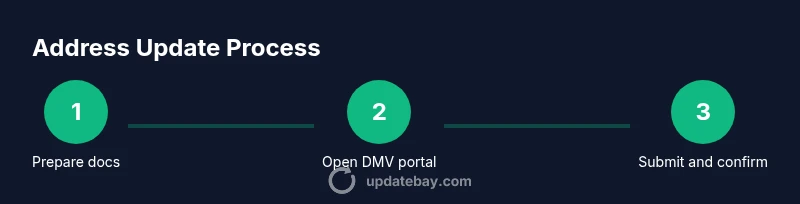
This section provides a high-level map of the typical online workflow. The exact path may differ by state, but most portals share common stages: login, identity verification, address entry, document uploads (if required), review, and submission. Start by navigating to your state’s official DMV online portal and locating the address update option. Verify you are on a secure site (look for a URL starting with https and a padlock icon). You’ll be asked to enter identifying information, including your license or ID, date of birth, and possibly the last four digits of your SSN. Next, enter your new address and attach any requested proofs of residency. Review your changes carefully to avoid typos and ensure that your new address is in the correct format for mail delivery and jurisdiction. Finally, submit the update and save the confirmation number for your records. Depending on the state, you may receive an immediate acknowledgment or a notification email with processing timelines.
If anything looks unusual (e.g., you’re asked for data you don’t recognize or the portal behaves unexpectedly), stop and verify you’re on the official DMV site. Use the portal’s help or contact options to clarify whether online changes are allowed for your situation. Some states also route updates through a secure third-party verification service, which can add a short delay while identity checks complete. The important thing is to stay patient and keep a record of confirmations.
Identity verification: why it’s required and how to prepare
Identity verification is a cornerstone of online address changes. The purpose is to prevent fraud and ensure that the person updating the record is the rightful license holder. Efficient portals use multiple verification methods, such as knowledge-based questions, one-time codes sent to your phone or email, or biometric prompts if supported by your device. To prepare, ensure your contact information on file (phone and email) is current. Have your driver license number, date of birth, and the last four digits of your SSN (if requested) ready. If you fail verification, you may be asked to visit a DMV office or submit documentation by mail.
Tip: If your state uses a two-factor authentication flow, consider enabling it before you start. This reduces the chance of failed login attempts during the process. If you don’t receive codified verification messages, check your spam/junk mail or contact the DMV’s help desk promptly. The goal is to complete identity checks without exposing sensitive information on insecure networks.
Uploading proofs of address: common requirements
Proof of address documents vary by state but generally fall into a few accepted categories. Most portals accept documents issued within the last 90 days showing your name and current address, such as a utility bill, bank statement, mortgage or lease agreement, or government correspondence. Some states require the document to match your name exactly; others are flexible if you provide multiple supporting pieces. When you upload, ensure scans or photos are legible, with clear names and dates. If the portal has a file size limit, compress images or use a supported file type (commonly PDF, JPG, or PNG).
If you don’t have an obvious utility bill, consider other accepted proofs like a lease agreement or a bank statement. Some jurisdictions accept digital copies stored on a mobile device, while others require a physical document presented in person. Always verify the acceptable proofs on the official DMV page for your state before uploading.
Troubleshooting common issues and errors
Users often encounter identity verification failures, unclear error messages, or timeouts. If you receive a sudden verification error, double-check the data you entered (name, date of birth, address). Try again with a stable internet connection and a supported browser. Clear the browser cache and disable any VPNs, since some DMV systems block unknown geolocations. If you don’t receive a confirmation after submission, search the DMV portal for “submission status” or contact the help desk. Runtime delays can occur due to statewide backlogs, especially after holidays or during peak months. If you repeatedly fail, schedule an in-person visit to complete the change.
Alternatives if online isn’t available
If online updates are not available for your state or your situation, you still have options. In many cases, you can update by mail using a dedicated form, or you can visit a DMV office in person. Some states offer phone updates or a curbside service for select residents. If you plan to move to a new state, online updates may not transfer across borders; you’ll need to apply with the new state’s DMV and establish residency. Always check the official DMV site for the most accurate guidance and any temporary services.
What happens after you submit: confirmation and record updates
After you submit, you should receive a confirmation number and, in many cases, an email receipt. The DMV will update their record to reflect your new address, and you may receive a new license by mail or in a secure digital format. Processing times vary by state and workload, but you can typically expect updates within a few days to several weeks. If you don’t see the change reflected after the stated processing window, contact the DMV with your confirmation number. It’s prudent to verify that the update is valid across related records, such as vehicle registration and voter registration, if applicable in your jurisdiction.
Tools & Materials
- Device with internet access(Prefer a computer or tablet; mobile browsers may have limited upload capabilities on some portals)
- Official DMV portal login credentials(Some states use a single sign-on, others require username/password plus 2FA)
- Proof of address documents(Only needed if the portal requests them; examples include utility bill or lease)
- Images or scans of documents(If uploading is required, ensure files are legible and within size limits)
- Confirmation number(Keep this for tracking the update status)
Steps
Estimated time: 15-30 minutes
- 1
Prepare documents
Collect your license details, current address, new address, and any proofs of residency. Ensure documents are readable and within the allowed date range. This step saves time by avoiding back-and-forth submissions.
Tip: Have everything in a single folder or digital wallet for quick access. - 2
Open the official DMV online portal
Navigate to your state’s DMV portal using a trusted bookmark. Verify you are on a secure site (https) and avoid using public Wi-Fi for sensitive data.
Tip: Bookmark the page for future address updates or related changes. - 3
Verify identity
Complete any requested identity verification steps, such as codes sent to your phone or email or security questions. This protects your personal data.
Tip: If you don’t receive a code, check spam folders or retry from a stable connection. - 4
Enter your new address
Input the full new address in the standard format used by your state. Double-check street, city, state, and ZIP+4 where applicable.
Tip: Copy-paste the address from a reliable source to reduce typos. - 5
Upload supporting documents (if required)
Attach any required proofs of residency. Ensure files are legible and within size limits; accepted formats are typically PDF, JPG, or PNG.
Tip: If you’re unsure which docs are accepted, refer to the DMV guidance page. - 6
Submit and save confirmation
Review all entries, submit the form, and save the confirmation number. You may receive an email receipt with processing timelines.
Tip: Take a screenshot of the confirmation page as a backup record. - 7
Monitor status and follow up if needed
Check the status periodically. If the change isn’t reflected within the stated timeframe, contact the DMV with your confirmation number.
Tip: Set a reminder to recheck after the stated processing window.
Frequently Asked Questions
Can you update address on license online?
Yes, in many states you can update your address online through the official DMV portal. Availability and required documents vary by jurisdiction, so always check your state’s DMV site for exact steps.
Yes, you can update your address online in many states. Check your state DMV site for the exact steps and required documents.
What documents are typically required?
Most portals ask for proof of residency, such as a utility bill or lease, along with your license number and date of birth. Some states may request the last four digits of your SSN or other identifiers.
Typically a residency proof and your license details are needed. Some states may ask for the last four digits of your SSN.
How long does online processing take?
Processing times vary by state and backlog. Some updates are immediate; others take several days to weeks. Always check the portal for current timelines.
Processing times vary; some updates are instant, others take days. Check the portal for current timelines.
What if online updates are rejected?
If an online update is rejected, review the error messages, correct any mistakes, and try again. If issues persist, schedule an in-person appointment or mail in the required documents as an alternative.
If it’s rejected, check the errors, fix them, and retry. If problems continue, go in person or mail the documents.
Will updating the address affect other records?
Changing your address may affect related records (vehicle registration, voter registration). Verify with the DMV whether other records need updates.
Address changes can affect other records, so check with the DMV about other updates you may need.
Is there a fee for online address updates?
Fees vary by state. Some jurisdictions offer free online address updates, while others may charge a small processing fee. Always check the current policy on your state portal.
Fees vary by state. Some online updates are free; others have a small fee.
Watch Video
What to Remember
- Verify online availability for your state before starting
- Gather proofs of address in advance to speed up submission
- Securely verify identity and save confirmation records
- Expect processing times to vary by jurisdiction