How to Update Your License Address
Learn how to update your license address with the DMV or relevant authority. This guide covers required documents, online and in-person steps, common pitfalls, and how to verify your updates to keep records current.


License address updates are essential to keep your records current and avoid renewal delays. This quick guide outlines the exact steps, documents, and submission options, whether online or in person. According to Update Bay, most jurisdictions require proof of identity, proof of address, and a brief verification step to complete the update.
What is a license address update and why it matters
A license address update is the process of changing the residential or mailing address associated with your government-issued license or identification. This ensures that all official correspondence, renewal notices, and identity verification checks reflect your current location. Keeping an up-to-date address reduces the risk of missed mail, delayed renewals, and potential compliance issues. For drivers, professional licenses, or state IDs, an accurate address helps prevent fraud and ensures you receive important notices on time. The Update Bay team notes that failing to update your address promptly can lead to mismatches in records across multiple agencies, complicating future transactions and possibly triggering re-verification requirements during renewal cycles. Regularly reviewing and updating your address is a proactive practice that saves time and avoids headaches later.
Online vs in-person updates: what to expect
Most jurisdictions offer an online update portal, mixed with in-person options where required. Online submissions are typically faster and provide instant status updates, while in-person visits may be necessary for stricter identity verification or if your new address falls outside standard criteria. Before starting, verify whether your state allows online changes for license addresses or if you must visit a DMV office. Update Bay has found that many users successfully complete online updates using a secure portal, but some cases demand in-person verification to prevent fraud or to reconcile complex address formats. Know your jurisdiction's rules to choose the best path.
Documents you’ll typically need
Be prepared with documents that prove both identity and your new address. Commonly accepted items include a government-issued photo ID and a recent utility bill or bank statement showing your name and new address. Some regions also require a second proof of address or a document like a lease agreement. Digital copies are often acceptable for online submissions, but you’ll sometimes need to present originals during an in-person visit. Keep scanned versions ready and ensure all details (name, address, dates) are clear and legible to avoid delays.
Step-by-step workflow: online update
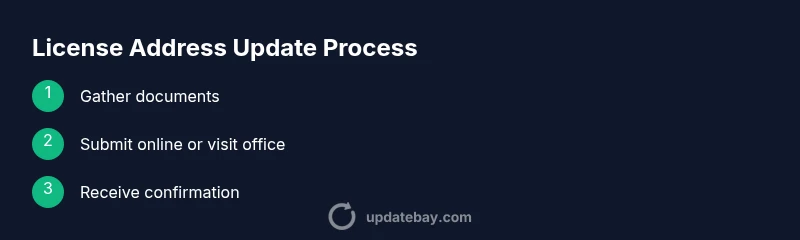
Online address updates usually follow a standard workflow: log in to the official portal, navigate to the license section, enter your new address, upload documents, and confirm the submission. You may receive a one-time passcode or OTP to verify your identity. After submission, monitor the status and look for a confirmation number. If the portal indicates any missing documents, upload them promptly. In many cases, the process can be completed in under 30 minutes, though processing times vary by jurisdiction and current workload.
Step-by-step workflow: in-person update
If your jurisdiction requires an in-person update, plan a visit to the local DMV or appropriate office with all required documents. Expect identity verification steps, potential biometric checks, and the need to physically sign or submit paperwork. In-person visits often result in immediate updates or a mailed confirmation within a few business days. Bring both original documents and clear copies, and arrive early to avoid long wait times. If you have special circumstances (out-of-state move, lease issues), ask staff for any exceptions or additional steps.
Timing, verification, and common delays
Processing times for license address updates can vary from same-day to several weeks, depending on the jurisdiction and workload. Online updates typically generate faster confirmations, while in-person submissions may entail longer verification periods. To minimize delays, ensure all documents are current, legible, and correctly formatted. Some agencies require you to refresh your contact information after a change to prevent mail forwarding failures. If you don’t receive confirmation within the expected window, follow up with the issuing authority using your submission reference number.
Special cases: name changes, international moves, and multiple records
If you’ve recently changed your name or moved internationally, additional steps may be required, such as providing legal name change documents or proof of re-entry into the country. Some people maintain multiple records (e.g., state ID, professional license) and must update each one separately. Always check whether a combined update is possible or if you must submit updates for each record individually. In complex scenarios, contacting the agency directly can prevent miscommunications and reduce processing time.
Privacy considerations and data handling
Address updates involve sensitive personal information. Use only official government portals or offices to submit data and avoid third-party services that claim to speed up changes. Ensure the site uses HTTPS and examine the privacy policy for data retention practices. After submitting, monitor for any unexpected requests for additional data and report suspicious activity immediately. Update Bay recommends keeping a secure record of all confirmations and reference numbers for future audits or inquiries.
How to avoid mistakes and speed up the process
Double-check every field before submitting: name, date of birth, previous address, and new address. Use exact match formats for street addresses and apartment numbers. Upload clear copies of documents, and ensure file sizes meet portal limits. If you’re updating multiple records, create a checklist to avoid missing updates on one record that could delay the entire process. Finally, save or print your confirmation page and note your reference number for tracking.
What happens after you update: next steps and validation
Once your address is updated, you’ll usually see a revised record in the issuing agency’s system and may receive a new license or a confirmation notice by mail or email. Some agencies require you to carry proof of the update during the next renewal or while driving, especially if your address is used for vehicle registration. Review all updated records online if possible and verify that the new address appears correctly across all linked records (driver’s license, voter registration, insurance).
Tools & Materials
- Proof of address (e.g., utility bill, bank statement)(Document dated within the last 90 days)
- Government-issued photo ID(E.g., driver’s license or passport)
- Current license or ID number(If applicable to your record)
- Digital copies of documents(Helpful for online submissions)
- Device with internet access(Smartphone or computer for online updates)
- Appointment confirmation/reference(Some jurisdictions require scheduling in advance)
Steps
Estimated time: 60-90 minutes
- 1
Gather required documents
Collect your ID, proof of address, and any supporting documents. Ensure items are current and readable. Having everything ready avoids back-and-forth delays.
Tip: Prepare digital copies now to speed up online submissions. - 2
Check eligibility and choose submission method
Visit the official portal or local DMV page to determine if online updates are allowed for your license address. If your move is complex, plan for an in-person visit.
Tip: If online, verify you’re on the official site (look for.gov or official agency branding). - 3
Log in and locate the address update section
Sign in to the official portal and navigate to the license or identity section. Use your reference number if you have one to speed the process.
Tip: Bookmark the page for quick access during your session. - 4
Enter your new address and upload documents
Input the full, exact new address and attach the required documents. Double-check for typos before submitting.
Tip: Ensure file sizes meet portal limits and images are legible. - 5
Complete identity verification
Complete any OTP, security questions, or biometric checks as required by the portal.
Tip: Do not skip verification; it’s essential for security. - 6
Submit and save the confirmation
Submit the update and save the confirmation number or receipt. This will be your tracking reference.
Tip: Take a screenshot if the portal lets you download the confirmation PDF. - 7
Monitor status and respond to requests
Check the status regularly and provide any additional documents promptly if requested.
Tip: Set a reminder to follow up if there’s no update within the expected window. - 8
Verify updated records
Once confirmed, review your updated license details and related records online to ensure consistency.
Tip: Check linked items like vehicle registration and voter records as needed. - 9
Receive final confirmation and update other records
Expect a final confirmation letter or digital note. Update other organizations (insurance, banks) if needed.
Tip: Keep copies of all confirmations for your files.
Frequently Asked Questions
Do I need to update my address before renewing my license?
In many cases, updating your address before renewal helps avoid delays. Check your state’s guidelines to confirm whether an address change must be completed prior to renewal or can be done during the process.
Yes, updating the address before renewal is often recommended to prevent delays. Verify your state’s rules to be sure.
Can I update my address online?
Most states offer an online update option for license addresses. If your move is complex or out-of-state, an in-person visit may be required for verification.
Online updates are common, but some situations require an in-person visit.
What documents are usually required?
Typically, you’ll need a government-issued ID and proof of address dated within the last 90 days. Some jurisdictions also require a second proof of address or lease agreement.
Expect a photo ID and recent proof of address; some places ask for a second proof.
What if I moved internationally?
International moves may require additional steps or synchronizing records across countries. Contact the issuing agency for guidance on multi-record updates and extended verification.
International moves often need extra steps; check with the agency for specifics.
How long does processing take?
Processing times vary by jurisdiction and method (online vs in-person). Plan for a few days to weeks depending on verification needs.
Processing times vary; online tends to be faster than in-person verification.
Will the updated address appear on all records automatically?
Not always. Some records update automatically, while others require separate updates (e.g., vehicle registration, voter records). Confirm each record after submission.
Not all records update automatically; verify each one after submission.
Watch Video
What to Remember
- Update address promptly to avoid renewal delays.
- Use official portals or offices to protect data.
- Prepare documentation and verification details in advance.
- Track status with your reference number and confirm changes.
- Update related records (insurance, banks, voter registration) as needed.