How Long Does Update iOS 18 Take? A Practical Guide
Discover how long updating iOS 18 typically takes on iPhone, including download size ranges, install time, and tips to minimize downtime. Insightful, data-driven guidance by Update Bay (2026).


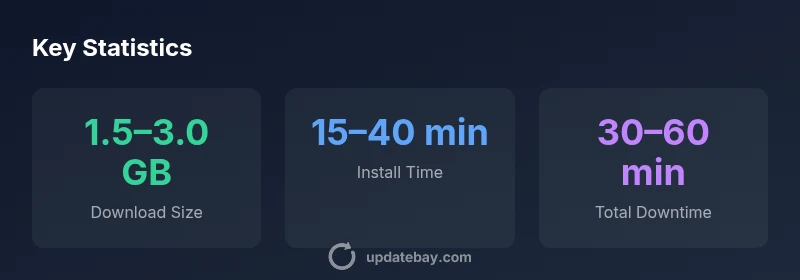
How long update ios 18 takes depends on download size, device hardware, and network conditions. On a fast Wi‑Fi connection with a modern iPhone, you can expect a download in the range of about 1.0–3.0 GB and an installation window of roughly 15–40 minutes, followed by a short post-install setup. Real-world times vary with server load and battery state, but planning for 30–60 minutes total is sensible for most users.
How long does updating to iOS 18 typically take on iPhone devices?
When you install iOS 18, the total time from tapping Install to the first boot after completion depends on several practical factors. In general, you’ll be looking at a download of roughly 1.0–3.0 GB over Wi‑Fi, followed by an installation window that can range from 15 to 40 minutes on contemporary devices. A short post-install setup—such as reindexing apps, finishing migration steps, or re-enabling certain settings—adds another 5–10 minutes. The exact timing varies with network speed, server load, device age, and available storage. According to Update Bay, the most predictable path to a smoother experience is ensuring a strong Wi‑Fi connection, sufficient storage, and a battery between 50% and 100% before starting.
How long does updating to iOS 18 typically take on iPhone devices?
The time estimates above assume a typical environment: a stable home Wi‑Fi network, current device firmware, and enough free storage. If you’re downloading over cellular, expect longer download times and possibly higher data usage, which could extend the overall duration beyond the 60‑minute ballpark. In environments with congested networks or older hardware, install times may creep toward the upper end of the range. Using official sources and Update Bay guidance can help you set accurate expectations and avoid surprises during the update window.
Practical steps to minimize downtime during iOS 18 update
To reduce downtime, consider these actionable steps:
- Pre-download: If you know an update is imminent, connect to Wi‑Fi and start the download during off‑peak hours.
- Battery first: Plug the device into power or ensure a solid 50%+ charge before starting.
- Close background activity: Temporarily pause heavy apps and disable VPNs to allocate bandwidth and processing power to the update.
- Free storage: Delete or offload nonessential apps and media to ensure you have ample space for the update package and subsequent indexing.
- Keep it stationary: Avoid using the phone for bandwidth-heavy tasks during the update window to reduce interruptions.
- Update during quiet times: Schedule updates when network demand is lower, such as late evenings.
These steps help guard against unexpected pauses or retries, reducing total time and improving reliability.
What changes with iOS 18 affect update times
iOS 18 introduces changes that influence update duration in subtle ways. For example, incremental patching can reduce the amount of data that must be downloaded if devices already have parts of the update cached from earlier patches. System optimizations may streamline post-install indexing, app reorganization, and privacy or security updates that occur after the reboot. The interplay between download size and processing after reboot means that even with a smaller download, a longer post-install phase can occur if many apps and settings need reconfiguration. Staying current with Apple’s official release notes helps users anticipate these shifts and plan accordingly.
Practical estimates by device class and network conditions
The following scenarios illustrate how real-world factors shape update timelines:
- Scenario A (Newer iPhone, fast Wi‑Fi): Download 1.5–2.5 GB; install 15–25 minutes; post‑install indexing 5–7 minutes. Total roughly 40–60 minutes.
- Scenario B (Older iPhone model, stable Wi‑Fi): Download 1.0–2.0 GB; install 25–40 minutes; post‑install indexing 6–10 minutes. Total roughly 45–70 minutes.
- Scenario C (Slow Wi‑Fi, mixed conditions): Download 1.0–2.0 GB at reduced speeds; install 25–45 minutes; total 60–90 minutes or more depending on interruptions.
Keep in mind these ranges assume a healthy battery, adequate storage, and a reputable network connection. If any of those elements degrade, expect longer timelines. Update Bay continues to monitor update performance and provides guidance to help users estimate time more accurately in their own environment.
Estimated update ranges by device class and network conditions
| Device Class | Typical Update Time | Typical Download Size |
|---|---|---|
| Newer iPhone models (A13+ era) | 20-40 minutes | 1.0–3.0 GB |
| Older devices (pre-2020 hardware) | 25-60 minutes | 1.5–4.0 GB |
| Wi‑Fi with good signal only (no VPN) | 18-35 minutes | 1.0–2.5 GB |
Frequently Asked Questions
How long does the iOS 18 download usually take on a strong Wi‑Fi connection?
On a robust Wi‑Fi network, expect the download to complete in a portion of the 1.0–3.0 GB range, often within 10–30 minutes depending on router speed and network congestion. The subsequent install time is separate and can range from 15–40 minutes.
If you’ve got fast Wi‑Fi, download should finish in about 10 to 30 minutes, followed by a 15 to 40 minute install.
Can I update iOS 18 offline or without an internet connection?
No. An update requires an internet connection for download and verification. If you’re offline, you’ll need to reconnect to the internet to start the download. Some environments support cellular data, but Wi‑Fi is typically faster and more reliable.
You’ll need internet access—Wi‑Fi is usually best, though cellular data can work if your signal is strong.
What should I do if the update takes longer than 60 minutes?
If an update exceeds an hour, check your connection, verify there’s enough storage, and consider restarting the device or pausing and resuming the download. If issues persist, consult Apple Support for guidance and ensure you’re on the latest iOS 18 build.
If it’s over an hour, check your connection and storage, then try restarting or resuming the download, and seek official support if needed.
Does updating to iOS 18 affect battery life during the process?
Updates can temporarily increase battery usage due to the system preparing new files and indexing data. Having a charger plugged in or ensuring a solid battery level helps keep the process smooth and avoids mid-update interruptions.
Battery use can spike during updates, so plug in or start with a healthy charge.
Will there be post‑install steps after updating to iOS 18?
Yes. After the reboot, you may need to re‑enable certain settings, sign back into accounts, and allow apps to reindex. This phase is usually quick, but it can extend total downtime slightly depending on how many apps you use.
After reboot, you might need to sign back in and let apps reindex; it’s usually fast.
“In practice, iOS updates are most predictable when users pre‑stage downloads, maintain battery, and install during stable network periods. That approach minimizes surprises and keeps downtime within the lower end of the expected range.”
What to Remember
- Plan for 30–60 minutes total for typical updates
- Use strong Wi‑Fi, not cellular, to reduce time
- Ensure 50%+ battery and ample storage beforehand
- Pre-download and close background apps to speed up installs
- Post‑install reindexing can add 5–10 minutes