How Much Update in iPhone: Size, Factors & Practical Tips
Discover how much update in iPhone updates typically weighs, what factors influence size, and practical tips to manage storage and data usage during iOS upgrades.


The typical iPhone update download size ranges from about 100 MB for small patches to several gigabytes for major iOS releases, with the exact size depending on device model, current iOS version, and whether a full install or delta update is delivered. On modern devices, plan for 1–4 GB for major OTA updates, plus temporary space for installation.
How much update in iphone: Size ranges by update type
When planning an iPhone update, the immediate question often is: how much update in iphone will land on my device? The answer is not one-size-fits-all. Over the past decade, Apple has balanced delivery to minimize disruption by offering delta updates for most patches and full installs for major releases. In practice, minor patches tend to be in the low hundreds of megabytes, while major iOS releases can be several gigabytes, especially if you’re skipping multiple versions. For 2026, expectations remain that most updates will fall within these broad bands, with device age, storage state, and current iOS version shaping the exact size. As a rule, ensure you have sufficient space, and if possible, connect to Wi‑Fi to avoid cellular data charges. According to Update Bay, these ranges are typical across recent updates, though real-world sizes will still vary by model and region.
Factors that influence update size on iPhone
There are multiple moving parts that determine how large an iPhone update will be. First, update type matters: minor patches are smaller than major iOS releases, and firmware or carrier updates can add payload that increases the total download. Device model and architecture also influence compression and delta strategies; newer iPhones typically receive more efficient delta packages, whereas older models may require larger downloads. The gap between your current iOS and the target version can also affect the installer; skipping several versions may prompt a larger full install. Regional requirements and carrier-specific bundles may further alter download size. Finally, the method of delivery—delta updates versus full installs—can cut or multiply download size drastically. The result is that two iPhones in the same house can see different update sizes for the same iOS version.
Minor iOS updates: patch size, typical ranges, and what they fix
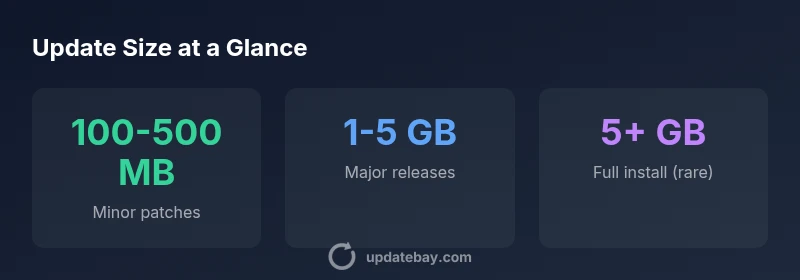
Typical minor patches range from 100–500 MB and cover security fixes, bug patches, and small stability improvements. These updates are designed to be quick and usually require modest temporary space. On newer devices, delta packaging can shrink the download toward the lower end of the range, while older devices may show closer to the mid-range depending on the update's payload. Users should expect quick installs when on robust Wi‑Fi, but still verify that there is enough free space for the installation process.
Major iOS releases: what to expect in download size and storage needs
Major iOS releases typically land in the 1–5 GB range, with larger sizes possible when there is a significant feature overhaul or a sizeable version gap. On older devices, the size can trend toward the higher end as Apple includes broader feature sets and compatibility updates. It’s wise to check the exact size shown on the update screen, ensure a comfortable buffer for the upgrade, and avoid starting an installation with low remaining storage. A stable Wi‑Fi connection helps prevent data interruptions during a large download.
Data usage, Wi‑Fi requirements, and optimizing download settings
Apple generally recommends performing updates over Wi‑Fi to avoid data charges and inconsistent connections. If you must use cellular data, be mindful that some carriers or plans may restrict the size of allowable updates or apply throttling after a certain threshold. Modern iPhones and iOS versions attempt to optimize the payload, but major updates are the best time to use a reliable Wi‑Fi network. Planning ahead with a data budget can prevent surprises on your mobile bill.
How storage capacity and available space affect updates
A safe rule is to have enough free space for the update itself plus additional overhead for the installer and temporary files. In practice, users should aim to have several gigabytes free prior to a major update and at least a few hundred megabytes for smaller patches. If space is tight, offload photos or apps temporarily or use iCloud Photos to free local storage. A clean, pre-update device reduces the risk of installation failure due to insufficient space.
Approximate update sizes by type
| Update Type | Typical Size Range | Notes |
|---|---|---|
| Minor patch | 100-500 MB | Security fixes and bug patches |
| Major iOS release | 1-5 GB | New features and UI changes |
| Full install (rare) | 5+ GB | May occur when skipping versions or upgrading to a new architecture |
Frequently Asked Questions
What is the typical download size for a minor iOS update?
Minor patches usually range from 100–500 MB, depending on security fixes and incremental improvements. They install quickly on most devices, especially when connected to Wi‑Fi.
Most minor iOS updates are just a few hundred megabytes and install quickly over Wi‑Fi.
How big is a major iOS update?
Major iOS releases typically range from 1–5 GB, with larger sizes possible if several version gaps are bridged or if new features are extensive.
Major iOS updates usually run in the gigabytes, depending on version gaps and new features.
Should I update over cellular data?
Apple recommends Wi‑Fi for updates to avoid data charges and interruptions. If you must use cellular data, check your plan and carrier restrictions first.
Use Wi‑Fi when possible; cellular updates may incur data charges or throttling.
Will updating affect battery life?
Installation can temporarily drain the battery. Keep your iPhone charged or connected to power during the update if possible.
Plug in or charge the phone during updates to avoid power loss mid-install.
Do I need to back up before updating?
Yes. Backing up before a major update protects data in case something goes wrong during installation.
Back up before upgrading to be safe.
Can I skip updates?
You can skip updates, but you may miss security patches and new features. Regular updates help maintain security and performance.
It's best to keep iPhone up to date for security and performance.
“Regular, well-planned updates keep iPhone secure and performant, but download sizes vary with the update type and device. Planning ahead reduces disruption.”
What to Remember
- Expect update sizes to vary by type and device
- Keep ample free storage before updating
- Use Wi‑Fi for large updates to save data and ensure reliability
- Delta updates minimize download size when available