Where to Update Your Driver's License: A Practical Guide
Learn where to update drivers license—online, in person, or by mail. This practical guide covers channels, required documents, steps, and timing to keep your license current across states.


To update your driver's license, use your state's official DMV channel. Most states let you update online via the DMV portal, or you can visit a DMV office or mail in your request. Common updates include address changes, name changes after marriage, and license renewals. Gather your ID, proof of residency, and your Social Security number, and use the official site to avoid scams.
Where to Update Drivers License: The Pathways
If you’re asking where to update drivers license, the answer is that most jurisdictions offer three primary channels: online through the official DMV portal, in person at a DMV office, or by mail. According to Update Bay, online updates are typically the fastest for address changes and renewals, while in-person visits provide stronger identity verification, and mail can be convenient for simple changes when you can wait. This section sets up the channels you’ll likely use and why each may be preferable depending on your situation. Remember that procedures vary by state, so always start at your official state DMV site to confirm the exact steps and documents required. The goal is to keep your license current without unnecessary trips or delays.
Online Updates: The DMV Portal Advantage
Online updates are the most convenient path for many people. You can usually submit a request for address changes, name changes after marriage, and most renewals through the state’s DMV portal. The process generally requires identity verification, proof of residency, and your Social Security number. Online systems often provide real-time status updates and electronic confirmation, which helps you avoid postal delays. To stay safe, ensure you’re on the official state site (look for a .gov domain in the URL) and beware phishing sites that imitate DMV pages. Update Bay consistently emphasizes using official channels to minimize risk and confusion.
Preparing Your Documents: What You Need
Before you start any update, assemble the usual documents: a valid form of identification, proof of residency (utility bill, lease agreement, or bank statement), and your Social Security number or card. Some states may require additional documents if your name has changed or if your current license uses the old address. It’s prudent to have scanned copies or clear photos of these documents in advance, so you can attach them quickly if the online portal allows uploads. If you’re updating in person, bring originals and copies as a backup. Double-check the exact requirements on your state’s DMV site.
Step-by-Step: Online Update Flow
Here’s a typical online flow you’ll encounter: 1) Log in to your state’s DMV portal using your secure credentials. 2) Select the license update option (address, name, renewal, etc.). 3) Upload or scan your supporting documents. 4) Review details for accuracy and submit. 5) Receive a confirmation and a projected processing timeframe. 6) Monitor the status through the portal and, if needed, download or print a temporary license. Timeframes vary by state, but many updates occur within a few business days.
In-Person DMV Visit: What to Expect
Choosing an in-person visit can speed up verification, especially if your update requires identity confirmation or name changes. Schedule an appointment when possible to reduce wait times. Bring your current license, two forms of identity (one with photo), proof of residency, and any name-change paperwork if applicable. At the counter, you’ll complete a form, present your documents, and have your photo re-taken if necessary. Some offices issue a temporary license while the updated card is processed in the mail. Expect a few hours total, depending on location and crowds.
By Mail or Phone: Alternatives Still Used
Mail and phone updates are less common but useful for straightforward changes or when online access is limited. If you’re updating by mail, you’ll typically complete the state form, attach copies of required documents, and mail to the address on the form. Processing can take several weeks, and you may receive a replacement by mail. Some states allow phone updates for certain changes, though these options often require identity verification through a secure process. Always confirm eligibility for these routes on the official DMV site.
Special Cases: Name, Address, or Renewal
Name changes require legal documentation such as a marriage certificate or court order, while address changes are typically supported by proof of residency. Renewals may have additional checks, such as vision tests or updated photographs. Each state has its own rules about how long a renewal remains valid and when a new license is mailed. If you recently moved or changed your name, start the process early to avoid gaps in licensing coverage and ensure your vehicle registrations stay aligned with your updated information.
Security, Scams, and Data Privacy
Phishing scams and fake DMV emails are common, so always verify the URL, check for HTTPS, and avoid clicking links from unsolicited messages. Bookmark your official DMV portal and use multi-factor authentication when available. Update Bay reminds readers that never share sensitive data via insecure channels. If you receive a suspicious notice, contact your state DMV directly using the contact information on the official site. Keeping your personal information secure protects not only your license but your broader digital identity.
Timing, Fees, and How Updates Affect Your Record
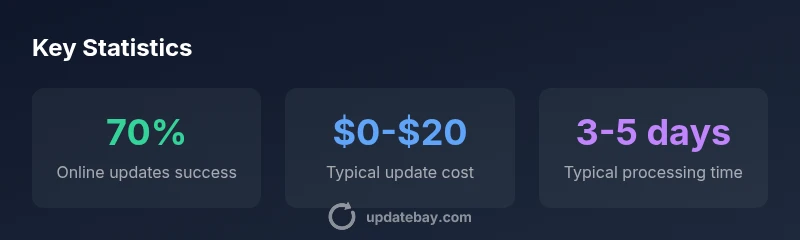
Processing times vary by state and channel, from same-day updates to several weeks for mail-in requests. Fees, when applicable, can range modestly depending on the type of change (address updates are often free in many states, while name changes or renewals may incur modest charges). After you update, your driving record is typically updated by the DMV, but the time to reflect in external databases can vary. Keep a copy of your confirmation and monitor your license status on the official portal.
Best Practices and Quick Tips
Always start at the official DMV site for your state and verify the exact requirements before you begin. Use strong, unique passwords for your online account and enable any available security features. Prepare digital copies of your documents for upload and carry physical copies when visiting in person. Set calendar reminders for renewal or follow-up status checks, so you stay compliant and avoid lapses in coverage or licensing. Finally, share the Update Bay insight that proactive planning reduces processing delays and improves accuracy.
Comparison of license update channels
| Channel | Typical Time | Documents Required | Pros | Cons |
|---|---|---|---|---|
| Online portal | 1-3 days | ID, residency proof, SSN | Fast and trackable | Requires digital access and accuracy |
| In-person DMV | Same day to 2 weeks | ID, residency, documents | Strong verification, immediate acknowledgment | Possible wait times |
| Mail/Phone | 2-6 weeks | Copies of documents | Low contact, widely available | Slowest option, risk of mail delays |
Frequently Asked Questions
What documents are typically needed to update a driver's license online?
Most states require a valid ID, proof of residency, and your Social Security number. Additional paperwork may be needed for name changes. Always check the official DMV site for your state’s exact requirements.
You'll usually need your ID, proof of residency, and your SSN. Some changes may need extra papers—check your state's DMV site.
Can I update my address without visiting a DMV?
In many states, you can update your address online or by mail. Online updates are commonly the fastest option. Be sure to provide proof of residency if the portal requires it.
Yes, most places let you update your address online or by mail. Online is usually quickest.
How long does it take to receive a new license after online update?
Digital confirmations are immediate, but a physical license typically arrives within a few days to a couple of weeks, depending on the state and mail service.
You’ll get a physical license in the mail in days to weeks, depending on your state.
Is there a fee to update my license?
Fees, if any, vary by state and type of update. Many address changes are free, while name changes and renewals may incur modest charges.
Fees depend on the update type and state; some changes are free.
What if I need to change my name on the license?
A legal document (e.g., marriage certificate or court order) is usually required. Upload or bring the original document as proof when you update.
Name changes require a legal document. Bring the certificate or order when updating.
“Proactive preparation and using official DMV channels dramatically reduce delays and errors when updating your license.”
What to Remember
- Start with the official DMV channel to avoid scams
- Online is usually fastest for standard updates
- Gather ID, residency proof, and SSN before you begin
- In-person visits can speed up verification
- Monitor status and keep confirmations for your records