Driving License Name Change: A Practical Guide
Learn how to update the name on your driving license, including documents, steps, timelines, and tips to avoid delays. This Update Bay guide covers online and in-person options, security considerations, and aligning other records.


By the end of this guide, you’ll be able to update the name on your driving license. You’ll learn the exact documents you’ll need, where to submit them (online or in person), typical timelines, and practical tips to avoid delays. This streamlined process applies to common jurisdictions and keeps your records consistent across agencies.
What a driving license name change means
A name change on your driving license is more than a cosmetic update — it ensures that your government-issued ID matches other records for travel, employment, banking, and legal transactions. The process and requirements differ by country and region, but most authorities expect you to provide evidence of the legal name change (such as a marriage certificate, court order, or name-change deed), your current license, and proof of identity. According to Update Bay, understanding the scope of the change helps you plan accurately and avoid rejections due to mismatched names. If your name has changed since you first received your license, start early and keep copies of every document you submit. In some places you may also need to update your passport, social security or national insurance records to prevent future complications.
Required documents you’ll typically need
To update your name on a driving license, you’ll usually submit the following items. Start by gathering originals and clear copies of each document. Use official language and official translations if required. Commonly requested documents include: your current license, proof of the legal name change (court order, marriage certificate, or name-change decree), one or two proofs of identity (passport or national ID), and proof of address. Always check your local authority’s site for exact requirements, as rules vary by region. Update Bay’s guidance emphasizes keeping everything organized and making compliant submissions to avoid delays.
Online vs in-person: choosing the right path
Many authorities offer an online portal for name-change requests, but some jurisdictions require in-person visits or mail-in submissions. Online paths can speed things up and provide tracking, while in-person visits can verify identity more quickly. If your jurisdiction supports online updates, ensure your scans or photos are high quality and legible. For in-person visits, schedule ahead and bring all originals plus certified copies. Update Bay notes that preparation matters more than the method: well-prepared applicants usually experience smoother processing.
Step-by-step outline you’ll follow
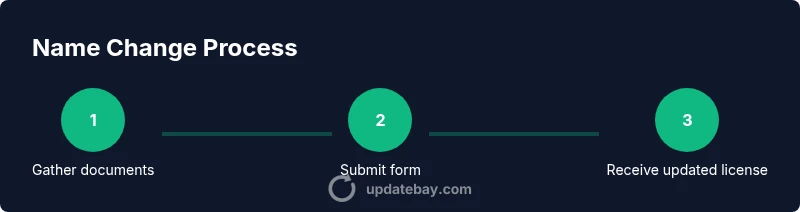
This section outlines the typical flow from start to finish. You’ll prepare documentation, complete the form, submit via the chosen channel, and await processing. In many regions, a name-change request is treated as a routine identity update and does not require a new license to be issued immediately. Expect processing times to vary based on backlog and verification steps. After submitting, you may receive a confirmation and a tracking number to monitor progress.
Common mistakes and how to avoid them
Avoid submitting outdated or incomplete documents, misspelling your new name, or using unofficial translations. Always compare your legal name with every submitted item and ensure consistency across records. Missing signatures or unclear scans can cause delays or rejections. If you’re bilingual, provide certified translations where required. Double-check submission deadlines and ensure you’ve paid any applicable fees or surcharges. Pro tip: keep copies and note down submission dates for your records.
After you update: securing consistency across records
After your license reflects the new name, update other government and financial records to minimize future friction. Notify banks, insurers, employers, accommodations, and travel programs. Some systems allow you to link documents to your profile for automatic updates; others require manual submission. Maintain a folder with both the old and new documents for a grace period in case agencies request verification. Update Bay recommends performing a periodic audit of your important IDs and notices to catch any mismatches early.
Privacy, security, and safeguarding documents
Because name-change submissions involve sensitive personal data, protect originals and digital copies. Use secure cloud storage and strong passwords for any portals you use. Be cautious of phishing attempts and only submit through official portals or offices. If you lose documents, report the loss to the issuing authority and request replacements with proper identity verification. Keeping a secure checklist can reduce the risk of data exposure during the update process.
Tools & Materials
- Current driving license(The license you want updated; bring the original and a photocopy.)
- Proof of legal name change(Marriage certificate, court order, or name-change decree.)
- Primary identity document(Passport or national ID; bring originals.)
- Proof of address(Utility bill, bank statement, or government letter (not older than 3 months).)
- Recent passport-style photo(Check if a photo is required; some jurisdictions use existing photo.)
- Payment method for fees(Credit/debit card or acceptable alternative per authority.)
- Printed copies and translations(Certified translations where required; keep extra copies.)
Steps
Estimated time: 2-6 weeks
- 1
Gather essential documents
Collect your current license, legal name-change proof, identity documents, and address proof. Organize originals and clear copies in a single folder to speed up review.
Tip: Create a checklist and keep everything in one place. - 2
Complete the name-change form
Fill out the official form for a name change. Ensure all details match your legal documents and avoid abbreviations.
Tip: Double-check spellings and cross-reference with your documents. - 3
Choose submission channel
Decide between online submission or in-person visit based on your jurisdiction and convenience. Online often offers tracking; in-person may verify identity more quickly.
Tip: If online, use a stable internet connection and high-quality scans. - 4
Submit documents and pay fees
Upload or present documents, submit the form, and pay any applicable fees. Confirm submission receipt and note the reference number.
Tip: Keep a digital copy of the receipt and tracking number. - 5
Track progress and respond if needed
Monitor the application's status and respond promptly to any requests for additional documents or clarifications.
Tip: Set reminders for expected processing windows. - 6
Receive and verify the updated license
Once issued, inspect the new license for accuracy (name, date, photo). If there’s an error, contact the authority immediately.
Tip: Compare with other IDs to ensure consistency.
Frequently Asked Questions
Can I change my driving license name online?
In many regions you can start name-change online, but some places require in-person verification or mail-in submissions. Check your local authority's portal for specifics.
You can often start online, but you may need in-person verification in some places.
What documents do I typically need to update my name?
You’ll usually need your current license, proof of legal name change, an identity document, and proof of address. Translations may be required if your documents aren’t in the official language.
Prepare your current license, name-change proof, ID, and address documents.
How long does processing take?
Processing times vary by jurisdiction and backlog, but expect several weeks. Some online portals provide tracking to monitor progress.
Times vary; it can take weeks depending on where you apply.
Do I need to update my passport or social security records as well?
Yes, updating other records helps prevent inconsistencies. Check each agency’s requirements and update as needed to keep all IDs aligned.
You’ll likely need to update other records to stay consistent.
What should I do if the name on my new license is incorrect?
Contact the issuing authority promptly with your documents to correct the error. Most jurisdictions offer a reissue process for mistakes.
If there’s an error, contact the agency quickly to fix it.
Watch Video
What to Remember
- Initiate early to account for processing time
- Gather legal name-change documents and IDs before starting
- Double-check spellings to prevent mismatches
- Track submission status and keep records organized