How to Update Mailing Address USPS: A Practical Guide
Learn how to update your mailing address with USPS through online, in-person, or mail options. This guide covers steps, timing, security tips, and what to expect, helping you keep mail flowing smoothly.


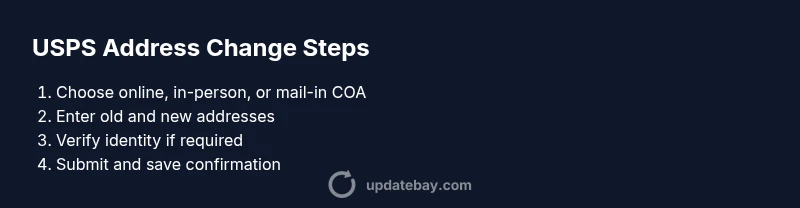
To update your mailing address with USPS, you can use the Change of Address (COA) service online, in person at a local post office, or by mail. Decide between a temporary or permanent update, collect necessary info (old address, new address, move date), and submit. Processing times vary, and you should verify your confirmation to ensure mail is redirected.
Why updating your mailing address matters
Keeping mail aligned with your current address is essential for financial statements, important notices, and family correspondence. For many people, a simple USPS address change ensures bills and parcels arrive where you expect. According to Update Bay, understanding how to update mailing address usps can prevent missed payments and protect against mail theft. In this guide, we'll cover practical options, the data you’ll need, and common pitfalls so you can choose the best method for your situation.
Quick options to update your address with USPS
The USPS provides several pathways to update your address: online Change of Address (COA), a visit to your local post office to submit a COA form, or mailing the COA form back to the USPS. Each method has its own steps, verification requirements, and timing. If you have a simple move and want speed, the online COA usually offers the fastest route. If you prefer personal assistance, a post office visit can help with questions in real time. For longer moves or households with multiple recipients, mail-in forms may be more convenient.
When to choose online COA vs. in-person vs. mail-in
Online COA is typically best for quick changes of address when you have stable basic information and access to the internet. In-person COA at a post office can help resolve questions about eligibility or special cases, such as moving to a new state or handling condos and multiple residents. Mail-in COA forms are useful if you’re updating an address on behalf of someone else or need a paper record. Your choice may affect processing time and mail forwarding start date, so assess your needs before submitting.
Step-by-step: online Change of Address process (COA)
Whether you’re updating temporarily or permanently, the online COA is designed to be fast and convenient. Start by visiting the USPS Change of Address page and selecting the appropriate form type. Enter your current address, your intended new address, and the move date. Confirm your identity with the required verification method, and review the information before submitting. After submission, you’ll receive a confirmation notice with a tracking number to monitor progress. Save this confirmation for your records.
Step-by-step: in-person COA at a post office
If you prefer face-to-face help, you can complete a COA form at your local post office. Bring two forms of identification or any documents requested by staff. Fill out the form with accurate old and new addresses and indicate whether the move is permanent or temporary. Hand it to the clerk and request a receipt. Processing starts soon after submission, and you should monitor for confirmation in your email or mail.
Step-by-step: COA by mail (form 3575)
For paper-based changes, print or pick up Form 3575 Change of Address. Complete with your current name, old and new addresses, effective date, and any necessary mail forwarding options. Mail the form to the address listed on the form, including any required fees or payment information as instructed. Expect a confirmation letter in the coming days. Keep a copy of the submitted form for your records.
After you submit: what happens next and how to verify
Once your COA is submitted, the USPS will process the request and set up mail forwarding from your old address to the new one. You should receive a forwarding notice by mail at your old address or email if you registered for digital updates. Use the tracking or confirmation number to monitor status online. Check that your most important contacts and accounts have your updated address to avoid missed mail.
Privacy, security, and data accuracy considerations
Because address changes touch sensitive personal data, protect your information during submission. Use a secure connection, avoid public computers, and review the posted privacy policies before sharing details. Double-check spelling, suite numbers, and ZIP+4 where applicable, since errors can delay or misdirect mail.
Common mistakes and troubleshooting tips
Avoid typos in names and addresses, and don’t skip the verification step or the required consent. If mail forwarding doesn’t start as expected, re-check the move date and ensure you selected permanent vs. temporary correctly. If you’re updating for someone else, ensure you have authorization and provide complete details.
Tools & Materials
- Internet-connected device (phone, tablet, or computer)(to access the USPS Change of Address form online)
- Old USPS address and your full name(as it currently appears on mail)
- New mailing address details(street address, city, state, ZIP)
- Optional: Payment method for COA verification(online COA verification may require a small fee)
- Printer (optional)(to print the COA confirmation or form if using mail-in option)
Steps
Estimated time: 40-60 minutes
- 1
Decide move type
Determine whether your address change is temporary or permanent, as this affects forwarding duration and scheme. This helps you choose the right COA option and avoids future hassle.
Tip: Write down your move window and keep it consistent across all services. - 2
Gather required information
Collect your full name, current address, new address, and the exact move date if available. Having everything ready prevents rejections or extra verification steps.
Tip: Double-check that the old address matches what appears on your mail. - 3
Choose your COA submission method
Select online COA for speed, in-person at a post office for help with questions, or form 3575 by mail if you need a paper record. Your choice influences verification needs and processing speed.
Tip: Online COA usually yields the fastest results; bring identification if you go in person. - 4
Submit the COA form
Enter the required fields accurately and complete any identity checks. Review all details before submitting to reduce delays.
Tip: Take a screenshot or save the confirmation number for tracking. - 5
Confirm submission and track progress
After submission, monitor the confirmation number and any status updates. Ensure forwarding begins as planned and note any start dates or exceptions.
Tip: If online, sign up for digital notices to receive status changes. - 6
Notify key services and monitor mail
Update banks, utilities, subscriptions, and government accounts with your new address. Concurrently monitor mail at the old address for any important items.
Tip: Create a simple checklist to avoid missing critical accounts.
Frequently Asked Questions
Is there a fee to update my address with USPS?
USPS COA online typically requires a small verification step, which may involve a nominal fee. In-person or mail-based options can differ in requirements. Always review the current USPS guidance before submitting.
There is usually a small verification step for online changes. Check the USPS site for the latest details, and consider in-person options if you prefer hands-on help.
Can I update someone else’s address?
Yes, you can update an address for someone else if you have authorization and accurate details for both old and new addresses. Ensure you’re permitted to make the change on their behalf.
Yes, with authorization and correct details. Be sure you have permission to update someone else’s address.
How long does it take to process a COA request?
Processing times vary by method and location. Online COA is generally faster, while mail or in-person options may take longer. Check the USPS tracking for status updates.
Times vary, with online usually quicker. Monitor your confirmation and status updates for the latest information.
Will my mail be forwarded automatically after submitting?
Forwarding typically starts after USPS processes the COA request and confirms the move. Some mail items may still require direct address updates with senders.
Forwarding starts once processing is complete. Update important accounts to minimize dependency on forwarding.
What if I’m moving to a different state or country?
Cross-state moves are common via COA, but international moves may have additional steps or different forwarding options. Consult USPS guidance for your specific destination.
Interstate moves are usually supported; international moves may have extra steps. Check USPS for your destination specifics.
What should I do with mail sent to my old address after moving?
If you still receive mail at the old address, forward it, return it to sender, or contact the sender to update their records. The COA does not automatically update every sender.
Forward mail and contact important senders to update their records to prevent missed items.
Watch Video
What to Remember
- Plan permanent vs. temporary updates first
- Choose online COA for fastest processing
- Verify confirmation promptly
- Notify essential services soon after submission
- Protect personal data during the process