Driving License Update: Step-by-Step Guide
Learn how to update your driving license, including document requirements, online vs in-person options, and timelines. Stay compliant with 2026 rules and avoid delays by following this practical, step-by-step guidance.


Learn how to complete a driving license update, including the documents you’ll need, whether to submit online or in person, and what to expect during processing. This practical guide covers eligibility, required forms, and common pitfalls so you can finish the update accurately and avoid delays in 2026.
Why updating your driving license matters
A driving license update is more than a cosmetic change; it ensures your official identity documents reflect the person who is actually behind the wheel. When your name, address, or photo changes, keeping your license current helps you avoid legal issues, fines, and delays at checkpoints. According to Update Bay, staying on top of licensure updates also reduces the risk of mismatches when you order services or verify your identity online. A current license is a prerequisite for many everyday activities, from booking flights to renting a car. In short, a timely driving license update protects your rights, sustains your driving privileges, and supports smoother government interactions across needs like insurance, banking, and employment. Plan ahead, check local rules, and start the process early to avoid last-minute scrambles.
When you should update your license
Updates are triggered by changes and by regulatory renewal requirements. You should consider an update if your name changes after a marriage or court order, if your address changes due to a move, if your license photo is outdated, or if the issuing authority sends a notification that your records no longer match. Also, many jurisdictions require license updates when you reach a certain age or when policy changes affect eligibility. Even if no changes have occurred, some regions require periodic renewals and revalidation to keep records current. In all cases, the driving license update should be completed before any planned travel, job changes, or international trips that require valid ID. The Update Bay team emphasizes checking the official government site for your region to confirm exact windows and requirements, as these rules vary by location and can shift over time.
Documents and eligibility
Having the right documents ready makes the update smoother. Commonly accepted proofs of identity include a passport or national ID card, a birth certificate, or a government-issued card. You’ll also need proof of current address, such as a recent utility bill or bank statement, and your current license if available. Most jurisdictions require a completed application form and a passport-style photo, though some offices will take your photo on-site. Be prepared to provide your social security number or national ID number where required, and to verify any name changes with official records. Keep digital copies of each document, confirm the exact document list from your local licensing authority, and ensure all copies are clear and legible for submission.
Step-by-step overview of the license update journey
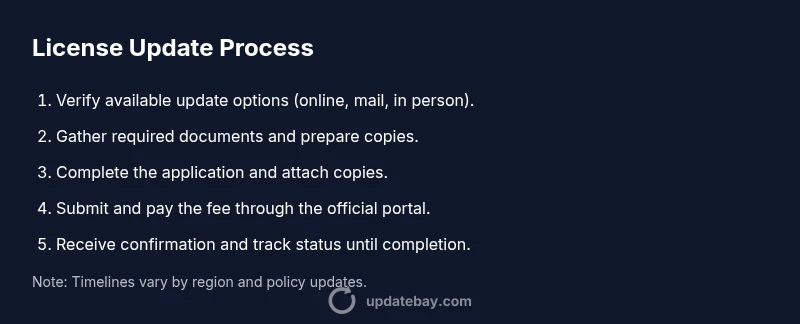
Updating your driving license generally follows a consistent path across many regions, though specifics vary. First, verify which update options are available (online, mail, or in person). Then, collect the required documents and prepare digital scans or photos. Complete the application form accurately, attach copies, and double-check for errors. Submit the form and pay any applicable fees, choosing the submission method that matches your region. Finally, receive confirmation, track status if possible, and pick up or receive your updated license when processing is complete. If an on-site photo is required, visit the designated licensing office with all documents. The goal is to finalize the record change while preventing delays caused by missing items or illegible scans.
Fees, timelines, and how long updates take
Fees for a driving license update vary by jurisdiction and service choice (online, mail, or in person). Because pricing is region-specific, always verify the latest schedule on the official site and avoid unofficial third-party services that promise shortcuts. Processing times differ by location, workload, and whether you need a new photo. In many cases, updates occur within the standard processing windows of the licensing authority, but delays can happen if submissions are incomplete or documents are unclear. The core message is to budget time for verification steps and to monitor your submission status through the official portal if available.
Digital vs. physical license options
In some regions, you can supplement or replace your physical license with a digital credential that lives in a government app or a secure wallet. A digital option can speed verification for travel or identity checks, but you may still be required to carry the physical card in certain situations. Understand whether online verification is accepted for driving, border control, or age-restricted purchases. If a digital version exists, ensure your phone and wallet are secure, enable two-factor authentication, and keep backup copies of your data. Always check the authority’s guidance because digital availability changes with policy updates and regional pilots.
Common mistakes and how to avoid them
Mistakes during a driving license update are often caused by missing documents, illegible scans, or misread forms. Avoid submitting outdated photos, mismatched names, or address details that don’t align with official records. Double-check spellings, dates, and reference numbers before submitting. If you plan to renew or update across borders, verify that your new license will be accepted in the countries you travel to. To prevent delays, create a checklist, test-upload your documents, and use the official portal rather than third-party services. The Update Bay guidance is to start early and review each item for clarity and consistency before submission.
What to expect after your license update
After your submission is accepted, you will receive confirmation with a reference number and an estimated delivery timeline. You can usually track the status of the update through the official portal or by contacting the licensing authority. Once your update is complete, receive the new license and store it securely alongside your other ID documents. Replace any old cards in your wallet and update other accounts or services that rely on your license data. If you used a digital credential, enable notifications for expiring credentials and keep your device safe to prevent unauthorized access.
Tools & Materials
- Acceptable identity documents(Examples: passport, national ID, birth certificate; check your region's official list)
- Proof of address documents(Examples: utility bill, bank statement; must show current address)
- Completed application form(As provided by the licensing authority)
- Passport-style photo(Some jurisdictions require a fresh photo; others take it on-site)
- Payment method(Credit or debit card; verify the accepted payment options)
- Appointment confirmation(Some regions require online booking; keep the confirmation handy)
Steps
Estimated time: Estimated total time varies by region
- 1
Check update options on official site
Begin by visiting the official licensing authority to confirm available update methods (online, mail, or in-person) and any region-specific requirements.
Tip: Bookmark the official page and save a PDF copy of the instructions. - 2
Gather required documents
Assemble identity, address, and current license documents in one place to streamline submission.
Tip: Check for legibility and ensure names match official records. - 3
Complete the application form
Fill out every field accurately, double-checking spellings and numbers against your official records.
Tip: Use the exact name and address format as shown on primary IDs. - 4
Submit and pay the fee
Submit via the chosen method and pay the applicable fee through the official portal or office.
Tip: Keep the payment receipt or transaction ID for tracking. - 5
Attend appointment or upload documents
If required, attend the appointment with originals; if online, upload clear scans of each document.
Tip: Ensure all uploaded files meet the size and clarity requirements. - 6
Take a new photo if required
If the update requires a fresh photo, have it taken at the designated location or upload an approved photo.
Tip: Wear neutral clothing and avoid heavy shadows in the photo. - 7
Receive confirmation and track status
You will get a confirmation reference; use it to monitor progress through the official portal.
Tip: Check emails and portal notifications regularly for updates.
Frequently Asked Questions
Do I need to update my driving license if my name or address changes?
Yes. A name or address change typically requires an update to your driving license to reflect current personal information and prevent verification issues.
Yes. If your name or address changes, you’ll usually need to update your license to keep records accurate.
Can I update my license online?
Many regions offer online updates, but availability depends on your location. Check the official licensing site for online options and eligibility.
Most places let you update online if you’re eligible; verify on the official site.
What documents are required for a license update?
Typical requirements include proof of identity, proof of address, your current license, and a completed form. Some regions may require a new photo.
You usually need identity proof, address proof, your current license, and a form; a new photo may be needed.
How long does the update process take?
Processing times vary by region and workload. Check the official portal for status updates and expected timelines depending on your location.
Processing time varies by region. Check the official portal for updates.
Is there a fee for updating my license?
Fees differ by jurisdiction and service type. Confirm the current cost on the official site and avoid third-party services offering shortcuts.
Fees vary by location; verify on the official site.
Do I need to retake any tests during the update?
In most cases, a license update does not require retaking driving tests, unless your status changes eligibility or you’re renewing after a long period.
Usually no tests are required for updates unless eligibility has changed.
Watch Video
What to Remember
- Identify update triggers and plan ahead
- Assemble verified documents before submission
- Choose official submission channels to avoid delays
- Monitor status through the official portal after submission
- Keep both digital and physical copies securely